
iLoungeiLounge
  • News
    • Apple
      • AirPods Pro
      • AirPlay
      • Apps
        • Apple Music
      • iCloud
      • iTunes
      • HealthKit
      • HomeKit
      • HomePod
      • iOS 13
      • Apple Pay
      • Apple TV
      • Siri
    • Rumors
    • Humor
    • Technology
      • CES
    • Daily Deals
    • Articles
    • Web Stories
  • iPhone
    • iPhone Accessories
  • iPad
  • iPod
    • iPod Accessories
  • Apple Watch
    • Apple Watch Accessories
  • Mac
    • MacBook Air
    • MacBook Pro
  • Reviews
    • App Reviews
  • How-to
    • Ask iLounge
Font ResizerAa
iLoungeiLounge
Font ResizerAa
Search
  • News
    • Apple
    • Rumors
    • Humor
    • Technology
    • Daily Deals
    • Articles
    • Web Stories
  • iPhone
    • iPhone Accessories
  • iPad
  • iPod
    • iPod Accessories
  • Apple Watch
    • Apple Watch Accessories
  • Mac
    • MacBook Air
    • MacBook Pro
  • Reviews
    • App Reviews
  • How-to
    • Ask iLounge
Follow US

Reviews

Reviews

Review: Zagg Messenger Universal Keyboard

Last updated: May 19, 2021 9:31 pm UTC
By Phil Dzikiy
Review: Zagg Messenger Universal Keyboard

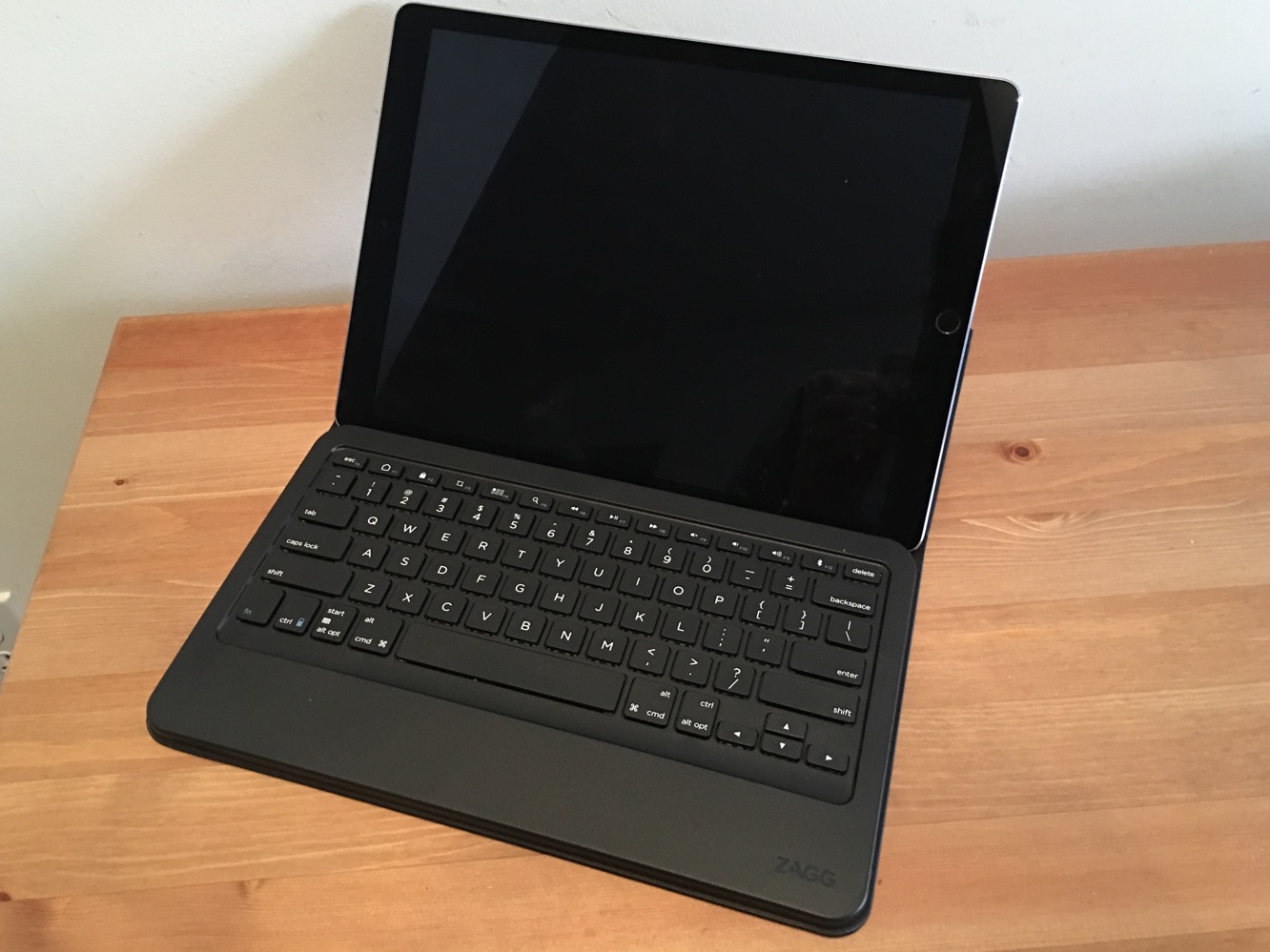
Apple’s iPad Pro has already seen a few Smart Connector keyboards — one from Logitech and one from Apple — but Bluetooth is still an option for would-be typers. Zagg’s Messenger Universal Keyboard ($70) is, as its name suggests, compatible with nearly any Bluetooth-enabled smartphone or tablet, but it specifically handles anything 12″ or less — which means it fits the iPad Pro, in addition to any other compatible iPad or iPhone. Unlike the other iPad Pro options (and plenty of other iPad options), Messenger Universal Keyboard is just a keyboard, not a case or cover for your iPad.


Review: Zagg Messenger Universal Keyboard

Review: Zagg Messenger Universal Keyboard

The plastic keyboard on Messenger Universal is about the size of a MacBook keyboard — it’s full-sized, with a row of its own function keys, including playback and volume controls, an app switching button, a screenshot button, and more. It’s attached to a folio which is folded and used to cover up the keyboard when it’s not in use, and its magnets actually activate the keyboard’s own sleep/wake function. The inside of the folio is microfiber, while the outside has a more durable waxed canvas feel.


When in use, the folio acts as a stand for an iPhone or iPad — it holds an iPad Pro well, and it even does a pretty good job when balanced on one’s lap. On the right side of the keyboard is an on/off switch and a micro-USB port for recharging (a micro-USB cable is included). Zagg claims Messenger Universal gets up to three months of battery life.

Review: Zagg Messenger Universal Keyboard

Messenger Universal’s built-in stand can hold an iPad or iPhone in portrait or landscape mode, but landscape is probably preferable, especially when using the bigger iPad Pro. Bluetooth pairing was simple and quick for us. Typing on Zagg’s keyboard is decent — it doesn’t have the feel of a MacBook or Logitech’s Create, but we do prefer these keys to the less bouncy keys of Apple’s Smart Keyboard.


There’s another possible issue, though: the keys do have a solid bounce and click, but when those keys work in tandem with the rest of the plastic keyboard — you’re touching nothing but plastic from your wrists to your fingertips — Messenger Universal feels sort of cheap in comparison to more premium options. That’s not a total surprise considering the price, but it may bother those who are used to working on Macs.

Review: Zagg Messenger Universal Keyboard

Zagg’s Messenger Universal is a nice, inexpensive Bluetooth keyboard that should have wide appeal, but it does have its drawbacks. It’s not a case or cover, which means it just becomes another item to carry around along with the rest of your gear. We believe most will find the keys workable at worst and quite comfortable at best, but the overwhelming plastic feel of the keyboard may put some off. If you have an iPad Pro, weigh all the benefits of Smart Connector keyboards (ease of use, shortcuts, built-in power, etc.) before deciding if you’d rather save some money on a standalone Bluetooth keyboard.



Latest News
The 14-inch MacBook Pro with M5 Chip 16GB RAM/512GB is $250 Off
1 Min Read
Noise and Static on AirPods Pro 3 Still Unfixed
1 Min Read
New iMac with 24-inch OLED Display May be Brighter With 600 Nits
1 Min Read
The 15-inch M4 MacBook Air 256GB Is $250 Off
1 Min Read
Internal Kernel Debug Kit from Apple Reveals Tests for a MacBook with A15 Chip
1 Min Read
Apple Currently In Talks With Suppliers for Chip Assembly & Packaging of iPhones in India
1 Min Read
Apple Allows Easier Battery Replacement For M5 MacBook Pro with 14-inch Display
1 Min Read
The Apple Watch SE 3 44mm GPS is $50 Off
1 Min Read
20th Anniversary iPhone May Launch in Two Years
1 Min Read
Better Image Generation Capabilities and Apple Music Integration Coming to ChatGPT
1 Min Read
A20 Pro Chip Coming to Next Gen iPad Mini OLED
1 Min Read
Amazon has the AirTag 4 Pack Marked $29 off
1 Min Read

iLounge logo

iLounge is an independent resource for all things iPod, iPhone, iPad, and beyond. iPod, iPhone, iPad, iTunes, Apple TV, and the Apple logo are trademarks of Apple Inc.

This website is not affiliated with Apple Inc.
iLounge © 2001 - 2025. All Rights Reserved.
  • Contact Us
  • Submit News
  • About Us
  • Forums
  • Privacy Policy
  • Terms Of Use
Welcome Back!

Sign in to your account

Lost your password?








