
iLoungeiLounge
  • News
    • Apple
      • AirPods Pro
      • AirPlay
      • Apps
        • Apple Music
      • iCloud
      • iTunes
      • HealthKit
      • HomeKit
      • HomePod
      • iOS 13
      • Apple Pay
      • Apple TV
      • Siri
    • Rumors
    • Humor
    • Technology
      • CES
    • Daily Deals
    • Articles
    • Web Stories
  • iPhone
    • iPhone Accessories
  • iPad
  • iPod
    • iPod Accessories
  • Apple Watch
    • Apple Watch Accessories
  • Mac
    • MacBook Air
    • MacBook Pro
  • Reviews
    • App Reviews
  • How-to
    • Ask iLounge
Font ResizerAa
iLoungeiLounge
Font ResizerAa
Search
  • News
    • Apple
    • Rumors
    • Humor
    • Technology
    • Daily Deals
    • Articles
    • Web Stories
  • iPhone
    • iPhone Accessories
  • iPad
  • iPod
    • iPod Accessories
  • Apple Watch
    • Apple Watch Accessories
  • Mac
    • MacBook Air
    • MacBook Pro
  • Reviews
    • App Reviews
  • How-to
    • Ask iLounge
Follow US

Reviews

Reviews

Review: Logitech Create iPad Pro Keyboard Case

Last updated: May 19, 2021 9:32 pm UTC
By Phil Dzikiy
Review: Logitech Create iPad Pro Keyboard Case

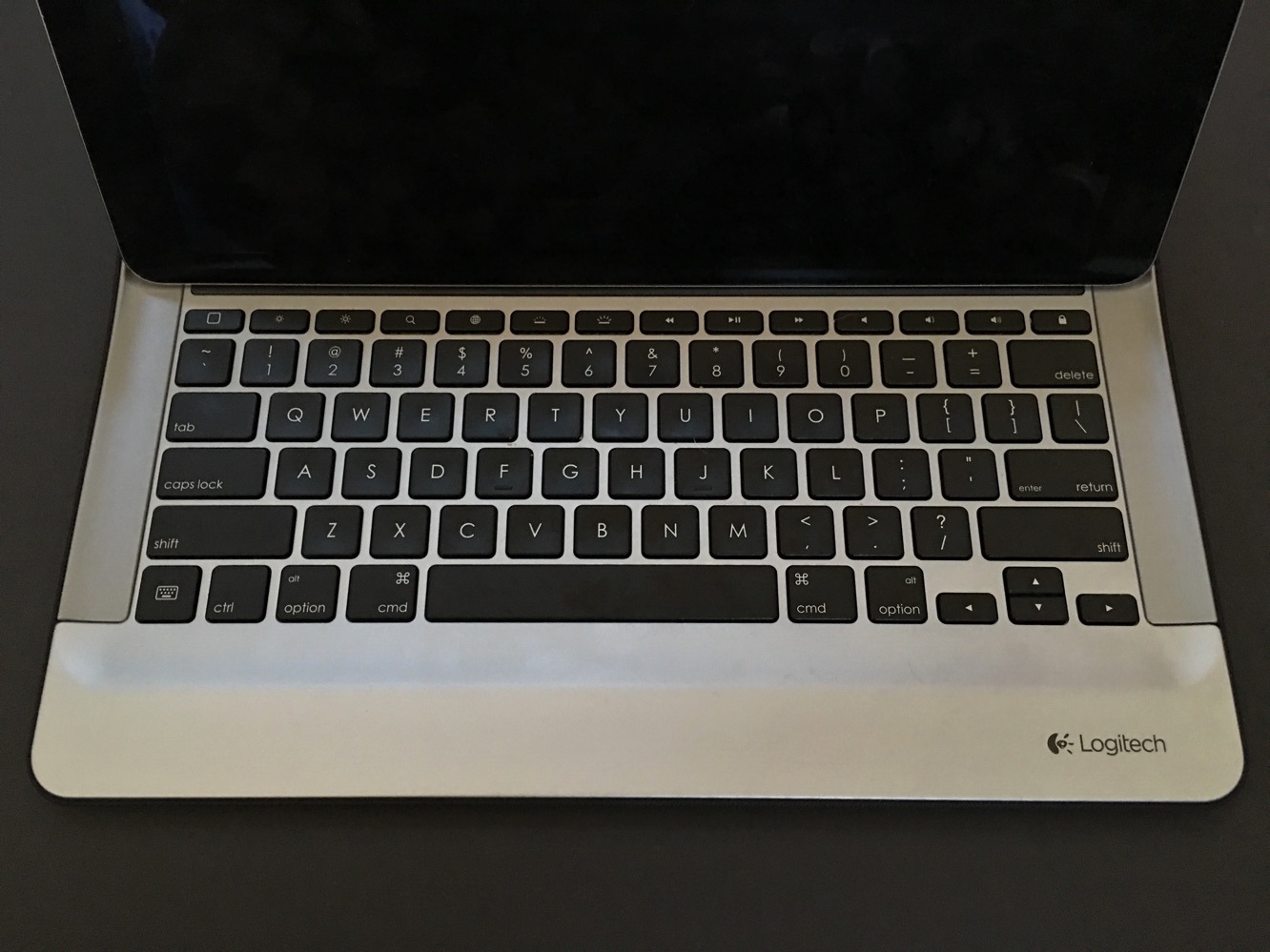
While Apple’s own Smart Keyboard for iPad Pro has been nearly impossible to find since the device’s launch last week, Logitech has filled in the gap for those who want an iPad Pro Smart Connector keyboard now. Create iPad Pro Keyboard Case ($150) is the first third-party accessory to dock with iPad Pro’s Smart Connector, which allows accessories and the iPad Pro to transfer both data and power to each other — no Bluetooth or wires necessary. Create features a full-sized keyboard, and as a case, it provides sleep/wake and volume button coverage. Unlike Apple’s Smart Keyboard, Create features backlit keys and comes in a variety of colors.

Review: Logitech Create iPad Pro Keyboard Case

When Create is connected to an iPad Pro, the total weight is 3.17 pounds — more than a current MacBook or MacBook Air, and closer to 13” MacBook Pro weight. That’s heavy, and it might be too heavy for some users to even consider.

Those willing to look past the weight will find a nice, solid feel to the rest of Create. Full-sized keys — including a row of shortcut keys — are contained within a mostly metal keyboard area. The outside of the case is covered in a nice, textured, water-repellent fabric, and there are holes to leave all four speakers unobstructed.


Review: Logitech Create iPad Pro Keyboard Case

Inserting the iPad Pro in Create seems a bit more frustrating than it needs to be. You have to push the iPad Pro into half of the frame, and while it works fine once installed correctly, there were a few times where we were a bit off in the installation. Once installed, Create can easily dock into typing position, or it can be set into a viewing angle — while we’re glad Logitech gave us a viewing option here, the iPad is nearly flat in this angle, making it almost pointless.


Review: Logitech Create iPad Pro Keyboard Case

Create can indeed be used in a lap, and that’s where its weight works to its benefit.

The iPad Pro will wobble slightly if you move around enough, but the Smart Connector and typing angle keep everything secure. The keyboard itself is quite good. While we’d put the overall feel as a step below a MacBook, it’s possible to type comfortably and accurately for a long period of time on Create’s adjustable backlit keys. We also appreciate the shortcut bar — both those shortcuts (for brightness, search, volume, playback, and more) and the keyboard shortcuts (bold, italics, etc.) all work as expected. We’re not sure how other iPad Pro keyboards will differ yet, but Create sets a nice bar for a good typing experience.

Review: Logitech Create iPad Pro Keyboard Case

The only strange issue we’ve had with Create during days of use is that on one occasion, the iPad Pro prompted us to say the accessory wasn’t supported.



Latest News
The 14-inch MacBook Pro with M5 Chip 16GB RAM/512GB is $250 Off
1 Min Read
Noise and Static on AirPods Pro 3 Still Unfixed
1 Min Read
New iMac with 24-inch OLED Display May be Brighter With 600 Nits
1 Min Read
The 15-inch M4 MacBook Air 256GB Is $250 Off
1 Min Read
Internal Kernel Debug Kit from Apple Reveals Tests for a MacBook with A15 Chip
1 Min Read
Apple Currently In Talks With Suppliers for Chip Assembly & Packaging of iPhones in India
1 Min Read
Apple Allows Easier Battery Replacement For M5 MacBook Pro with 14-inch Display
1 Min Read
The Apple Watch SE 3 44mm GPS is $50 Off
1 Min Read
20th Anniversary iPhone May Launch in Two Years
1 Min Read
Better Image Generation Capabilities and Apple Music Integration Coming to ChatGPT
1 Min Read
A20 Pro Chip Coming to Next Gen iPad Mini OLED
1 Min Read
Amazon has the AirTag 4 Pack Marked $29 off
1 Min Read

iLounge logo

iLounge is an independent resource for all things iPod, iPhone, iPad, and beyond. iPod, iPhone, iPad, iTunes, Apple TV, and the Apple logo are trademarks of Apple Inc.

This website is not affiliated with Apple Inc.
iLounge © 2001 - 2025. All Rights Reserved.
  • Contact Us
  • Submit News
  • About Us
  • Forums
  • Privacy Policy
  • Terms Of Use
Welcome Back!

Sign in to your account

Lost your password?








