
iLoungeiLounge
  • News
    • Apple
      • AirPods Pro
      • AirPlay
      • Apps
        • Apple Music
      • iCloud
      • iTunes
      • HealthKit
      • HomeKit
      • HomePod
      • iOS 13
      • Apple Pay
      • Apple TV
      • Siri
    • Rumors
    • Humor
    • Technology
      • CES
    • Daily Deals
    • Articles
    • Web Stories
  • iPhone
    • iPhone Accessories
  • iPad
  • iPod
    • iPod Accessories
  • Apple Watch
    • Apple Watch Accessories
  • Mac
    • MacBook Air
    • MacBook Pro
  • Reviews
    • App Reviews
  • How-to
    • Ask iLounge
Font ResizerAa
iLoungeiLounge
Font ResizerAa
Search
  • News
    • Apple
    • Rumors
    • Humor
    • Technology
    • Daily Deals
    • Articles
    • Web Stories
  • iPhone
    • iPhone Accessories
  • iPad
  • iPod
    • iPod Accessories
  • Apple Watch
    • Apple Watch Accessories
  • Mac
    • MacBook Air
    • MacBook Pro
  • Reviews
    • App Reviews
  • How-to
    • Ask iLounge
Follow US

Reviews

Reviews

Review: Apple Smart Keyboard for iPad Pro

Last updated: May 19, 2021 9:31 pm UTC
By Phil Dzikiy
Review: Apple Smart Keyboard for iPad Pro

While Apple’s Smart Keyboard ($169) was first released alongside the iPad Pro, its stock was almost immediately depleted, and the Smart Connector keyboard became impossible to find pretty much from the get-go, with shipping dates being listed more than a month later. Currently, Smart Keyboard is somehow still showing a shipping date online of 2-3 weeks, but the accessory has recently become easier to find in brick-and-mortar Apple Stores. (A current survey of NYC-area Apple Store locations shows the Smart Keyboard is listed as available for pickup in about half of nearby stores.) While the delays have cause Smart Keyboard to be beaten to the punch in many respects by Logitech’s Create iPad Pro Keyboard Case, many interested users have likely waited for Apple’s own keyboard to fit its own device. But was it worth the wait?

Review: Apple Smart Keyboard for iPad Pro

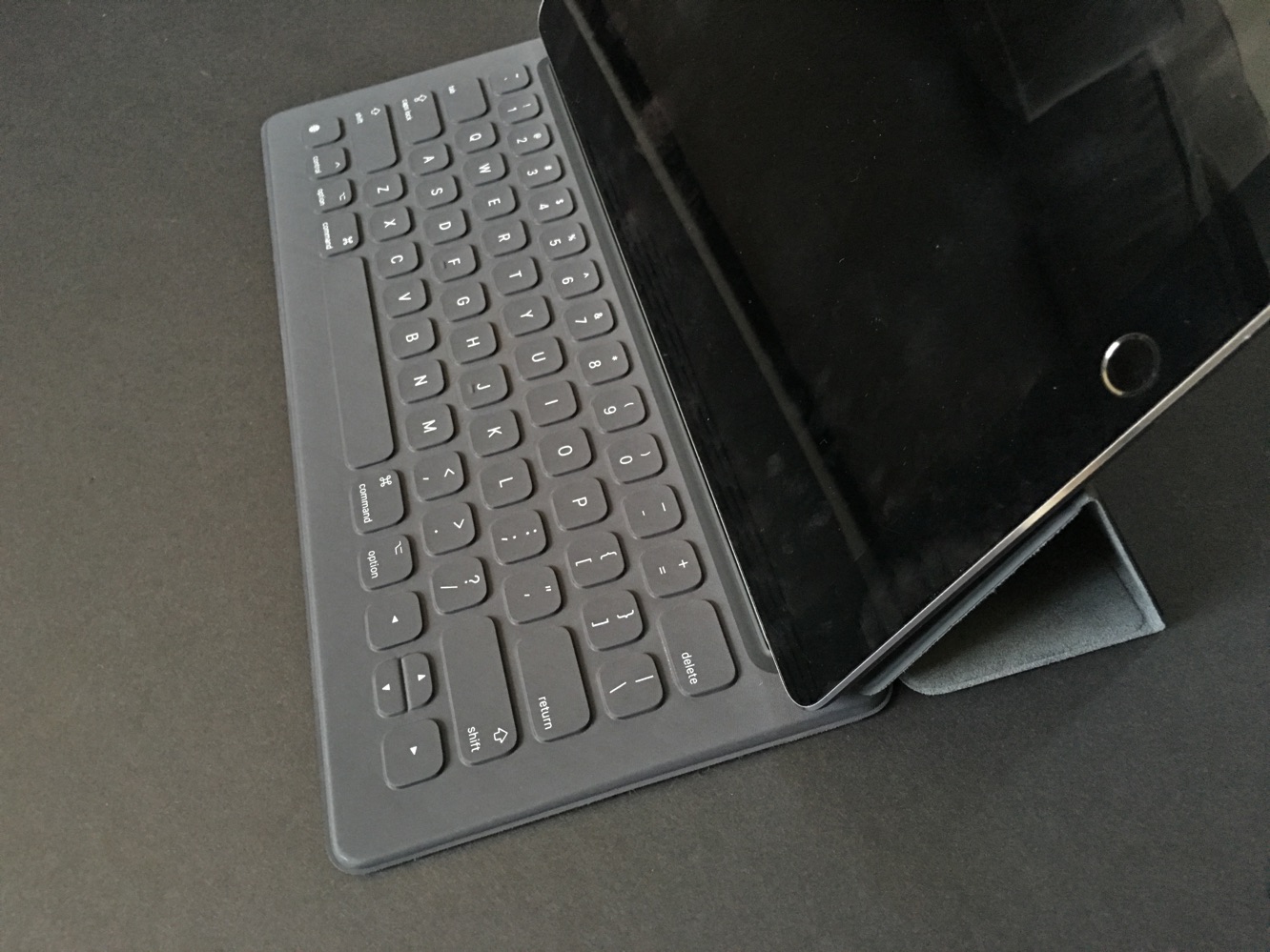
Unlike Logitech’s bulky, backlit, all-encompassing keyboard case, Apple’s Smart Keyboard is a thinner, more minimalist affair, which isn’t a surprise. The keyboard itself is 3.2mm thin, and light, and the rest of the accessory acts as a viewing stand or a smart cover, with a microfiber lining and polyurethane top. We like the way the keyboard folds flat across part of the screen when used as a cover, adding almost no extra bulk. Smart Keyboard can also be used in conjunction with other cases, such as Apple’s own Silicone Case.


The design is thoughtful while offering screen coverage, and it makes a lot of sense at first glance.

Review: Apple Smart Keyboard for iPad Pro

It’s easy to dock Smart Keyboard — it snaps right onto the Smart Connector — and after you’ve quickly figured out how to position the stand, you can start typing right away. The keyboard certainly looks nice, and the feel of the water-resistant, stain-resistant fabric certainly feels like a justification of the $169 price tag. Despite its thinness and lightness, you can actually balance Smart Keyboard on your lap pretty well, too. This was a pleasant surprise to us.


Review: Apple Smart Keyboard for iPad Pro

But the typing experience itself is the disappointment. To put it simply, we wouldn’t want to type on Smart Keyboard for any extended period of time, and that kind of defeats the purpose of buying a pricey add-on keyboard. The thin keys have very little bounce. So much of typing is about feel, so we realize this is subjective, but Smart Keyboard’s quiet, thin keys don’t do it for us.

At best, it feels a bit unsatisfactory. At worst, it feels fatiguing. We wouldn’t want to use Smart Keyboard for more than a few minutes of typing — if that’s the case, it doesn’t much of an advantage over the onscreen keyboard. It’s also worth noting that Smart Keyboard lacks the row of shortcut keys found on Logitech’s Create, or a MacBook keyboard. Removing these keys — for brightness, playback, volume, etc. — saves space, but also loses some functionality.

Review: Apple Smart Keyboard for iPad Pro

When looking at Apple’s Smart Keyboard as a total package, it hits the mark in a number of ways: fit, stand/cover versatility, materials, and design are all top-rate. But if you don’t actually enjoy the experience of typing, these attributes seem decidedly minor.



Latest News
The 14-inch MacBook Pro with M5 Chip 16GB RAM/512GB is $250 Off
1 Min Read
Noise and Static on AirPods Pro 3 Still Unfixed
1 Min Read
New iMac with 24-inch OLED Display May be Brighter With 600 Nits
1 Min Read
The 15-inch M4 MacBook Air 256GB Is $250 Off
1 Min Read
Internal Kernel Debug Kit from Apple Reveals Tests for a MacBook with A15 Chip
1 Min Read
Apple Currently In Talks With Suppliers for Chip Assembly & Packaging of iPhones in India
1 Min Read
Apple Allows Easier Battery Replacement For M5 MacBook Pro with 14-inch Display
1 Min Read
The Apple Watch SE 3 44mm GPS is $50 Off
1 Min Read
20th Anniversary iPhone May Launch in Two Years
1 Min Read
Better Image Generation Capabilities and Apple Music Integration Coming to ChatGPT
1 Min Read
A20 Pro Chip Coming to Next Gen iPad Mini OLED
1 Min Read
Amazon has the AirTag 4 Pack Marked $29 off
1 Min Read

iLounge logo

iLounge is an independent resource for all things iPod, iPhone, iPad, and beyond. iPod, iPhone, iPad, iTunes, Apple TV, and the Apple logo are trademarks of Apple Inc.

This website is not affiliated with Apple Inc.
iLounge © 2001 - 2025. All Rights Reserved.
  • Contact Us
  • Submit News
  • About Us
  • Forums
  • Privacy Policy
  • Terms Of Use
Welcome Back!

Sign in to your account

Lost your password?








