
Having debuted the fancy Qode Ultimate Keyboard Case for iPad Air in November 2013, Belkin released the even fancier Qode Ultimate Pro Keyboard Case for iPad Air in October 2014 – only days before Apple launched the physically incompatible iPad Air 2. To accommodate the thinner tablet, Belkin quickly announced sequels to both products: the Qode Ultimate Keyboard Case for iPad Air 2 ($130) and Qode Ultimate Pro Keyboard Case for iPad Air 2 ($150). While they have a lot in common with one another and their predecessors, the iPad Air 2 keyboard cases are a little different, so we’ve updated our prior reviews to discuss what’s new below.
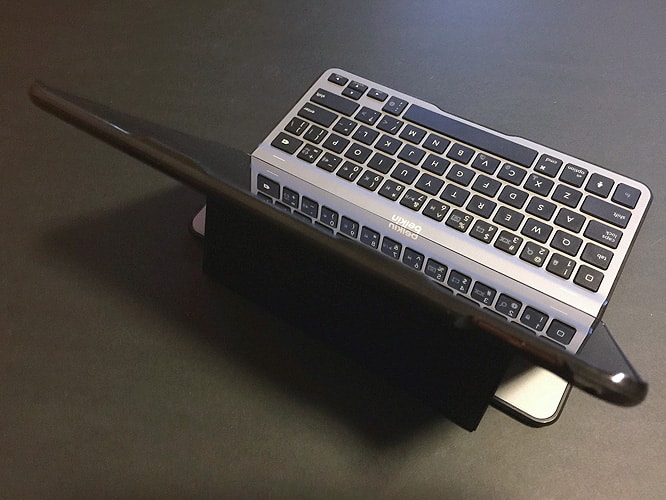
We’ve said before that keyboard cases are rarely worthy of $130 or $150 MSRPs, as many good to great options can be had for $100 or less. But for now, Belkin has the iPad Air 2 keyboard case market nearly to itself, as rivals haven’t yet updated their iPad Air designs for the new tablet. Pricetags aside, that’s not a problem: both of the Ultimate Keyboard Cases look and feel better than the vast majority of prior-generation iPad Air keyboards we’ve tested. Packaged with micro-USB to USB charging cables, they both feature aluminum tops and aluminum keyboard surfaces, mixed with realistic faux leather, matte plastic keys, and matte plastic rear shells; black or white versions are available, with differently tinted metal accents. What’s most obviously different between the $130 and $150 models is that Ultimate’s keyboard is not detachable from the case, while Ultimate Pro’s keyboard is both detachable and capable of pairing easily with two devices. The presence of a magnetic leatherette flap to connect the keyboard and case is the major reason Pro is thicker than the Ultimate version; each has a substantially (but not fully) protective case that properly fits the slimmer iPad Air 2’s body.


Contoured cases aren’t something iPad Air 2 users can take for granted at this point, as properly-tailored cases are currently rare for the new tablet. When each keyboard case is closed, they’re relatively slender, adding only millimeters of additional thickness to the iPad Air 2’s body.
But they differ in certain specifics: the Ultimate shell is thin on the top and bottom but adds 4-6mm of thickness on the left and right sides, while Ultimate Pro is thin on the top and left sides but adds 4-5mm to the right and bottom edges. Belkin uses the thicker edges to hold magnets, while the Pro version redirects the iPad Air 2’s speakers forwards with thin waveguides, which is nice but recesses the Lightning connector enough to limit compatibility with many docks. On both cases, the buttons, switches, ports, microphones, and the rear camera are all left exposed, but Ultimate also fully exposes the speakers, and Pro — when detached — leaves the Air 2’s left edge bare, perhaps not coincidentally leaving just enough space to attach Apple’s iPad Air Smart Cover.


Both Qode keyboards use Bluetooth wireless connections to pair their physical typing surfaces with the iPad Air 2, and a magnetic-based hinge system that props the iPad upright on your choice of two (Ultimate Pro) or three (Ultimate) viewing angles while you’re typing. We were somewhat surprised to discover that the keyboards weren’t just different from each other: Ultimate for iPad Air 2 is actually different from the original iPad Air keyboard, as well. The new Ultimate’s left-edge keys are a little narrower than before, and during testing, there were times when we found the spacing to be tight, and the key positioning a little confusing. Once again, Belkin has moved the colon and semi-colon key next to the arrow keys, and mapped the > and < keys atop the / and ? keys to give other characters additional space. By comparison, Ultimate Pro’s keys are basically identical to the ones on the original iPad Air model, notably with seriously tiny left and right edge keys to make room for ultra-narrow punctuation keys that are otherwise in the correct general places. Each of the keyboards is a bit of a compromise, but we found that Pro’s keys required less re-learning.


We really liked the fact that the Pro keyboard and case can be physically separated from one another.
As was the case with the iPad Air version, the iPad Air 2 remains inside a substantially hard plastic frame, protected on all sides save for its left edge. This frame isn’t the smallest shell you’ll find for the iPad Air 2, but it feels solid, and enables you to enjoy most of the newer iPad’s thinness and lightness without dragging a keyboard around.

The Ultimate Pro keyboard’s attachable side-mounted hinge can also be used to stand the encased Air 2 up on your choice of portrait or landscape modes, a fairly uncommon ability amongst iPad keyboard cases; Ultimate works solely in landscape orientation. Belkin’s magnet systems work exceptionally well to automatically manage both units’ powering on, pairing, and unlocking of the iPad screen. Even though an automatic power-off feature in the keyboard kills the Bluetooth connection when the iPad case is detached from Pro, you can restore the keys’ power and connectivity by flipping the hinge’s magnet forward on top of the keyboard. As noted above, you can also pair the Pro keyboard with a second device using separate Bluetooth buttons, which could be useful for typing on an Apple TV or iPhone. The regular Ultimate is designed to pair only with a single device.

Ultimate Pro also includes a four-setting backlighting system for the keyboard, which is absent from Ultimate. Using a function key and the 5 key, you can toggle keyboard backlighting off, low, medium, or high, complete with the ability to see the actual letters, numbers, and key icons glowing in dark light. While it’s not the strongest backlit keyboard we’ve seen, it works well enough if you need it, and can be switched off otherwise.











