
iLoungeiLounge
  • News
    • Apple
      • AirPods Pro
      • AirPlay
      • Apps
        • Apple Music
      • iCloud
      • iTunes
      • HealthKit
      • HomeKit
      • HomePod
      • iOS 13
      • Apple Pay
      • Apple TV
      • Siri
    • Rumors
    • Humor
    • Technology
      • CES
    • Daily Deals
    • Articles
    • Web Stories
  • iPhone
    • iPhone Accessories
  • iPad
  • iPod
    • iPod Accessories
  • Apple Watch
    • Apple Watch Accessories
  • Mac
    • MacBook Air
    • MacBook Pro
  • Reviews
    • App Reviews
  • How-to
    • Ask iLounge
Font ResizerAa
iLoungeiLounge
Font ResizerAa
Search
  • News
    • Apple
    • Rumors
    • Humor
    • Technology
    • Daily Deals
    • Articles
    • Web Stories
  • iPhone
    • iPhone Accessories
  • iPad
  • iPod
    • iPod Accessories
  • Apple Watch
    • Apple Watch Accessories
  • Mac
    • MacBook Air
    • MacBook Pro
  • Reviews
    • App Reviews
  • How-to
    • Ask iLounge
Follow US

News › Apps

Apps

IK Multimedia iRig Pads Editor

Last updated: May 16, 2021 3:40 pm UTC
By Jesse Hollington
IK Multimedia iRig Pads Editor

We were pretty impressed with IK Multimedia’s iRig Pads MIDI Groove Controller when it arrived last year, and the company has now taken its offering up a notch with its iRig Pads Editor (free), a Mac application that lets users much more easily customize the MIDI controller for their own personal creative process.
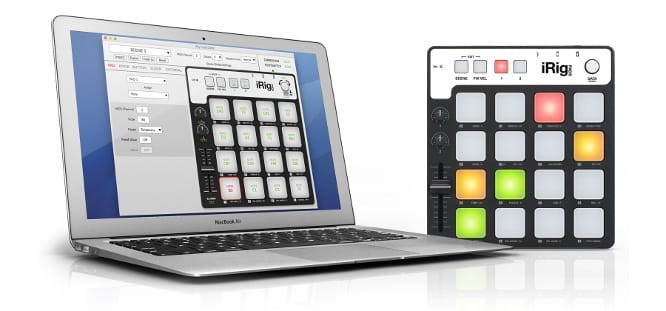

IK Multimedia iRig Pads Editor

The app features an intuitive single-screen user interface for quickly creating, editing, and transferring scenes to iRig Pads, providing full control over all MIDI messages and a much faster and more convenient way to customize the rig to your own production and performance needs.

MIDI control messages can be easily assigned to any of the pads, knobs, buttons, slider, and even an external pedal or footswitch controller, and the editor provides full support for Note, Program Change, Control Change, MIDI System Real Time, and MIDI Machine Control messages. Users can also easily switch between a note mode designed to assign MIDI channels and notes to transmit and a Toggle mode for triggering loops.

Users can even send two different messages from a single button or pad — great for switching up between presets such as instruments, loop sets, or effects settings. Control Change mode lets users assign MIDI Continuous Controller messages like volume, pan or expression, which can be assigned to parameters on other devices that iRig Pads is controlling, including the ability to transmit variable values.



Latest News
The Apple Watch Series 11 42mm GPS is $100 Off
1 Min Read
Apple Launching A New Education Hub In India Teaching Robotics and Swift Programming
1 Min Read
Women’s and Men’s Golf Added to Apple Sports
1 Min Read
Apple Adding Civilization VII and Other Games To Apple Arcade
1 Min Read
AirPods 4 ANC Is $59 Off
1 Min Read
Apple Using 2NM Process For Their M6 and A20 Chip
1 Min Read
iPhone 18 Models Will Not Have a Big Redesign
1 Min Read
Launch of MacBook Pro M5 Pro and M5 Max Models is Approaching
1 Min Read
Get the iPad Mini 7 256GB Wi-Fi at $99 Off
1 Min Read
Mozilla Now Allows Turning AI Features Off
1 Min Read
Barcelona Passeig de Gràcia Apple Store Temporarily Closing
1 Min Read
Apple’s Plans to Enter the Smart Glasses Market is Changing the Industry
1 Min Read

iLounge logo

iLounge is an independent resource for all things iPod, iPhone, iPad, and beyond. iPod, iPhone, iPad, iTunes, Apple TV, and the Apple logo are trademarks of Apple Inc.

This website is not affiliated with Apple Inc.
iLounge © 2001 - 2025. All Rights Reserved.
  • Contact Us
  • Submit News
  • About Us
  • Forums
  • Privacy Policy
  • Terms Of Use
Welcome Back!

Sign in to your account

Lost your password?








