
iLoungeiLounge
  • News
    • Apple
      • AirPods Pro
      • AirPlay
      • Apps
        • Apple Music
      • iCloud
      • iTunes
      • HealthKit
      • HomeKit
      • HomePod
      • iOS 13
      • Apple Pay
      • Apple TV
      • Siri
    • Rumors
    • Humor
    • Technology
      • CES
    • Daily Deals
    • Articles
    • Web Stories
  • iPhone
    • iPhone Accessories
  • iPad
  • iPod
    • iPod Accessories
  • Apple Watch
    • Apple Watch Accessories
  • Mac
    • MacBook Air
    • MacBook Pro
  • Reviews
    • App Reviews
  • How-to
    • Ask iLounge
Font ResizerAa
iLoungeiLounge
Font ResizerAa
Search
  • News
    • Apple
    • Rumors
    • Humor
    • Technology
    • Daily Deals
    • Articles
    • Web Stories
  • iPhone
    • iPhone Accessories
  • iPad
  • iPod
    • iPod Accessories
  • Apple Watch
    • Apple Watch Accessories
  • Mac
    • MacBook Air
    • MacBook Pro
  • Reviews
    • App Reviews
  • How-to
    • Ask iLounge
Follow US

News

News

Why’s My Mac Slower & Running Its Fans After Updating iTunes?

Last updated: May 15, 2021 10:50 am UTC
By Jeremy Horwitz
Why’s My Mac Slower & Running Its Fans After Updating iTunes?

Back when we were Windows PC users, there was a standard protocol to be followed after adding or updating software to the computer: run Norton Disk Doctor. Or SystemWorks. Or some other third-party program capable of fixing all the damage that was accidentally or thoughtlessly done to the computer’s registry by an installer when something new was added. It was a mess, a pain, and one of many things we were thrilled to be without when we switched to Macs. We were even more impressed when we saw our Macs taking an extra minute or so after certain installations to optimize the hard disk: that one minute delay reduced countless potential future slowdowns.

Why’s My Mac Slower & Running Its Fans After Updating iTunes?

But in recent months, post-installation blues with Apple software have created problems for our Macs, too. We didn’t write about the last one, the screwy Mac OS 10.5.7 update, because we’re not a Mac OS-focused site.

For that one, two iLounge editors saw their aluminum MacBooks stuck in blue screen loops after trying to upgrade from 10.5.6 using Software Update. Ugh—it was a throwback to the Microsoft days. But the latest one is iTunes 8.2, QuickTime, and Front Row-related: install them and you may notice that your Mac’s running slower, its fans are constantly spinning, and its battery is draining faster than it did before.


Why’s My Mac Slower & Running Its Fans After Updating iTunes?

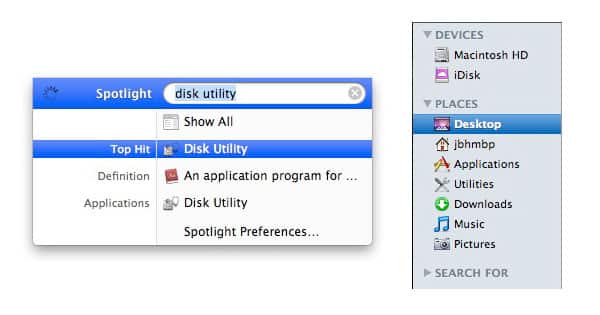
To be completely fair, this isn’t the first time that iTunes, QuickTime, or other Apple software has done this sort of thing, but the problem has become a fairly serious one: why should users have to suffer for days, weeks, or longer with lower battery life and hotter machines after installing all but mandatory updates to core applications? Thankfully, there’s a fix, a solution that is free, easy to use, and will almost certainly improve your Mac’s performance. It’s called Disk Utility, and it’s hidden in the Utilities folder on your Mac—a folder that’s tucked into your Applications folder.


Why’s My Mac Slower & Running Its Fans After Updating iTunes?

You can find the program with Spotlight at the top right of your Mac’s screen, but we’d advise adding the Utilities folder to your list of Places (see screenshot) by going into your Applications folder, dragging the Utilities folder into the sidebar, and having it there for reference whenever you need it. [We also use the more powerful, free third-party application Onyx, which hasn’t been updated yet for 10.5.7.]


Why’s My Mac Slower & Running Its Fans After Updating iTunes?

Disk Utility does a number of things, generally (but not always) quickly and well.


Here, the only things you need to know are to select your hard drive from the list on the left of the window, and press the button called “Repair Disk Permissions.” This starts an invariably harmless process that goes through and fixes screwy file information on your Mac. After five minutes, it will most likely have found a bunch of Apple programs with messed up “permissions,” which it will fix instantly. Apple’s most recent iTunes and QuickTime updates led to over 60 permissions errors, all found and “repaired” by Disk Utility. Then you can restart your Mac, and you’ll most likely find that it’s running cooler, quieter, and faster.


Why’s My Mac Slower & Running Its Fans After Updating iTunes?

But not always. When we ran Disk Utility a second time to take additional screenshots for this article, we were surprised to discover that some of the problems had persisted, and Disk Utility “repaired” them again. We’re not quite sure how or why that would be happening, but it did, and iTunes, QuickTime, and Front Row were all listed as being to blame.



Latest News
The AirPods Pro 3 is $20 Off
1 Min Read
Exynos 2600 Chip 2nm Process Revealed by Samsung
1 Min Read
New Celebrity Ad Campaign Featuring Travis Scott Released by Beats
1 Min Read
Australia Getting Hypertension Notification Feature
1 Min Read
The 14-inch MacBook Pro with M5 Chip 16GB RAM/512GB is $250 Off
1 Min Read
Noise and Static on AirPods Pro 3 Still Unfixed
1 Min Read
New iMac with 24-inch OLED Display May be Brighter With 600 Nits
1 Min Read
The 15-inch M4 MacBook Air 256GB Is $250 Off
1 Min Read
Internal Kernel Debug Kit from Apple Reveals Tests for a MacBook with A15 Chip
1 Min Read
Apple Currently In Talks With Suppliers for Chip Assembly & Packaging of iPhones in India
1 Min Read
Apple Allows Easier Battery Replacement For M5 MacBook Pro with 14-inch Display
1 Min Read
The Apple Watch SE 3 44mm GPS is $50 Off
1 Min Read

iLounge logo

iLounge is an independent resource for all things iPod, iPhone, iPad, and beyond. iPod, iPhone, iPad, iTunes, Apple TV, and the Apple logo are trademarks of Apple Inc.

This website is not affiliated with Apple Inc.
iLounge © 2001 - 2025. All Rights Reserved.
  • Contact Us
  • Submit News
  • About Us
  • Forums
  • Privacy Policy
  • Terms Of Use
Welcome Back!

Sign in to your account

Lost your password?








