
iLoungeiLounge
  • News
    • Apple
      • AirPods Pro
      • AirPlay
      • Apps
        • Apple Music
      • iCloud
      • iTunes
      • HealthKit
      • HomeKit
      • HomePod
      • iOS 13
      • Apple Pay
      • Apple TV
      • Siri
    • Rumors
    • Humor
    • Technology
      • CES
    • Daily Deals
    • Articles
    • Web Stories
  • iPhone
    • iPhone Accessories
  • iPad
  • iPod
    • iPod Accessories
  • Apple Watch
    • Apple Watch Accessories
  • Mac
    • MacBook Air
    • MacBook Pro
  • Reviews
    • App Reviews
  • How-to
    • Ask iLounge
Font ResizerAa
iLoungeiLounge
Font ResizerAa
Search
  • News
    • Apple
    • Rumors
    • Humor
    • Technology
    • Daily Deals
    • Articles
    • Web Stories
  • iPhone
    • iPhone Accessories
  • iPad
  • iPod
    • iPod Accessories
  • Apple Watch
    • Apple Watch Accessories
  • Mac
    • MacBook Air
    • MacBook Pro
  • Reviews
    • App Reviews
  • How-to
    • Ask iLounge
Follow US

News

News

Mac OS Leopard can’t format a USB hard disk? Seriously?

Last updated: May 15, 2021 3:04 pm UTC
By Jeremy Horwitz
Mac OS Leopard can’t format a USB hard disk? Seriously?

Though I spend most of my waking hours working with them, I spend almost no time actually writing about Mac computers. Generally, I love my Macs, and wouldn’t trade them for anything. But ever since Leopard was released, I’ve been having serious multiple-hour-wasting problems doing straightforward things. And when I go to research possible solutions, I see that lots of other people are having the exact same problems. Today’s example: formatting a USB hard disk with Disk Utility.

Mac OS Leopard can’t format a USB hard disk? Seriously?

Last week, after trying Time Capsule and realizing that there was no way I could—at least with its current software—rely upon it as a device for streaming iTunes video content around the office or house, the 1TB Capsule went back to the store and was replaced by a brand new 1TB G-Tech G-Drive Q.

For the uninitiated, G-Tech makes great drives, and Q is a fast but wire-tethered option. It was a snap to transfer the contents of a smaller 500GB USB 2.0-only G-Drive onto the newer 1TB unit, but when I went to format the 500GB model, I hit a snag. Apple’s Disk Utility couldn’t do it.


Mac OS Leopard can’t format a USB hard disk? Seriously?

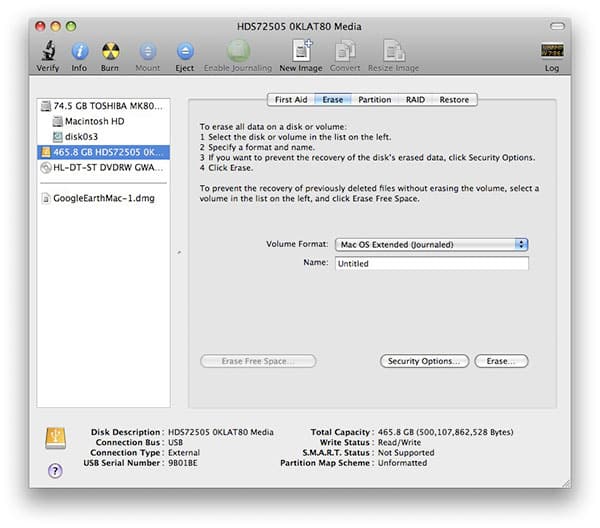
Specifically, when you use the Erase tab—which anyone would do when trying to erase a drive—Disk Utility gets stuck at the very start of the formatting process, when it’s supposedly creating a partition map. When displaying the “Creating Partition Map” message, the adjacent barber pole-style progress bar grinds and grinds for hours, until it’s terminated.


Mac OS Leopard can’t format a USB hard disk? Seriously?

Closer inspection of the application showed that it was hung.

Reading numerous support postings online showed me that other users have been experiencing this issue for quite some time. Trying the same format with another Leopard machine produced the same results, and trying a format from the OS X 10.5 installation DVD did, too.


Mac OS Leopard can’t format a USB hard disk? Seriously?

After contacting G-Tech, which tried its best to be helpful, I was presented with only two known solutions: find an older version of OS X, or use a PC with MacDrive to format the drive. “Ah,” I said, “I have 10.4.10 installed on my Mac mini.” Amazingly, that didn’t work, either. It turns out that when G-Tech said older, it meant “pre-10.4.6.” Apparently, Apple has been aware of this issue since April of 2006, when OS X 10.4.6 was released and Disk Utility started to hang when formatting USB drives (see G-Tech’s FAQ, CURRENT FIREWIRE/SATA/USB PRODUCTS, #10). Nearly two years have passed, and the bug hasn’t been fixed, persisting through the 10.4 point releases and now 10.5, as well.



Latest News
The AirPods Pro 3 is $20 Off
1 Min Read
Exynos 2600 Chip 2nm Process Revealed by Samsung
1 Min Read
New Celebrity Ad Campaign Featuring Travis Scott Released by Beats
1 Min Read
Australia Getting Hypertension Notification Feature
1 Min Read
The 14-inch MacBook Pro with M5 Chip 16GB RAM/512GB is $250 Off
1 Min Read
Noise and Static on AirPods Pro 3 Still Unfixed
1 Min Read
New iMac with 24-inch OLED Display May be Brighter With 600 Nits
1 Min Read
The 15-inch M4 MacBook Air 256GB Is $250 Off
1 Min Read
Internal Kernel Debug Kit from Apple Reveals Tests for a MacBook with A15 Chip
1 Min Read
Apple Currently In Talks With Suppliers for Chip Assembly & Packaging of iPhones in India
1 Min Read
Apple Allows Easier Battery Replacement For M5 MacBook Pro with 14-inch Display
1 Min Read
The Apple Watch SE 3 44mm GPS is $50 Off
1 Min Read

iLounge logo

iLounge is an independent resource for all things iPod, iPhone, iPad, and beyond. iPod, iPhone, iPad, iTunes, Apple TV, and the Apple logo are trademarks of Apple Inc.

This website is not affiliated with Apple Inc.
iLounge © 2001 - 2025. All Rights Reserved.
  • Contact Us
  • Submit News
  • About Us
  • Forums
  • Privacy Policy
  • Terms Of Use
Welcome Back!

Sign in to your account

Lost your password?








