iLoungeiLounge
  • News
    • Apple
      • AirPods Pro
      • AirPlay
      • Apps
        • Apple Music
      • iCloud
      • iTunes
      • HealthKit
      • HomeKit
      • HomePod
      • iOS 13
      • Apple Pay
      • Apple TV
      • Siri
    • Rumors
    • Humor
    • Technology
      • CES
    • Daily Deals
    • Articles
    • Web Stories
  • iPhone
    • iPhone Accessories
  • iPad
  • iPod
    • iPod Accessories
  • Apple Watch
    • Apple Watch Accessories
  • Mac
    • MacBook Air
    • MacBook Pro
  • Reviews
    • App Reviews
  • How-to
    • Ask iLounge
Font ResizerAa
iLoungeiLounge
Font ResizerAa
Search
  • News
    • Apple
    • Rumors
    • Humor
    • Technology
    • Daily Deals
    • Articles
    • Web Stories
  • iPhone
    • iPhone Accessories
  • iPad
  • iPod
    • iPod Accessories
  • Apple Watch
    • Apple Watch Accessories
  • Mac
    • MacBook Air
    • MacBook Pro
  • Reviews
    • App Reviews
  • How-to
    • Ask iLounge
Follow US

Reviews › App Reviews

App Reviews

Spotty Time App Review

Last updated: Nov 6, 2020 3:22 pm UTC
By Haider Ali Khan
Spotty Time App icon

Spotty Time is a reward-based screen time lock app that’s fairly simple to operate and install.


Take a look at our Spotty Time review and see how it can help you become more productive and keep your children safe from too much time on the internet.

Spotty Time App icon

How Does Spotty Time Work?

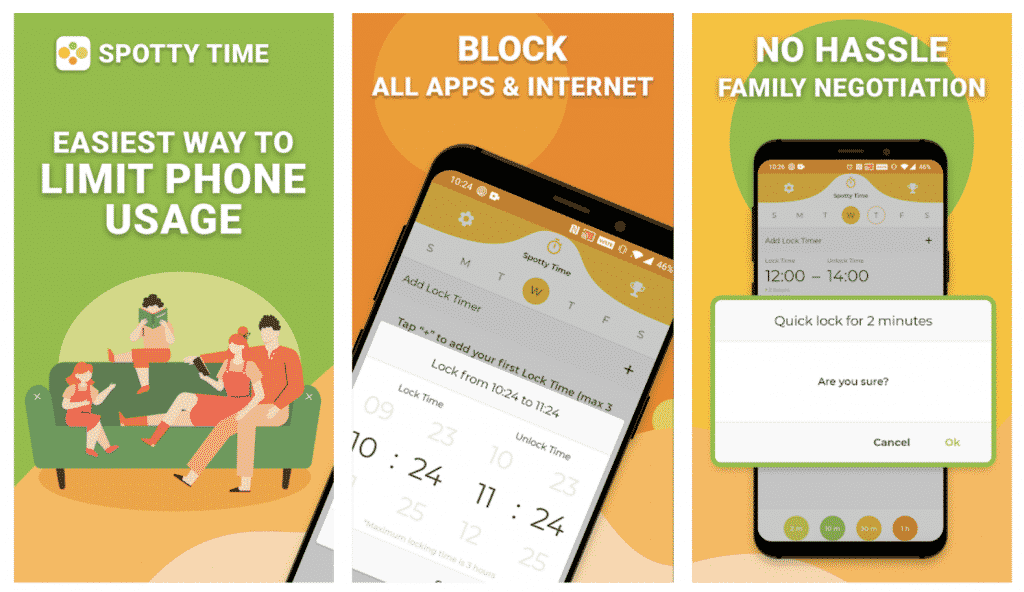
Spotty Time App in screenshots

Parents can set screen time limit per day and add time limits as needed.

Spotty Time has pre-set buttons for quick locks when it’s needed. The app will block access automatically when the time frames come.

Time spent offline will give the device user coins to spend on aesthetic upgrades.


Spotty Time Features
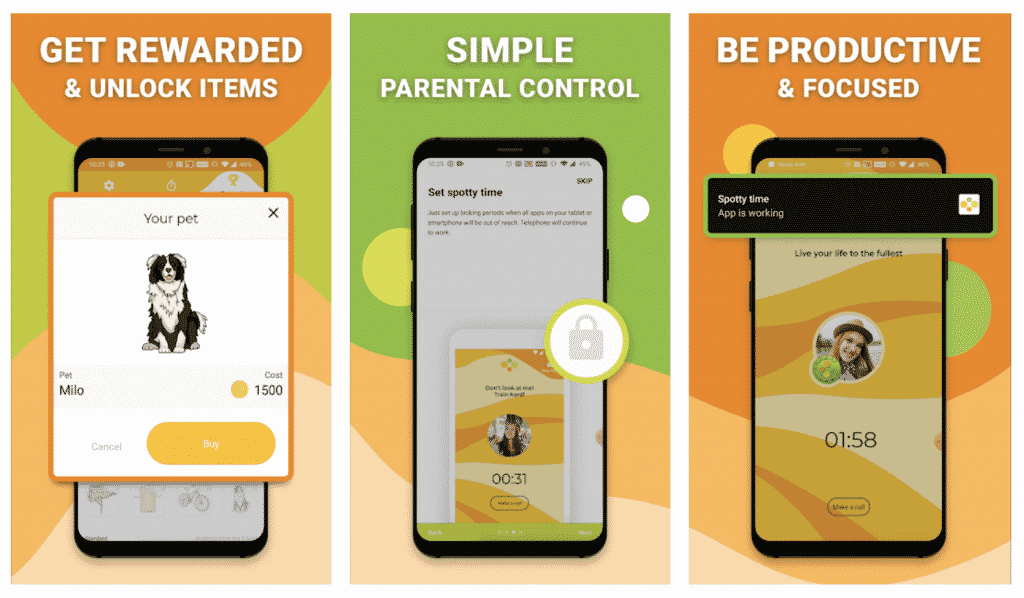
Spotty Time Features in screenshots

Limit Screen Time

Spotty Time is first and foremost a screen time app that sets how much one can spend on his or her phone. To this end the app works great and has a number of options you can enforce the ‘no phone’ rule.

Aside from locking the whole phone the app can also block specific apps, including social media and games. Spotty Time has a fairly good anti-tamper protocol so your kids won’t be able to manipulate it to get extra time.


Screen Time Management

Aside from real time blocking Spotty can also set the time limits throughout the week or during certain time frames.

For example, you can set a lock beginning 9pm until 6am the next day for weekdays. Set the control to do this every week and you won’t have to manually set it after that.

Reward-Based System

What sets Spotty Time apart from other parental control apps is its rewards system that’s based on how much time the device was offline.


The coins you earn may be used to unlock customization options such as gear, in-app pictures and to buy pets in-app. It’s a welcome change in the parental control genre where the users are rewarded for following offline time.

Not Just for Kids

Adults can also benefit from having Spotty Time on their phones. It can help curb distractions and notifications from popping up, which means you can get more work done.

The app also blocks addictive apps and improves one’s self control. Anyone can use Spotty Time and enjoy their offline activities more.

Download Spotty Time App on Google Play Store

More information about the App can be found on https://www.spottytime.com/


Latest News
The Apple Watch Series 11 46mm GPS Is $100 Off
1 Min Read
Clamshell Style iPhone Being Looked Into By Apple
1 Min Read
Foldable iPhones May Have the Largest Battery Ever
1 Min Read
Apple and TSMC’s 10-Year Collaboration May Be Ending
1 Min Read
The 13-inch M5 iPad Pro 256GB Wi-Fi Is $149 Off
1 Min Read
M5 Pro and M5 Max Chips for the MacBook Pro could Roll Out with macOS 26.3
1 Min Read
Mac Ordering Process Revamped
1 Min Read
Check Signed By Steve Wozniak and Steve Jobs Sold For $2.4 Million
1 Min Read
The Anker 140W 4-Port GaN USB-C Charger is $35 Off
1 Min Read
No iPhone Air 2 This Year, according to Latest Report
1 Min Read
New Report Corroborates Split iPhone Release Dates
1 Min Read
Apple Losing More Researchers As They Plan To Release 2 Siri Versions
1 Min Read

iLounge logo

iLounge is an independent resource for all things iPod, iPhone, iPad, and beyond. iPod, iPhone, iPad, iTunes, Apple TV, and the Apple logo are trademarks of Apple Inc.

This website is not affiliated with Apple Inc.
iLounge © 2001 - 2025. All Rights Reserved.
  • Contact Us
  • Submit News
  • About Us
  • Forums
  • Privacy Policy
  • Terms Of Use
Welcome Back!

Sign in to your account

Lost your password?