iLoungeiLounge
  • News
    • Apple
      • AirPods Pro
      • AirPlay
      • Apps
        • Apple Music
      • iCloud
      • iTunes
      • HealthKit
      • HomeKit
      • HomePod
      • iOS 13
      • Apple Pay
      • Apple TV
      • Siri
    • Rumors
    • Humor
    • Technology
      • CES
    • Daily Deals
    • Articles
    • Web Stories
  • iPhone
    • iPhone Accessories
  • iPad
  • iPod
    • iPod Accessories
  • Apple Watch
    • Apple Watch Accessories
  • Mac
    • MacBook Air
    • MacBook Pro
  • Reviews
    • App Reviews
  • How-to
    • Ask iLounge
Font ResizerAa
iLoungeiLounge
Font ResizerAa
Search
  • News
    • Apple
    • Rumors
    • Humor
    • Technology
    • Daily Deals
    • Articles
    • Web Stories
  • iPhone
    • iPhone Accessories
  • iPad
  • iPod
    • iPod Accessories
  • Apple Watch
    • Apple Watch Accessories
  • Mac
    • MacBook Air
    • MacBook Pro
  • Reviews
    • App Reviews
  • How-to
    • Ask iLounge
Follow US

News

News

Tesla updates its iOS App with new controls, widgets and more

Last updated: Sep 1, 2021 3:03 pm UTC
By Samantha Wiley
Tesla Updates Its iOS App

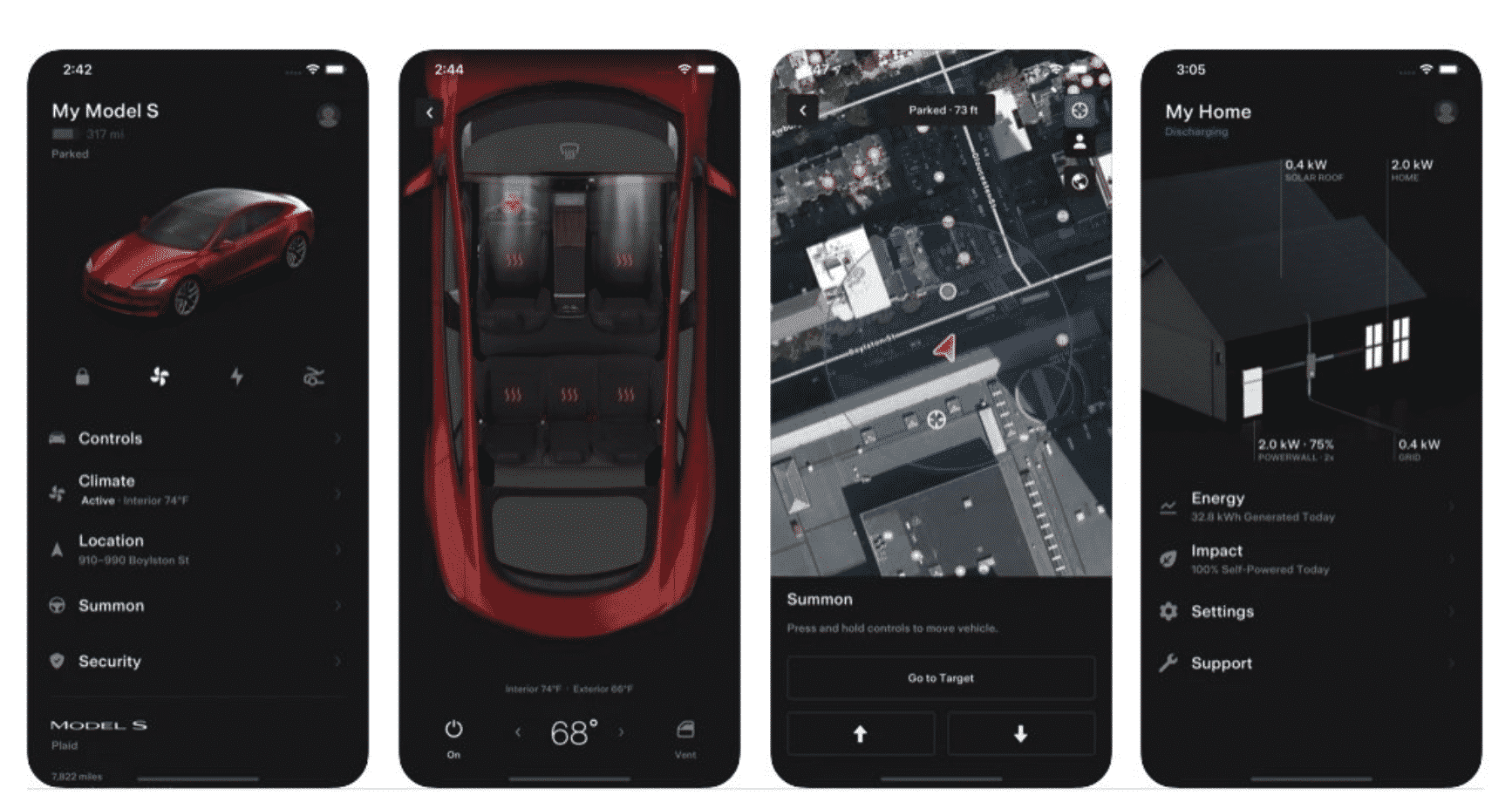
Tesla has recently launched a new version of its iPhone app. Some of the most notable changes include added controls, better widgets and a redesign.


EV owners will see a visual overhaul when they open the app. Commands can now be sent through an iPhone without having to wake the car first. Those who own multiple Tesla vehicles will now be able to unlock them using a phone key.
Tesla Updates Its iOS App

The Tesla iOS app also features a 3D vehicle representation and more fluid animations throughout. The company has upgraded the Charging section and shows only pertinent charging details when the EV is connected to an energy source.

Sentry mode, valet mode and speed limit settings have been relegated to the ‘Security’ section. Supercharging history may also be viewed in-app.

As for the widgets, iOS users can choose between two, with data such as unlock status, charging and location information and vehicle name shown on the screen.



Latest News
The 13-inch M4 MacBook Air Is $200 Off
1 Min Read
iPhone Fold Rumored To Be Made With Liquid Metal and ‘Better’ Titanium
1 Min Read
Four New Games Coming to Apple Arcade
1 Min Read
iPhone Shows ‘SOS Mode’ Due To Verizon Network Outage
1 Min Read
The 13-inch M5 iPad Pro 2TB Nano-Texture Wi-Fi is $200 Off
1 Min Read
Several Apple Apps No Longer Getting Updates Unless You Get The Subscription
1 Min Read
Firmware Update For AirPods Pro 3 Released By Apple Today
1 Min Read
Pixelmator for iOS No Longer Receiving Future Updates
1 Min Read
The Apple Watch Series 11 42mm GPS Is $100 Off
1 Min Read
The Influence Apple Has Over TSMC is Deteriorating Due to the Rise Of AI
1 Min Read
Apple Regent Store In London Closing Temporarily
1 Min Read
Apple and Other Manufacturers Oppose Source Code Access Proposal by India
1 Min Read

iLounge logo

iLounge is an independent resource for all things iPod, iPhone, iPad, and beyond. iPod, iPhone, iPad, iTunes, Apple TV, and the Apple logo are trademarks of Apple Inc.

This website is not affiliated with Apple Inc.
iLounge © 2001 - 2025. All Rights Reserved.
  • Contact Us
  • Submit News
  • About Us
  • Forums
  • Privacy Policy
  • Terms Of Use
Welcome Back!

Sign in to your account

Lost your password?