
iLoungeiLounge
  • News
    • Apple
      • AirPods Pro
      • AirPlay
      • Apps
        • Apple Music
      • iCloud
      • iTunes
      • HealthKit
      • HomeKit
      • HomePod
      • iOS 13
      • Apple Pay
      • Apple TV
      • Siri
    • Rumors
    • Humor
    • Technology
      • CES
    • Daily Deals
    • Articles
    • Web Stories
  • iPhone
    • iPhone Accessories
  • iPad
  • iPod
    • iPod Accessories
  • Apple Watch
    • Apple Watch Accessories
  • Mac
    • MacBook Air
    • MacBook Pro
  • Reviews
    • App Reviews
  • How-to
    • Ask iLounge
Font ResizerAa
iLoungeiLounge
Font ResizerAa
Search
  • News
    • Apple
    • Rumors
    • Humor
    • Technology
    • Daily Deals
    • Articles
    • Web Stories
  • iPhone
    • iPhone Accessories
  • iPad
  • iPod
    • iPod Accessories
  • Apple Watch
    • Apple Watch Accessories
  • Mac
    • MacBook Air
    • MacBook Pro
  • Reviews
    • App Reviews
  • How-to
    • Ask iLounge
Follow US

News

News

Apple releases how-to videos showcasing new iPadOS features

Last updated: Sep 25, 2019 12:40 pm UTC
By Abhay Ram
iPadOS videos
iPadOS videos

Today Apple released iPadOS, its new OS dedicated to just iPads. The focus with iPadOS is to separate the iPhone and iPad software to enable new features specific to the iPad. The iPad is a bigger device with more screen real estate, it can do more and the iPadOS brings new features like Slide Over, Split View, gestures for text editing, and QuickPath. 


To make it easier for iPad users to know about these features and understand how to use them, Apple has released a series of videos on YouTube explaining the functionality and step-by-step use of the feature. These videos can be found on YouTube channel named “Apple Support”. Till now, the company has released four videos explaining various new iPadOS features.
iPadOS videos

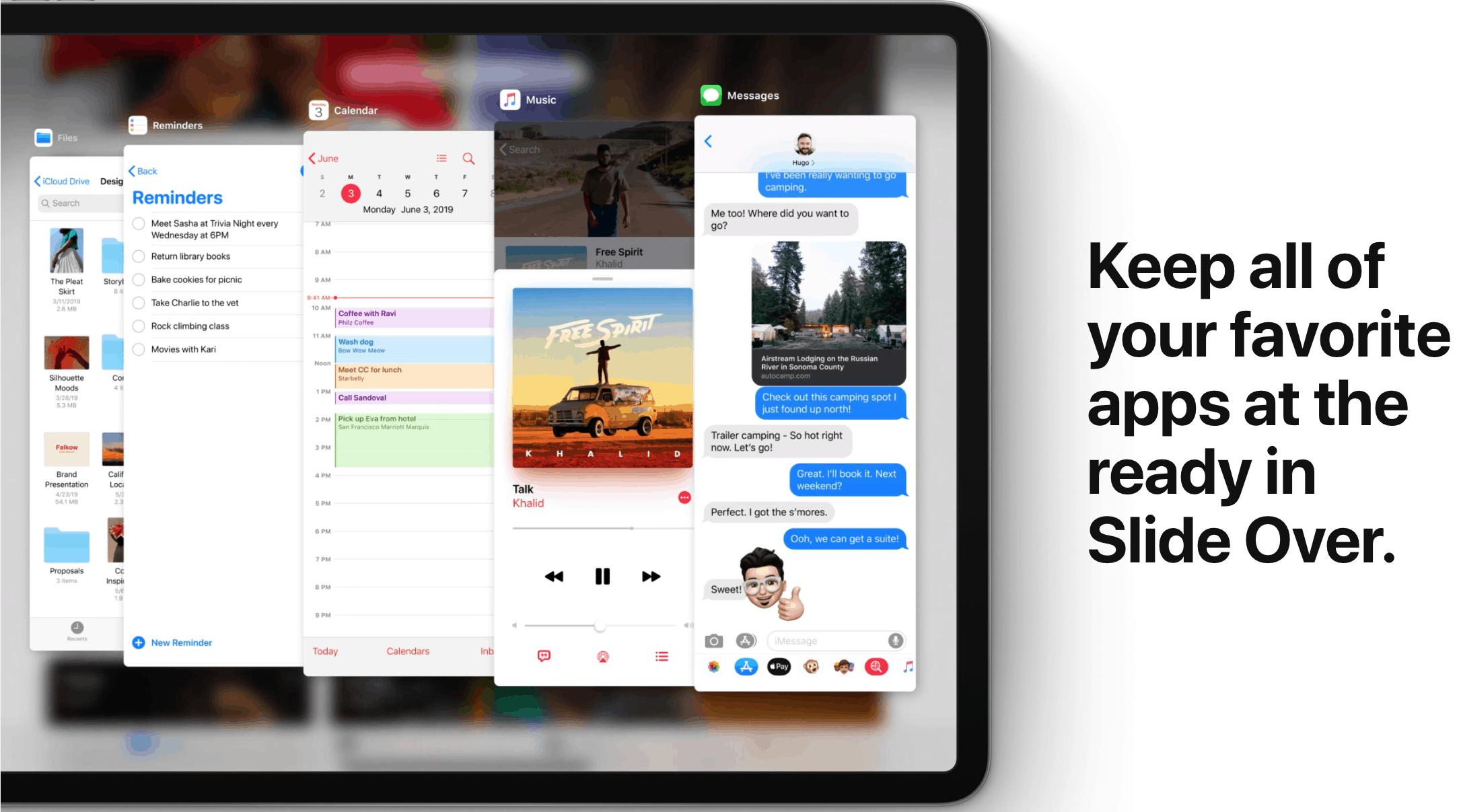
The first video of the series talks about the new “Slide Over” feature which allows users to access an app on top of another app by creating a mini window on the side by just swiping. The “Slide Over” bar can be scrolled through to open a different app. Its a non-intrusive way to get something done quickly without closing the current app you are working on. 


The second video of the series talks about the improved multitasking in the iPadOS. Users can now open two instances of the same app and use them side by side. Prior to the iPadOS, users were restricted to just using two different apps side by side. However, now users can create two instances of the same app and with added functionality of drag & drop in iPadOS, users can do a lot more now.

The third video talks about how users can now use gestures to edit text. A three finger pinch gesture copies the text on the screen and three finger pinch out gesture will paste the copied text. Another video talks about the latest QuickPath keyboard feature which allows swipe typing.


https://youtu.be/ITzy5J3j5Is
https://youtu.be/nSBZKr5kXYM
https://youtu.be/xdljRClDfv8
https://youtu.be/toNpXLTKZZM

Latest News
The 14-inch MacBook Pro with M5 Chip 16GB RAM/512GB is $250 Off
1 Min Read
Noise and Static on AirPods Pro 3 Still Unfixed
1 Min Read
New iMac with 24-inch OLED Display May be Brighter With 600 Nits
1 Min Read
The 15-inch M4 MacBook Air 256GB Is $250 Off
1 Min Read
Internal Kernel Debug Kit from Apple Reveals Tests for a MacBook with A15 Chip
1 Min Read
Apple Currently In Talks With Suppliers for Chip Assembly & Packaging of iPhones in India
1 Min Read
Apple Allows Easier Battery Replacement For M5 MacBook Pro with 14-inch Display
1 Min Read
The Apple Watch SE 3 44mm GPS is $50 Off
1 Min Read
20th Anniversary iPhone May Launch in Two Years
1 Min Read
Better Image Generation Capabilities and Apple Music Integration Coming to ChatGPT
1 Min Read
A20 Pro Chip Coming to Next Gen iPad Mini OLED
1 Min Read
Amazon has the AirTag 4 Pack Marked $29 off
1 Min Read

iLounge logo

iLounge is an independent resource for all things iPod, iPhone, iPad, and beyond. iPod, iPhone, iPad, iTunes, Apple TV, and the Apple logo are trademarks of Apple Inc.

This website is not affiliated with Apple Inc.
iLounge © 2001 - 2025. All Rights Reserved.
  • Contact Us
  • Submit News
  • About Us
  • Forums
  • Privacy Policy
  • Terms Of Use
Welcome Back!

Sign in to your account

Lost your password?









