
iLoungeiLounge
  • News
    • Apple
      • AirPods Pro
      • AirPlay
      • Apps
        • Apple Music
      • iCloud
      • iTunes
      • HealthKit
      • HomeKit
      • HomePod
      • iOS 13
      • Apple Pay
      • Apple TV
      • Siri
    • Rumors
    • Humor
    • Technology
      • CES
    • Daily Deals
    • Articles
    • Web Stories
  • iPhone
    • iPhone Accessories
  • iPad
  • iPod
    • iPod Accessories
  • Apple Watch
    • Apple Watch Accessories
  • Mac
    • MacBook Air
    • MacBook Pro
  • Reviews
    • App Reviews
  • How-to
    • Ask iLounge
Font ResizerAa
iLoungeiLounge
Font ResizerAa
Search
  • News
    • Apple
    • Rumors
    • Humor
    • Technology
    • Daily Deals
    • Articles
    • Web Stories
  • iPhone
    • iPhone Accessories
  • iPad
  • iPod
    • iPod Accessories
  • Apple Watch
    • Apple Watch Accessories
  • Mac
    • MacBook Air
    • MacBook Pro
  • Reviews
    • App Reviews
  • How-to
    • Ask iLounge
Follow US

News

News

iOS 14: Widgets, App Library, and visual improvements

Last updated: Jun 28, 2020 8:00 am UTC
By Abhay Ram
iOS 14

Apple unveiled iOS 14 – its major update to the operating system that powers the iPhone. It has been reported that the company has focused more on stability and performance with this update compared to new features. Nonetheless, this update also packs new features as well.


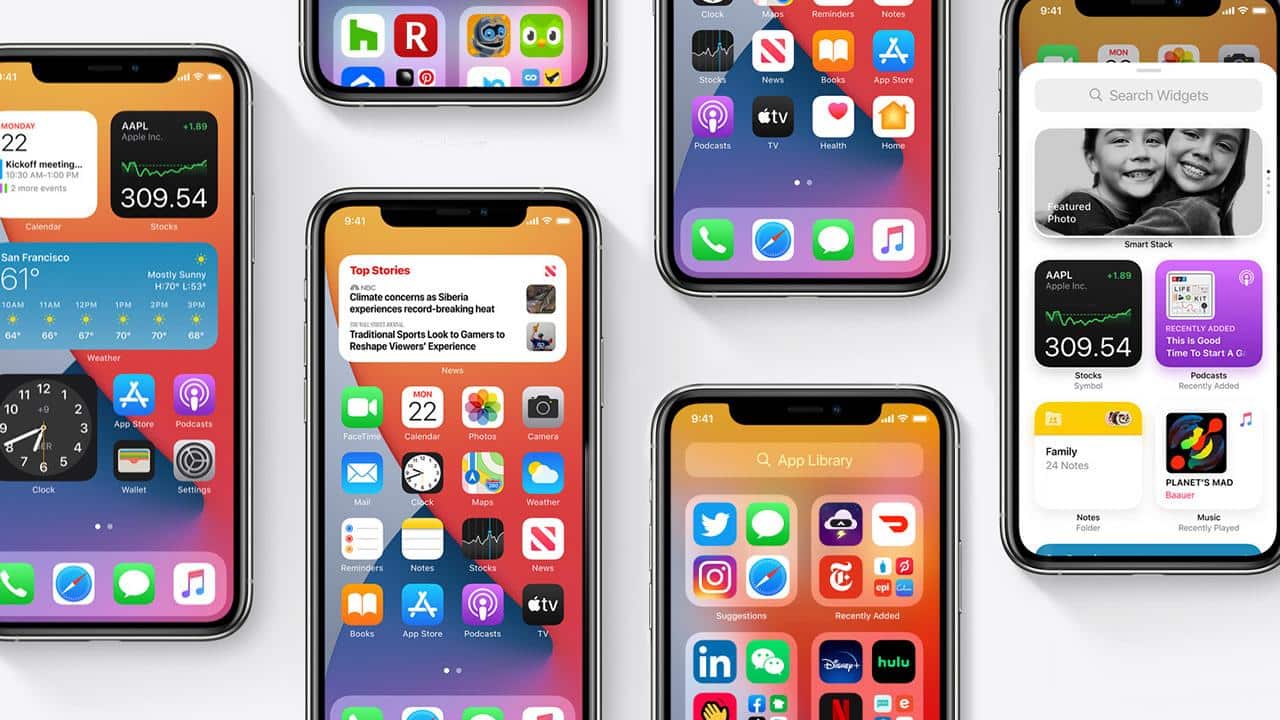
The major new addition to iOS with the new update is widgets. Users can now place widgets on the home screen alongside the app icons. Android has had this feature for years but Apple’s implementation is a little richer – nicer looking.
iOS 14

The widgets kind of also look like the tiles from Windows Phone. iOS 14 will allow users to select a widget for an app from three different sizes similar to the resizing option on Windows Phone. However, iOS does not allow resizing of the widget on the go; users will have to remove the current and go back to the widget drawer to pull the different sized widget.


Apple is also bringing smart stack – a collection of widgets in a single widget. Users can select all the widgets that should be in the stack and then can swipe through each and every gesture. The smart stack can also be set to intelligently show the right information based on time.

The other major visual change or addition in iOS 14 is App Library. Similar to Android’s app drawer, users will now have a seperate section with all the installed apps along with curated lists. The App Library in iOS 14 lives at the end of the home screen pages and users can also now hide any of the pages they do not want to be seen all the time.

Calls in iOS 14 will now be non-obtrusive compared to the current iOS version which takes over the whole screen when somebody calls. iOS 14 will instead show a mini notification on top with accept or decline options.



Latest News
The Apple Watch Series 11 46mm GPS Is $100 Off
1 Min Read
Clamshell Style iPhone Being Looked Into By Apple
1 Min Read
Foldable iPhones May Have the Largest Battery Ever
1 Min Read
Apple and TSMC’s 10-Year Collaboration May Be Ending
1 Min Read
The 13-inch M5 iPad Pro 256GB Wi-Fi Is $149 Off
1 Min Read
M5 Pro and M5 Max Chips for the MacBook Pro could Roll Out with macOS 26.3
1 Min Read
Mac Ordering Process Revamped
1 Min Read
Check Signed By Steve Wozniak and Steve Jobs Sold For $2.4 Million
1 Min Read
The Anker 140W 4-Port GaN USB-C Charger is $35 Off
1 Min Read
No iPhone Air 2 This Year, according to Latest Report
1 Min Read
New Report Corroborates Split iPhone Release Dates
1 Min Read
Apple Losing More Researchers As They Plan To Release 2 Siri Versions
1 Min Read

iLounge logo

iLounge is an independent resource for all things iPod, iPhone, iPad, and beyond. iPod, iPhone, iPad, iTunes, Apple TV, and the Apple logo are trademarks of Apple Inc.

This website is not affiliated with Apple Inc.
iLounge © 2001 - 2025. All Rights Reserved.
  • Contact Us
  • Submit News
  • About Us
  • Forums
  • Privacy Policy
  • Terms Of Use
Welcome Back!

Sign in to your account

Lost your password?








