iLoungeiLounge
  • News
    • Apple
      • AirPods Pro
      • AirPlay
      • Apps
        • Apple Music
      • iCloud
      • iTunes
      • HealthKit
      • HomeKit
      • HomePod
      • iOS 13
      • Apple Pay
      • Apple TV
      • Siri
    • Rumors
    • Humor
    • Technology
      • CES
    • Daily Deals
    • Articles
    • Web Stories
  • iPhone
    • iPhone Accessories
  • iPad
  • iPod
    • iPod Accessories
  • Apple Watch
    • Apple Watch Accessories
  • Mac
    • MacBook Air
    • MacBook Pro
  • Reviews
    • App Reviews
  • How-to
    • Ask iLounge
Font ResizerAa
iLoungeiLounge
Font ResizerAa
Search
  • News
    • Apple
    • Rumors
    • Humor
    • Technology
    • Daily Deals
    • Articles
    • Web Stories
  • iPhone
    • iPhone Accessories
  • iPad
  • iPod
    • iPod Accessories
  • Apple Watch
    • Apple Watch Accessories
  • Mac
    • MacBook Air
    • MacBook Pro
  • Reviews
    • App Reviews
  • How-to
    • Ask iLounge
Follow US

News

News

Apple provides in-depth look at Car Crash Detection

Last updated: Sep 19, 2022 6:44 pm UTC
By Samantha Wiley
Car Crash Detection

Apple has recently shared a new video explaining the new Car Crash Detection feature and how it works.


Car Crash Detection is a feature that’s available on the 2nd generation Apple Watch SE, the Apple Watch Ultra, the Apple Watch Series 8 and all iPhone 14 models.
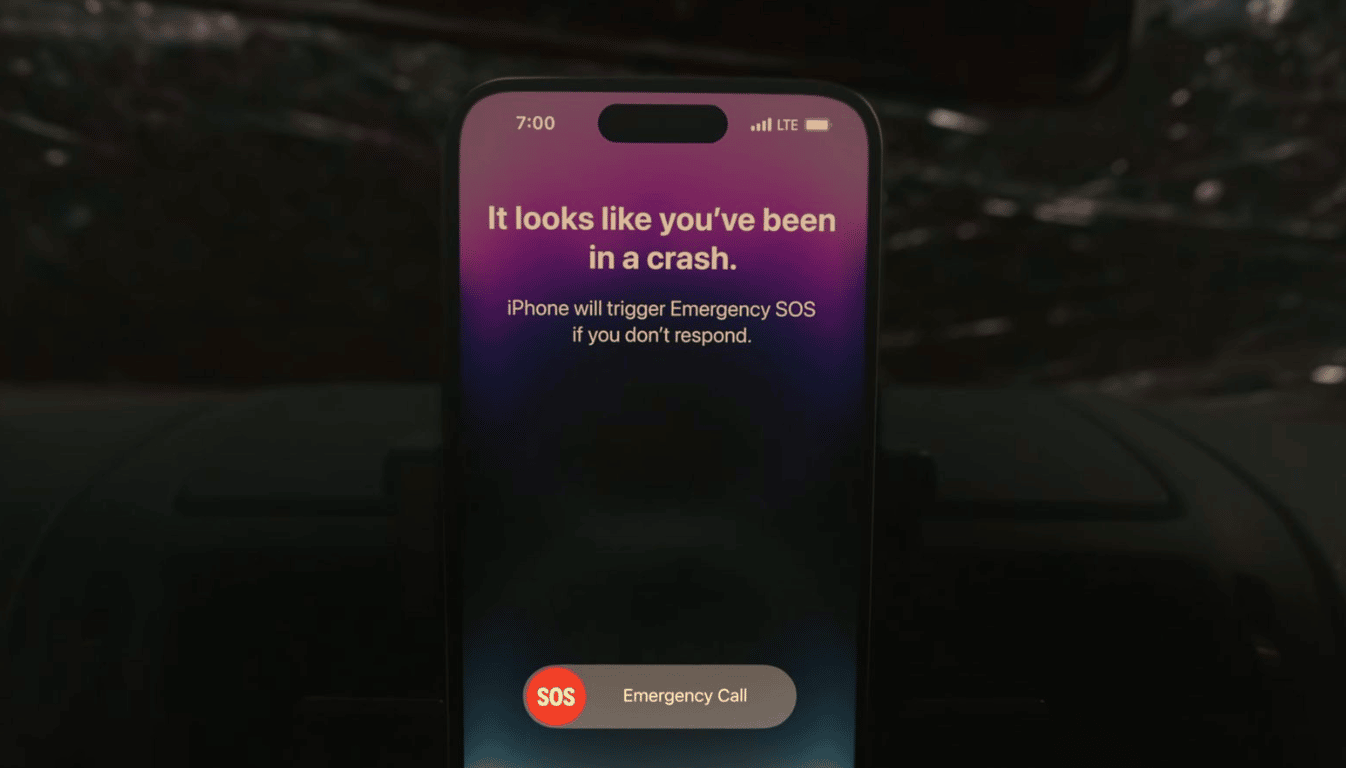
Car Crash Detection

The mechanism detects severe crashes in several aspects, including rollovers, rear-end collisions, side-impact and front impact on pickup trucks, SUVs, minivans and sedans. Apple then issues a warning that the Crash Detection feature won’t be able to detect all crashes.

For a severe crash, the user will have to interact with their Apple Watch if they have it. Otherwise, the prompt will come to their iPhone.

An alert will pop up alongside an alarm, with the ability to call emergency services via the slider on the Apple Watch or iPhone. After 20 seconds and if the user hasn’t responded, the device will automatically contact emergency services.

The full video is available to watch on Apple’s official YouTube channel.


Latest News
The Powerbeats Pro 2 is $50 Off
1 Min Read
Limited Edition AirTag Will Be Given Away By Apple
1 Min Read
New Ads Shared By Apple
1 Min Read
Other Roomba Vacuums Receive Matter Support
1 Min Read
The Beats iPhone 17 Pro Kickstand Case Is $26 Off
1 Min Read
Track Santa's Journey From the North Pole Using Google's Santa Tracker
Track Santa’s Journey From the North Pole Using Google’s Santa Tracker
1 Min Read
Prototype For AirPods with Bright Colors Revealed
1 Min Read
Tesla May Be Adding Support for Apple Car Keys
1 Min Read
The AirPods Pro 3 is $50 Off
1 Min Read
Camera Sensor for iPhone 18 Camera to be Made by Samsung in Austin, TX Facility
1 Min Read
Apple Changing the Structure Of App Store Fees in Brazil
1 Min Read
iPhone Air 2 Could Launch Next Year
1 Min Read

iLounge logo

iLounge is an independent resource for all things iPod, iPhone, iPad, and beyond. iPod, iPhone, iPad, iTunes, Apple TV, and the Apple logo are trademarks of Apple Inc.

This website is not affiliated with Apple Inc.
iLounge © 2001 - 2025. All Rights Reserved.
  • Contact Us
  • Submit News
  • About Us
  • Forums
  • Privacy Policy
  • Terms Of Use
Welcome Back!

Sign in to your account

Lost your password?