
iLoungeiLounge
  • News
    • Apple
      • AirPods Pro
      • AirPlay
      • Apps
        • Apple Music
      • iCloud
      • iTunes
      • HealthKit
      • HomeKit
      • HomePod
      • iOS 13
      • Apple Pay
      • Apple TV
      • Siri
    • Rumors
    • Humor
    • Technology
      • CES
    • Daily Deals
    • Articles
    • Web Stories
  • iPhone
    • iPhone Accessories
  • iPad
  • iPod
    • iPod Accessories
  • Apple Watch
    • Apple Watch Accessories
  • Mac
    • MacBook Air
    • MacBook Pro
  • Reviews
    • App Reviews
  • How-to
    • Ask iLounge
Font ResizerAa
iLoungeiLounge
Font ResizerAa
Search
  • News
    • Apple
    • Rumors
    • Humor
    • Technology
    • Daily Deals
    • Articles
    • Web Stories
  • iPhone
    • iPhone Accessories
  • iPad
  • iPod
    • iPod Accessories
  • Apple Watch
    • Apple Watch Accessories
  • Mac
    • MacBook Air
    • MacBook Pro
  • Reviews
    • App Reviews
  • How-to
    • Ask iLounge
Follow US

News

News

Apple Maps update is exciting: ETA Sharing & Look Around

Last updated: Sep 26, 2019 1:09 pm UTC
By Abhay Ram
Apple Maps Look Around Image 1
Image Credits: MacRumors

Remember the Apple Maps debacle in 2012 when the company tried to replace Google Maps? Scott Forstall, SVP (Senior Vice President) of iOS back then was fired for not being able to deliver a good maps experience and replaced by Craig Federighi. Apple has come a long way since then and the updated Apple Maps app on iOS 13 is a great justification to that. 


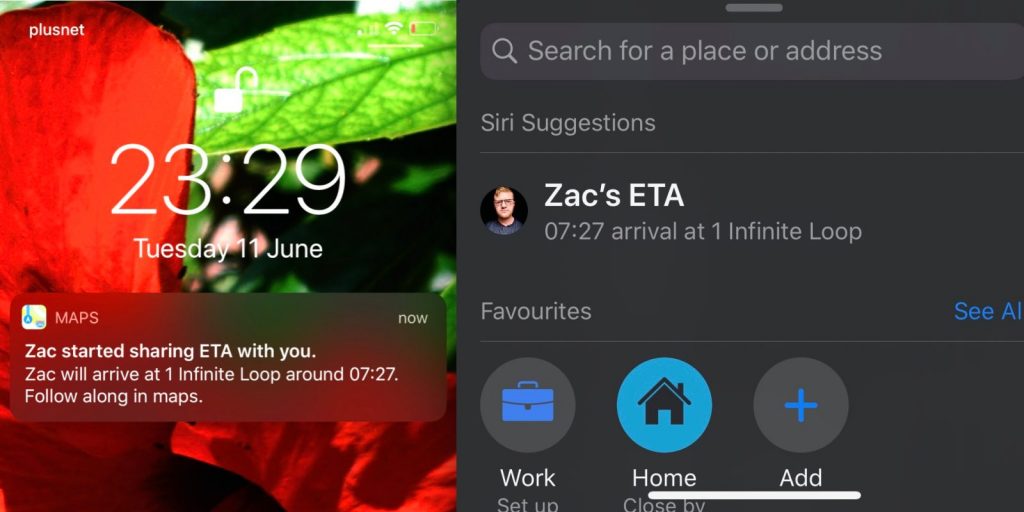
One of the most useful additions is the ability to share ETA with friends and family. ETA (Estimated Time of Arrival ) can now be shared via text message or iMessage.

Apple Maps Look Around Image 1
Apple Maps update is exciting: ETA Sharing & Look Around

Here’s how-

  1. Open Apple Maps app and get turn-by-turn directions to your destination. 
  2. When viewing the directions, swipe up from the bottom of the area that displays your arrival time and the end button. 
  3. Tap the “Share ETA” button to trigger the action. 
  4. Select the contacts that you would like to share your ETA with. 

After which, Apple Maps sends a message with all the necessary details. A sample message of which should look like this- 


I started sharing my ETA with you in Apple Maps: arriving at Moscone West around 11:48 PM. I’ll let you know if I’m running late.

Look Around: The Google Street View equivalent
Apple Maps update is exciting: ETA Sharing & Look Around

Apple Maps also allows sharing location information inside the app without using texts. When sharing, if the person you are about to share your ETA with is on Apple Maps then they’ll receive an Apple Maps notification which they can follow to check your current location, the directions you are going to take to reach the destination.

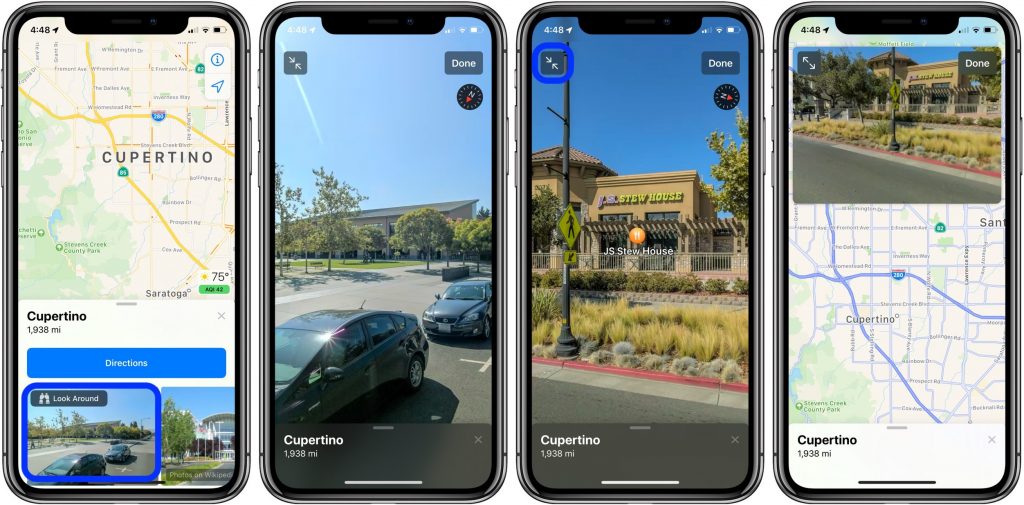
iOS 13.1 also adds “Look Around” feature to the Apple Maps application. It is similar to Google’s Street View which allows users to get 3D view of the area. At the moment, “Look Around” is only limited to San Francisco. In the future, we expect the feature to work in other states as well.



Latest News
The Apple Watch Series 11 46mm GPS Is $100 Off
1 Min Read
Clamshell Style iPhone Being Looked Into By Apple
1 Min Read
Foldable iPhones May Have the Largest Battery Ever
1 Min Read
Apple and TSMC’s 10-Year Collaboration May Be Ending
1 Min Read
The 13-inch M5 iPad Pro 256GB Wi-Fi Is $149 Off
1 Min Read
M5 Pro and M5 Max Chips for the MacBook Pro could Roll Out with macOS 26.3
1 Min Read
Mac Ordering Process Revamped
1 Min Read
Check Signed By Steve Wozniak and Steve Jobs Sold For $2.4 Million
1 Min Read
The Anker 140W 4-Port GaN USB-C Charger is $35 Off
1 Min Read
No iPhone Air 2 This Year, according to Latest Report
1 Min Read
New Report Corroborates Split iPhone Release Dates
1 Min Read
Apple Losing More Researchers As They Plan To Release 2 Siri Versions
1 Min Read

iLounge logo

iLounge is an independent resource for all things iPod, iPhone, iPad, and beyond. iPod, iPhone, iPad, iTunes, Apple TV, and the Apple logo are trademarks of Apple Inc.

This website is not affiliated with Apple Inc.
iLounge © 2001 - 2025. All Rights Reserved.
  • Contact Us
  • Submit News
  • About Us
  • Forums
  • Privacy Policy
  • Terms Of Use
Welcome Back!

Sign in to your account

Lost your password?








