
iLoungeiLounge
  • News
    • Apple
      • AirPods Pro
      • AirPlay
      • Apps
        • Apple Music
      • iCloud
      • iTunes
      • HealthKit
      • HomeKit
      • HomePod
      • iOS 13
      • Apple Pay
      • Apple TV
      • Siri
    • Rumors
    • Humor
    • Technology
      • CES
    • Daily Deals
    • Articles
    • Web Stories
  • iPhone
    • iPhone Accessories
  • iPad
  • iPod
    • iPod Accessories
  • Apple Watch
    • Apple Watch Accessories
  • Mac
    • MacBook Air
    • MacBook Pro
  • Reviews
    • App Reviews
  • How-to
    • Ask iLounge
Font ResizerAa
iLoungeiLounge
Font ResizerAa
Search
  • News
    • Apple
    • Rumors
    • Humor
    • Technology
    • Daily Deals
    • Articles
    • Web Stories
  • iPhone
    • iPhone Accessories
  • iPad
  • iPod
    • iPod Accessories
  • Apple Watch
    • Apple Watch Accessories
  • Mac
    • MacBook Air
    • MacBook Pro
  • Reviews
    • App Reviews
  • How-to
    • Ask iLounge
Follow US

News › iPad

iPadiPhoneiPod

Using Do Not Disturb in iOS 6

Last updated: May 16, 2021 4:23 pm UTC
By Jesse Hollington
Using Do Not Disturb in iOS 6

The iPhone has generally taken a very straightforward approach to handling alerts, eschewing complicated schedule and profile setups in favour of a simple hardware Ring/Silent switch, a practice also somewhat followed with the iPad. The idea here is simple: Leave the switch in the “ring” position when you want to hear sounds and move it to the “silent” position when you want alerts to either vibrate or make no sound at all. Unfortunately, while easy this approach has had its limitations: Even in “silent’ mode your iPhone will vibrate in most cases, and the screen will light up when notifications and alerts come in.


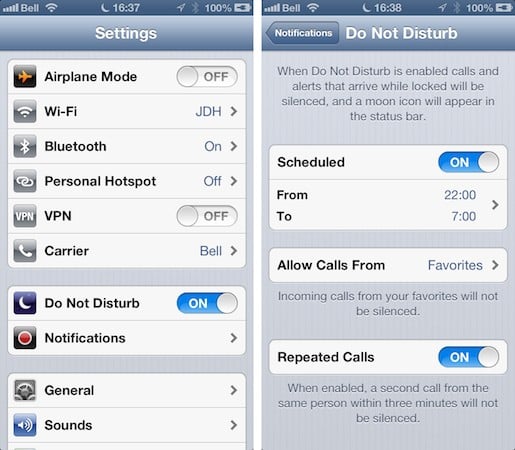
In iOS 6 Apple has addressed this by creating a true “Do Not Disturb” feature that can be toggled on demand and/or set to a daily schedule. At its most basic, turning on Do Not Disturb is simply a matter of going into your iPhone Settings app and toggling the option found there. When enabled, your device will suppress all alert notifications—sounds, vibrations and screen illumination—whenever the screen is already off; calls will be sent directly and quietly to voicemail and notification messages will stack up on the lock screen without waking up your device’s screen.

Using Do Not Disturb in iOS 6

By taking a quick trip into your Settings app and selecting Notifications, Do Not Disturb, you can also configure your iPhone to automatically enable this mode based on a daily schedule and determine which phone calls will still be permitted to ring through.

Note that alarms set in the Clock app will still sound even when Do Not Disturb is enabled. Also, notifications and phone calls are handled normally when you’re actually using your device (i.e. if the screen is on), regardless of the Do Not Disturb setting.


.

Latest News
The 14-inch MacBook Pro with M5 Chip 16GB RAM/512GB is $250 Off
1 Min Read
Noise and Static on AirPods Pro 3 Still Unfixed
1 Min Read
New iMac with 24-inch OLED Display May be Brighter With 600 Nits
1 Min Read
The 15-inch M4 MacBook Air 256GB Is $250 Off
1 Min Read
Internal Kernel Debug Kit from Apple Reveals Tests for a MacBook with A15 Chip
1 Min Read
Apple Currently In Talks With Suppliers for Chip Assembly & Packaging of iPhones in India
1 Min Read
Apple Allows Easier Battery Replacement For M5 MacBook Pro with 14-inch Display
1 Min Read
The Apple Watch SE 3 44mm GPS is $50 Off
1 Min Read
20th Anniversary iPhone May Launch in Two Years
1 Min Read
Better Image Generation Capabilities and Apple Music Integration Coming to ChatGPT
1 Min Read
A20 Pro Chip Coming to Next Gen iPad Mini OLED
1 Min Read
Amazon has the AirTag 4 Pack Marked $29 off
1 Min Read

iLounge logo

iLounge is an independent resource for all things iPod, iPhone, iPad, and beyond. iPod, iPhone, iPad, iTunes, Apple TV, and the Apple logo are trademarks of Apple Inc.

This website is not affiliated with Apple Inc.
iLounge © 2001 - 2025. All Rights Reserved.
  • Contact Us
  • Submit News
  • About Us
  • Forums
  • Privacy Policy
  • Terms Of Use
Welcome Back!

Sign in to your account

Lost your password?









