
iLoungeiLounge
  • News
    • Apple
      • AirPods Pro
      • AirPlay
      • Apps
        • Apple Music
      • iCloud
      • iTunes
      • HealthKit
      • HomeKit
      • HomePod
      • iOS 13
      • Apple Pay
      • Apple TV
      • Siri
    • Rumors
    • Humor
    • Technology
      • CES
    • Daily Deals
    • Articles
    • Web Stories
  • iPhone
    • iPhone Accessories
  • iPad
  • iPod
    • iPod Accessories
  • Apple Watch
    • Apple Watch Accessories
  • Mac
    • MacBook Air
    • MacBook Pro
  • Reviews
    • App Reviews
  • How-to
    • Ask iLounge
Font ResizerAa
iLoungeiLounge
Font ResizerAa
Search
  • News
    • Apple
    • Rumors
    • Humor
    • Technology
    • Daily Deals
    • Articles
    • Web Stories
  • iPhone
    • iPhone Accessories
  • iPad
  • iPod
    • iPod Accessories
  • Apple Watch
    • Apple Watch Accessories
  • Mac
    • MacBook Air
    • MacBook Pro
  • Reviews
    • App Reviews
  • How-to
    • Ask iLounge
Follow US

News › iPhone

iPhone

Tracking Your Sleep in iOS 10

Last updated: May 16, 2021 2:01 pm UTC
By Jesse Hollington
Tracking Your Sleep in iOS 10

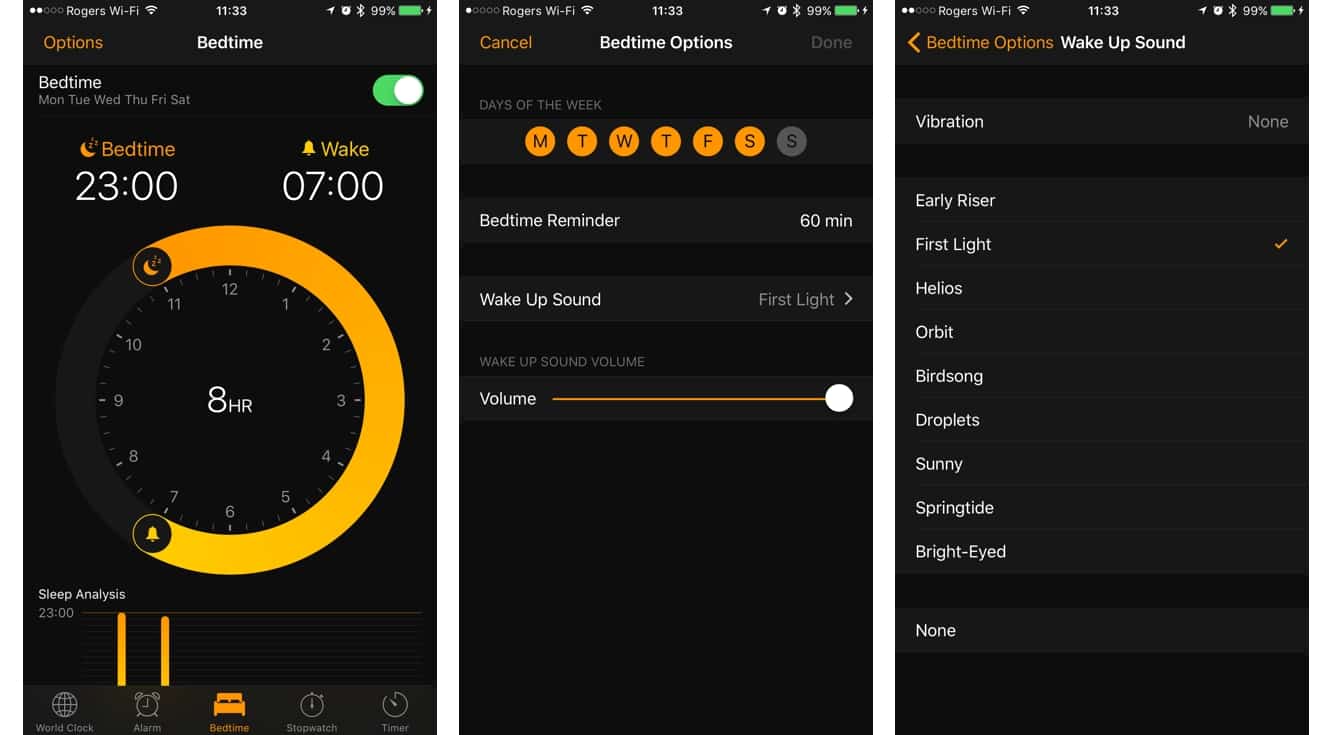
Although the iPhone’s Clock app doesn’t often see many changes, Apple snuck an interesting new feature into iOS 10 that allows your iPhone to perform basic sleep tracking without any additional accessories. In the app, you’ll find a new Bedtime section that lets you set up bedtime reminders and wakeup alarms that work separately from the normal clock alarms.

Tracking Your Sleep in iOS 10

Tracking Your Sleep in iOS 10

On the Bedtime screen, you’ll see a circular display where you can draw an arc to represent your preferred bedtime and wakeup times; the total hours of sleep your chosen times represent will be shown in the middle. Tapping on Options in the top left corner lets you choose to only apply your bedtime schedule on specified days of the week, select the alarm wake up sound, and choose how many minutes before bedtime you’d like to receive a bedtime reminder.


Notably, Apple has added nine unique new sounds in this section that aren’t available for normal alarms, and many of these are more soothing sounds suitable for slowly waking up. There’s also a “None” option available if you’d like to use the sleep tracking feature without it being tied to an alarm — in this case, you’ll still get a visual alarm on your iPhone screen at the selected wakeup time, so you can acknowledge getting up, but no sound will be made.


Tracking Your Sleep in iOS 10

There’s more to this feature than simply setting a bedtime reminder and alarm, however. Once you’ve configured your Bedtime settings, your iPhone will track your sleep based on when you actually go to bed and when you wake up.

It will also make note of any times where you happen to get up in the night and reach for your iPhone — the accelerometer appears to be used to determine when you’re using your iPhone, and therefore not sleeping. A bar graph at the bottom of the Bedtime screen shows you the current week’s sleep analysis, and the Clock app also records this data into the iOS Health app so it can be tracked alongside your other health stats. The Show All Data section in the Health app can be used to view more detailed information on the specific times that iOS 10 determined you were actually in bed — or not.

.


Latest News
The AirPods Pro 3 is $20 Off
1 Min Read
Exynos 2600 Chip 2nm Process Revealed by Samsung
1 Min Read
New Celebrity Ad Campaign Featuring Travis Scott Released by Beats
1 Min Read
Australia Getting Hypertension Notification Feature
1 Min Read
The 14-inch MacBook Pro with M5 Chip 16GB RAM/512GB is $250 Off
1 Min Read
Noise and Static on AirPods Pro 3 Still Unfixed
1 Min Read
New iMac with 24-inch OLED Display May be Brighter With 600 Nits
1 Min Read
The 15-inch M4 MacBook Air 256GB Is $250 Off
1 Min Read
Internal Kernel Debug Kit from Apple Reveals Tests for a MacBook with A15 Chip
1 Min Read
Apple Currently In Talks With Suppliers for Chip Assembly & Packaging of iPhones in India
1 Min Read
Apple Allows Easier Battery Replacement For M5 MacBook Pro with 14-inch Display
1 Min Read
The Apple Watch SE 3 44mm GPS is $50 Off
1 Min Read

iLounge logo

iLounge is an independent resource for all things iPod, iPhone, iPad, and beyond. iPod, iPhone, iPad, iTunes, Apple TV, and the Apple logo are trademarks of Apple Inc.

This website is not affiliated with Apple Inc.
iLounge © 2001 - 2025. All Rights Reserved.
  • Contact Us
  • Submit News
  • About Us
  • Forums
  • Privacy Policy
  • Terms Of Use
Welcome Back!

Sign in to your account

Lost your password?









