
iLoungeiLounge
  • News
    • Apple
      • AirPods Pro
      • AirPlay
      • Apps
        • Apple Music
      • iCloud
      • iTunes
      • HealthKit
      • HomeKit
      • HomePod
      • iOS 13
      • Apple Pay
      • Apple TV
      • Siri
    • Rumors
    • Humor
    • Technology
      • CES
    • Daily Deals
    • Articles
    • Web Stories
  • iPhone
    • iPhone Accessories
  • iPad
  • iPod
    • iPod Accessories
  • Apple Watch
    • Apple Watch Accessories
  • Mac
    • MacBook Air
    • MacBook Pro
  • Reviews
    • App Reviews
  • How-to
    • Ask iLounge
Font ResizerAa
iLoungeiLounge
Font ResizerAa
Search
  • News
    • Apple
    • Rumors
    • Humor
    • Technology
    • Daily Deals
    • Articles
    • Web Stories
  • iPhone
    • iPhone Accessories
  • iPad
  • iPod
    • iPod Accessories
  • Apple Watch
    • Apple Watch Accessories
  • Mac
    • MacBook Air
    • MacBook Pro
  • Reviews
    • App Reviews
  • How-to
    • Ask iLounge
Follow US

News › iTunes

iTunes

Optimizing iTunes Media Storage in macOS Sierra

Last updated: May 16, 2021 2:00 pm UTC
By Jesse Hollington
Optimizing iTunes Media Storage in macOS Sierra

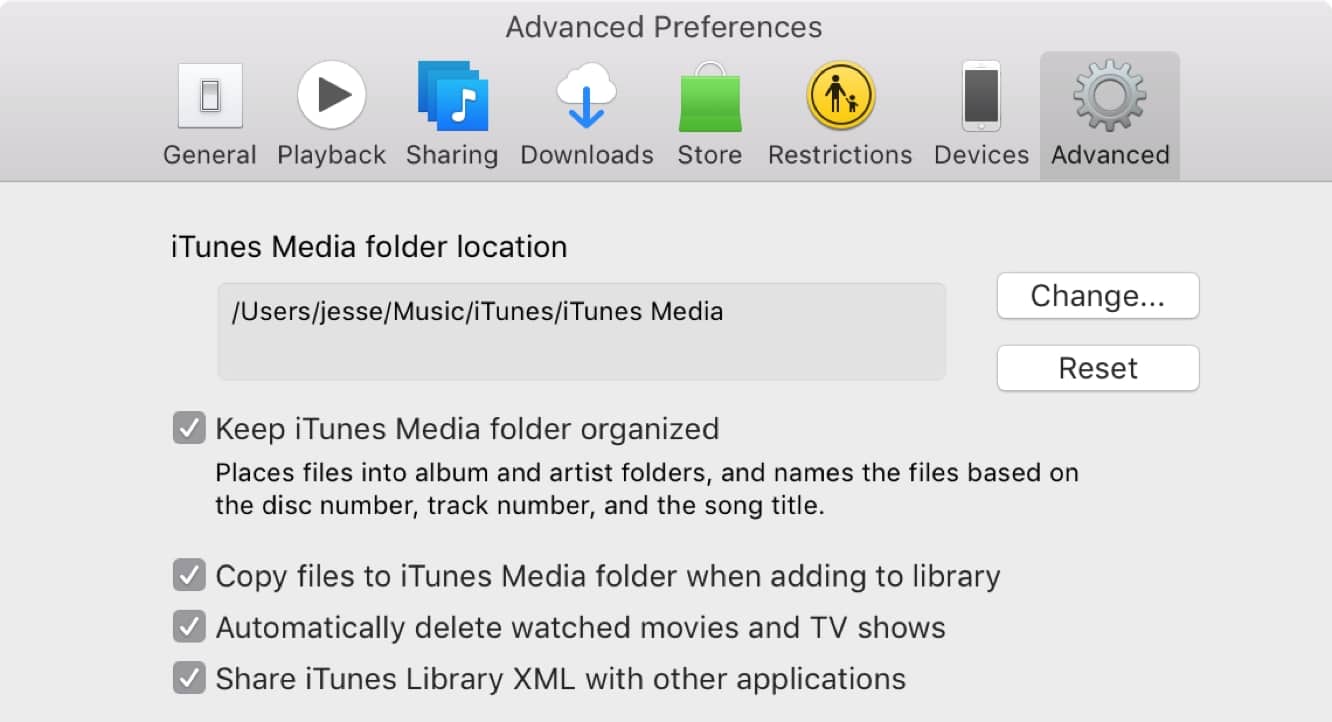
If you’re a Mac user with a large iTunes video library and limited storage space, you might appreciate a new feature in macOS Sierra that lets iTunes automatically take care of leaving those videos you’ve watched up in the cloud to free up space on your Mac’s hard drive.

Optimizing iTunes Media Storage in macOS Sierra

A new option, Automatically delete watched movies and TV shows, can be found in the Advanced section of your iTunes preferences, and it’s pretty self-explanatory; when enabled, you basically give iTunes permission to automatically clean up any movies or TV shows you’ve downloaded from the iTunes Store once you’ve watched them.

It’s worth mentioning that this setting only takes effect when iTunes and macOS determine that you’re low on space — much like the space optimization found in iOS, if you’ve got lots of free space available, there’s no need to remove anything from your hard drive just for the sake of removing it.

This setting also only applies to movies and TV shows you’ve downloaded from the iTunes Store, of course, since those can be re-downloaded or streamed from iTunes in the Cloud should you want to watch them again; naturally you wouldn’t want iTunes arbitrarily removing videos you’ve encoded and added yourself, so those will be left alone regardless of whether this setting is enabled or not.

.


Latest News
The 14-inch MacBook Pro with M5 Chip 16GB RAM/512GB is $250 Off
1 Min Read
Noise and Static on AirPods Pro 3 Still Unfixed
1 Min Read
New iMac with 24-inch OLED Display May be Brighter With 600 Nits
1 Min Read
The 15-inch M4 MacBook Air 256GB Is $250 Off
1 Min Read
Internal Kernel Debug Kit from Apple Reveals Tests for a MacBook with A15 Chip
1 Min Read
Apple Currently In Talks With Suppliers for Chip Assembly & Packaging of iPhones in India
1 Min Read
Apple Allows Easier Battery Replacement For M5 MacBook Pro with 14-inch Display
1 Min Read
The Apple Watch SE 3 44mm GPS is $50 Off
1 Min Read
20th Anniversary iPhone May Launch in Two Years
1 Min Read
Better Image Generation Capabilities and Apple Music Integration Coming to ChatGPT
1 Min Read
A20 Pro Chip Coming to Next Gen iPad Mini OLED
1 Min Read
Amazon has the AirTag 4 Pack Marked $29 off
1 Min Read

iLounge logo

iLounge is an independent resource for all things iPod, iPhone, iPad, and beyond. iPod, iPhone, iPad, iTunes, Apple TV, and the Apple logo are trademarks of Apple Inc.

This website is not affiliated with Apple Inc.
iLounge © 2001 - 2025. All Rights Reserved.
  • Contact Us
  • Submit News
  • About Us
  • Forums
  • Privacy Policy
  • Terms Of Use
Welcome Back!

Sign in to your account

Lost your password?









