
iLoungeiLounge
  • News
    • Apple
      • AirPods Pro
      • AirPlay
      • Apps
        • Apple Music
      • iCloud
      • iTunes
      • HealthKit
      • HomeKit
      • HomePod
      • iOS 13
      • Apple Pay
      • Apple TV
      • Siri
    • Rumors
    • Humor
    • Technology
      • CES
    • Daily Deals
    • Articles
    • Web Stories
  • iPhone
    • iPhone Accessories
  • iPad
  • iPod
    • iPod Accessories
  • Apple Watch
    • Apple Watch Accessories
  • Mac
    • MacBook Air
    • MacBook Pro
  • Reviews
    • App Reviews
  • How-to
    • Ask iLounge
Font ResizerAa
iLoungeiLounge
Font ResizerAa
Search
  • News
    • Apple
    • Rumors
    • Humor
    • Technology
    • Daily Deals
    • Articles
    • Web Stories
  • iPhone
    • iPhone Accessories
  • iPad
  • iPod
    • iPod Accessories
  • Apple Watch
    • Apple Watch Accessories
  • Mac
    • MacBook Air
    • MacBook Pro
  • Reviews
    • App Reviews
  • How-to
    • Ask iLounge
Follow US

News › iPhone

iPhone

Inserting Pauses when Dialing a Phone Number

Last updated: May 16, 2021 3:40 pm UTC
By Jesse Hollington
Inserting Pauses when Dialing a Phone Number

Although dial-up touchtone services like voicemail and calling cards have started to be replaced by modern technologies like Visual Voicemail and voice-over-IP, sometimes they’re still useful and necessary.


If you find yourself frequently dialing into a voicemail system that requires a password, making long distance calls using a calling card service, or even dialing somebody’s office extension, the iPhone still provides the ability to automatically insert pauses into your dialing sequence to help you automate the process.
Inserting Pauses when Dialing a Phone Number

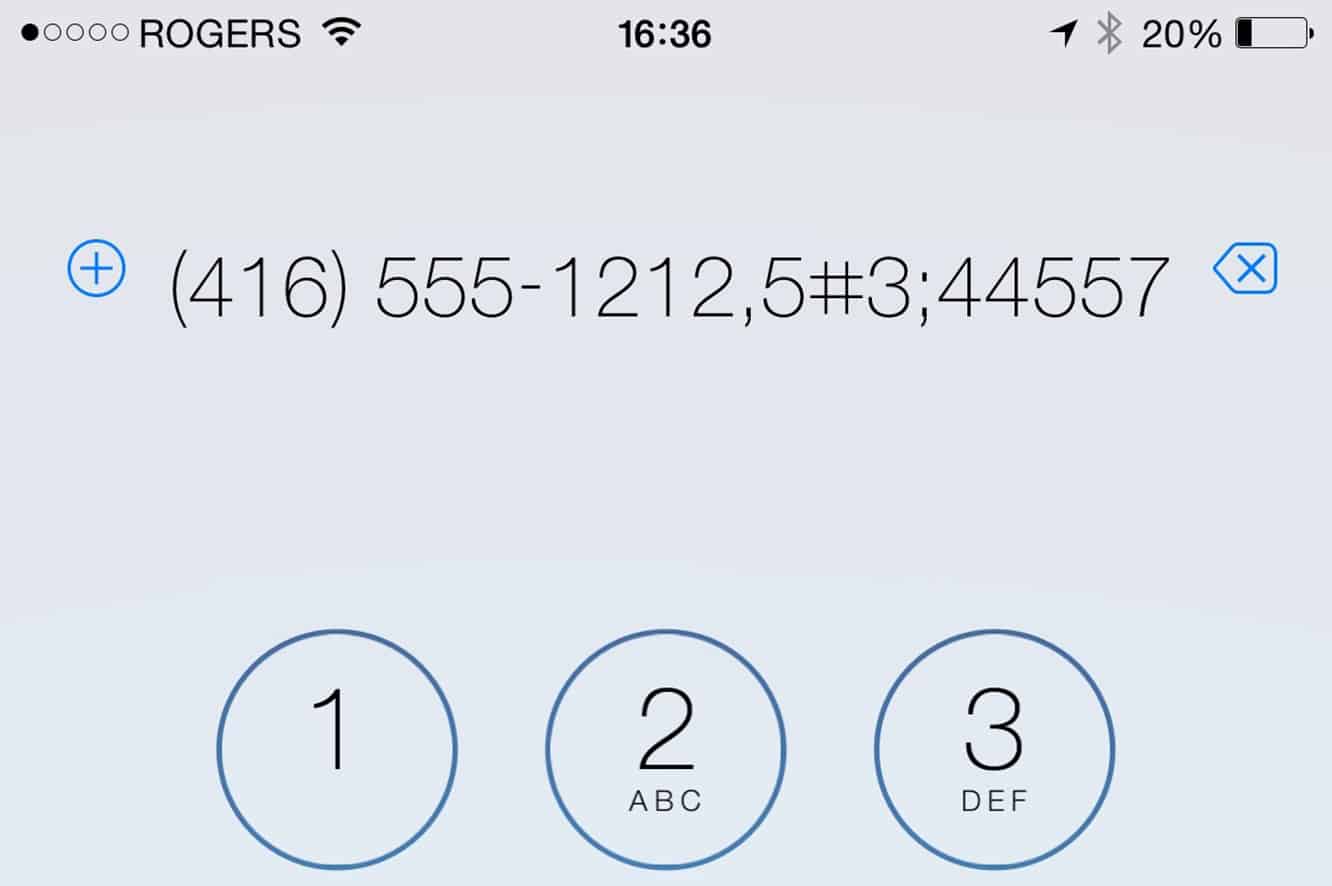
When dialing from the iPhone keypad, you can do this by holding down the * key to insert a timed two-second pause, or holding down the # key to insert a manual pause — causing the iPhone to wait to send additional touch tones until you tap the “Dial” button again.

These pauses are represented by a comma and semi-colon, respectively, and you can enter these characters directly into an iOS Contact record if you want to save the number that way — useful for when you need to reach somebody through an automated switchboard, for example.

.


Latest News
The Anker Prime 14in1 Thunderbolt 5 Dock is $60 Off
1 Min Read
iPhone 18 Pro Max May Have a Bigger Battery That’s The Best of Its Kind
1 Min Read
Apple Tightens Their Grip on the Market for Tablets As Demand For iPad Rises
1 Min Read
Teardown Video For AirTag 2 Shared By iFixit
1 Min Read
The Apple Watch Series 11 42mm GPS is $100 Off
1 Min Read
Apple Launching A New Education Hub In India Teaching Robotics and Swift Programming
1 Min Read
Women’s and Men’s Golf Added to Apple Sports
1 Min Read
Apple Adding Civilization VII and Other Games To Apple Arcade
1 Min Read
AirPods 4 ANC Is $59 Off
1 Min Read
Apple Using 2NM Process For Their M6 and A20 Chip
1 Min Read
iPhone 18 Models Will Not Have a Big Redesign
1 Min Read
Launch of MacBook Pro M5 Pro and M5 Max Models is Approaching
1 Min Read

iLounge logo

iLounge is an independent resource for all things iPod, iPhone, iPad, and beyond. iPod, iPhone, iPad, iTunes, Apple TV, and the Apple logo are trademarks of Apple Inc.

This website is not affiliated with Apple Inc.
iLounge © 2001 - 2025. All Rights Reserved.
  • Contact Us
  • Submit News
  • About Us
  • Forums
  • Privacy Policy
  • Terms Of Use
Welcome Back!

Sign in to your account

Lost your password?









