
iLoungeiLounge
  • News
    • Apple
      • AirPods Pro
      • AirPlay
      • Apps
        • Apple Music
      • iCloud
      • iTunes
      • HealthKit
      • HomeKit
      • HomePod
      • iOS 13
      • Apple Pay
      • Apple TV
      • Siri
    • Rumors
    • Humor
    • Technology
      • CES
    • Daily Deals
    • Articles
    • Web Stories
  • iPhone
    • iPhone Accessories
  • iPad
  • iPod
    • iPod Accessories
  • Apple Watch
    • Apple Watch Accessories
  • Mac
    • MacBook Air
    • MacBook Pro
  • Reviews
    • App Reviews
  • How-to
    • Ask iLounge
Font ResizerAa
iLoungeiLounge
Font ResizerAa
Search
  • News
    • Apple
    • Rumors
    • Humor
    • Technology
    • Daily Deals
    • Articles
    • Web Stories
  • iPhone
    • iPhone Accessories
  • iPad
  • iPod
    • iPod Accessories
  • Apple Watch
    • Apple Watch Accessories
  • Mac
    • MacBook Air
    • MacBook Pro
  • Reviews
    • App Reviews
  • How-to
    • Ask iLounge
Follow US

News › iPad

iPadiPhoneiPod

Finding Flagged or Unread Messages in all Mailboxes

Last updated: May 16, 2021 1:27 pm UTC
By Jesse Hollington
Finding Flagged or Unread Messages in all Mailboxes

While iOS 7’s smart mailboxes and the new message filters in the iOS 10 Mail app are great for finding flagged and unread items in a single folder such as your inbox, they’re less useful for those situations where you’ve archived a flagged message or filed it away in another folder. Fortunately, the iOS Mail app has a pretty robust search feature borrowed from its bigger brother on macOS, including the ability to search for message status in addition to message content.

Finding Flagged or Unread Messages in all Mailboxes

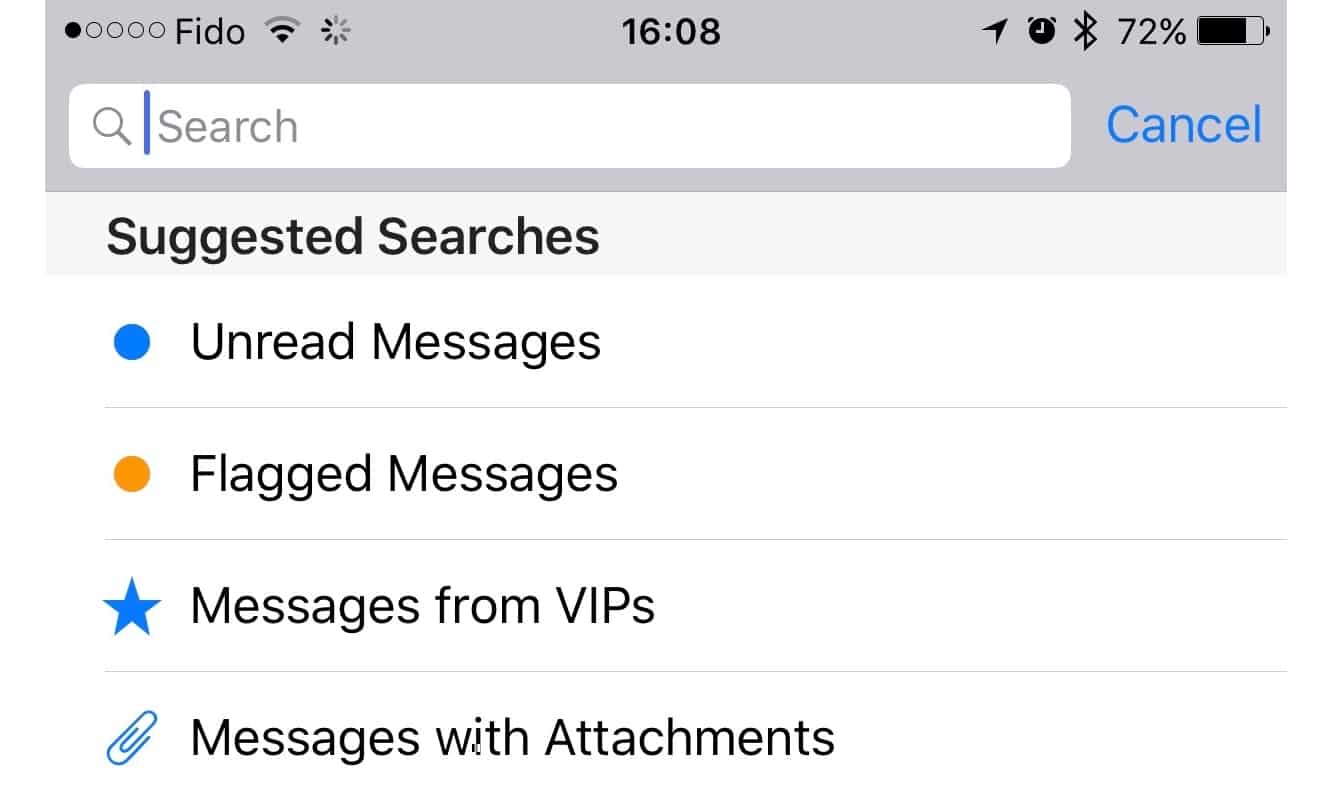
Scrolling up to the top of your message list in any mailbox reveals the search field, and if you tap on this you’ll immediately see predefined “Suggested Searches” for unread messages, flagged messages, messages from VIPs, and messages with attachments.

Tapping on any one of these immediately initiates a search for messages matching that specific criterion, and if “All Mailboxes” is selected at the top of the screen, the search will go through not only the currently selected folder, but every folder in that particular account to ferret out those messages. You can even combine these searches by typing in the other terms you want to use — for example, tap on “Flagged Messages” to start a search for all flagged messages, and then type in “Attachments” and tap on “Messages with Attachments” at the bottom of the “Suggested Searches” list and your results will be filtered to include only those messages that are flagged and have one or more attachments.


There are also a number of other special search terms that can be used in this field, such as “Today” or “Yesterday” or “Last Week” to find messages from only those time frames — simply start typing in the appropriate word or phrase and then pick the option from the “Suggested Searches” to add them to the list of search criteria. Other date terms can be used as well, such as entering a month or weekday to bring up specific date ranges.

.


Latest News
The 14-inch MacBook Pro with M5 Chip 16GB RAM/512GB is $250 Off
1 Min Read
Noise and Static on AirPods Pro 3 Still Unfixed
1 Min Read
New iMac with 24-inch OLED Display May be Brighter With 600 Nits
1 Min Read
The 15-inch M4 MacBook Air 256GB Is $250 Off
1 Min Read
Internal Kernel Debug Kit from Apple Reveals Tests for a MacBook with A15 Chip
1 Min Read
Apple Currently In Talks With Suppliers for Chip Assembly & Packaging of iPhones in India
1 Min Read
Apple Allows Easier Battery Replacement For M5 MacBook Pro with 14-inch Display
1 Min Read
The Apple Watch SE 3 44mm GPS is $50 Off
1 Min Read
20th Anniversary iPhone May Launch in Two Years
1 Min Read
Better Image Generation Capabilities and Apple Music Integration Coming to ChatGPT
1 Min Read
A20 Pro Chip Coming to Next Gen iPad Mini OLED
1 Min Read
Amazon has the AirTag 4 Pack Marked $29 off
1 Min Read

iLounge logo

iLounge is an independent resource for all things iPod, iPhone, iPad, and beyond. iPod, iPhone, iPad, iTunes, Apple TV, and the Apple logo are trademarks of Apple Inc.

This website is not affiliated with Apple Inc.
iLounge © 2001 - 2025. All Rights Reserved.
  • Contact Us
  • Submit News
  • About Us
  • Forums
  • Privacy Policy
  • Terms Of Use
Welcome Back!

Sign in to your account

Lost your password?









