
When Apple introduced Family Sharing in iOS 8, we mostly welcomed it as a great solution for those families trying to figure out the best way to share iTunes and App Store purchases among multiple family members. The new feature is especially useful for families with children, as each can have their own iCloud, iTunes, and App Store accounts, with their own passwords and preferences and purchasing capabilities that must be approved by the parent. However, one thing we ran into very early on with the new Family Sharing feature was that Apple didn’t appear to provide any means to convert an existing account into a child account. Let’s face it, until Family Sharing came along with its support for Children’s Accounts, the only way to create an Apple ID for a child under the age of 13 was to fudge the child’s birthday, and there are undoubtedly more than a few folks who took that approach just to make sure that their children could have their own parentally-supervised Apple IDs.
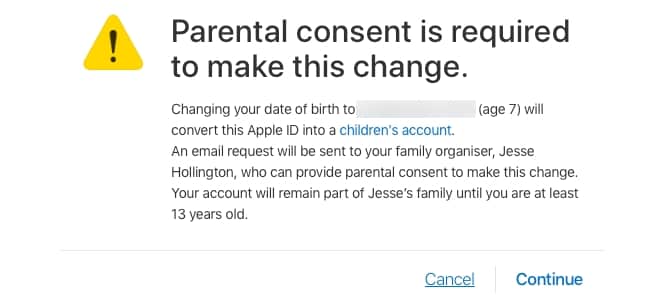
Of course, it seems that Apple has been tacitly aware of this all along as well, and although there are no obvious support articles or other instructions to walk you through the process, Apple has provided a loophole by which you can “come clean” and convert your children’s “teenage” Apple IDs into proper “Children’s Accounts” without having to set up entirely new Apple IDs for them. To start the process, first ensure that your child’s Apple IDs has been added to Family Sharing, and then log in to your child’s Apple ID on the web at appleid.apple.com and edit their account information to enter their correct birthday. As soon as you enter a birthday that places them under 13 years of age, you’ll get a prompt alerting you that parental consent is required, that this process will convert the account into a “children’s account” and an e-mail request will be sent to the family organizer.
Keep in mind that as the warning prompt suggests, this process is irreversible, and the account will be permanently converted to a children’s account until the child reaches 13, based on the new date of birth that you’ve entered.
It’s also important to mention here that once you’ve completed this process, you won’t be able to change the date of birth without contacting Apple support, so double-check to make sure you’ve entered it correctly before continuing. Clicking “Continue” will send an email to the family organizer (which should be you in this scenario), although until it’s been approved, the request can still be cancelled.

An e-mail should appear in your inbox shortly asking for your approval to update your child’s birthdate and change their account into a children’s account.

Clicking the “Approve Request” button will take you to the Apple ID sign-in page in your web browser of choice, and once you’ve signed in you’ll be shown the birthday change (where you’ll have another chance to correct it if needed) and a Parent Privacy Disclosure and will need to confirm the change by entering the security code from whichever credit card is assigned to the primary payment method for your family; the payment verification method is more or less the same procedure required to set up a children’s account from scratch, as detailed in Apple’s knowledgeable article on Family Sharing and Apple ID for your child.

Once you’ve approved the request, your child’s date of birth will be updated and their Apple ID will be irrevocably converted to a children’s account and associated with your family.











