
iLoungeiLounge
  • News
    • Apple
      • AirPods Pro
      • AirPlay
      • Apps
        • Apple Music
      • iCloud
      • iTunes
      • HealthKit
      • HomeKit
      • HomePod
      • iOS 13
      • Apple Pay
      • Apple TV
      • Siri
    • Rumors
    • Humor
    • Technology
      • CES
    • Daily Deals
    • Articles
    • Web Stories
  • iPhone
    • iPhone Accessories
  • iPad
  • iPod
    • iPod Accessories
  • Apple Watch
    • Apple Watch Accessories
  • Mac
    • MacBook Air
    • MacBook Pro
  • Reviews
    • App Reviews
  • How-to
    • Ask iLounge
Font ResizerAa
iLoungeiLounge
Font ResizerAa
Search
  • News
    • Apple
    • Rumors
    • Humor
    • Technology
    • Daily Deals
    • Articles
    • Web Stories
  • iPhone
    • iPhone Accessories
  • iPad
  • iPod
    • iPod Accessories
  • Apple Watch
    • Apple Watch Accessories
  • Mac
    • MacBook Air
    • MacBook Pro
  • Reviews
    • App Reviews
  • How-to
    • Ask iLounge
Follow US

News › iPad

iPadiPhoneiPodMac

Capturing iOS and tvOS screenshots using your Mac

Last updated: May 16, 2021 1:20 pm UTC
By Jesse Hollington
Capturing iOS and tvOS screenshots using your Mac

By now it’s pretty common knowledge that you can grab a screenshot from any iPhone, iPad, or iPod touch simply by pressing the home and sleep/wake buttons simultaneously, saving a PNG image of whatever is on the current screen to your on-device photo library. While this works well enough in most cases, sometimes the necessary finger gymnastic can make it a bit tricky to capture more complicated screenshots, such as when playing a game or trying to capture a “peek” screen from a 3D Touch gesture.

Capturing iOS and tvOS screenshots using your Mac

Fortunately, if you find yourself wanting to grab those hard-to-capture screen moments, there’s another option — provided you’re a Mac user.

To facilitate screen captures by iOS developers, Apple’s Xcode development tool incorporates the ability to grab whatever is on your iOS device’s screen directly over a USB connection. Despite it being a development tool, you don’t need to be a registered developer to use Xcode; it’s available from the Mac App Store, although it’s a hefty download. Once you’ve installed it, you can perform screen captures by opening it up and selecting Devices from the Window menu.


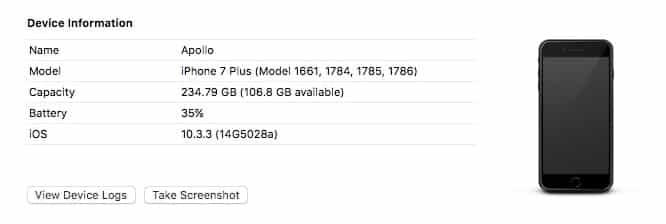
You should see any connected iPhone, iPad, or iPod touch devices shown in the top-left corner; select the device you want to capture a screenshot from, and you’ll see a “Take Screenshot” button right below the device information. Clicking this will save a PNG file to your Desktop folder of whatever is currently displayed on the device’s screen.

This method can also be used to capture screenshots from an Apple TV, which otherwise has no built-in screenshot capabilities at all.



Latest News
The 14-inch MacBook Pro with M5 Chip 16GB RAM/512GB is $250 Off
1 Min Read
Noise and Static on AirPods Pro 3 Still Unfixed
1 Min Read
New iMac with 24-inch OLED Display May be Brighter With 600 Nits
1 Min Read
The 15-inch M4 MacBook Air 256GB Is $250 Off
1 Min Read
Internal Kernel Debug Kit from Apple Reveals Tests for a MacBook with A15 Chip
1 Min Read
Apple Currently In Talks With Suppliers for Chip Assembly & Packaging of iPhones in India
1 Min Read
Apple Allows Easier Battery Replacement For M5 MacBook Pro with 14-inch Display
1 Min Read
The Apple Watch SE 3 44mm GPS is $50 Off
1 Min Read
20th Anniversary iPhone May Launch in Two Years
1 Min Read
Better Image Generation Capabilities and Apple Music Integration Coming to ChatGPT
1 Min Read
A20 Pro Chip Coming to Next Gen iPad Mini OLED
1 Min Read
Amazon has the AirTag 4 Pack Marked $29 off
1 Min Read

iLounge logo

iLounge is an independent resource for all things iPod, iPhone, iPad, and beyond. iPod, iPhone, iPad, iTunes, Apple TV, and the Apple logo are trademarks of Apple Inc.

This website is not affiliated with Apple Inc.
iLounge © 2001 - 2025. All Rights Reserved.
  • Contact Us
  • Submit News
  • About Us
  • Forums
  • Privacy Policy
  • Terms Of Use
Welcome Back!

Sign in to your account

Lost your password?








