
iLoungeiLounge
  • News
    • Apple
      • AirPods Pro
      • AirPlay
      • Apps
        • Apple Music
      • iCloud
      • iTunes
      • HealthKit
      • HomeKit
      • HomePod
      • iOS 13
      • Apple Pay
      • Apple TV
      • Siri
    • Rumors
    • Humor
    • Technology
      • CES
    • Daily Deals
    • Articles
    • Web Stories
  • iPhone
    • iPhone Accessories
  • iPad
  • iPod
    • iPod Accessories
  • Apple Watch
    • Apple Watch Accessories
  • Mac
    • MacBook Air
    • MacBook Pro
  • Reviews
    • App Reviews
  • How-to
    • Ask iLounge
Font ResizerAa
iLoungeiLounge
Font ResizerAa
Search
  • News
    • Apple
    • Rumors
    • Humor
    • Technology
    • Daily Deals
    • Articles
    • Web Stories
  • iPhone
    • iPhone Accessories
  • iPad
  • iPod
    • iPod Accessories
  • Apple Watch
    • Apple Watch Accessories
  • Mac
    • MacBook Air
    • MacBook Pro
  • Reviews
    • App Reviews
  • How-to
    • Ask iLounge
Follow US

News › iPhone

iPhone

Calling Phone Numbers from the Clipboard

Last updated: May 16, 2021 4:19 pm UTC
By Jesse Hollington
Calling Phone Numbers from the Clipboard

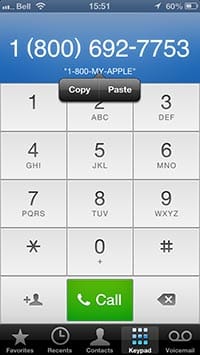
Although iOS tries to turn phone numbers in many apps into clickable links, this doesn’t work everywhere, and can be especially troublesome for “vanity” phone numbers such as 1-800-MY-APPLE. In these cases, however, you can take advantage of a hidden feature in iOS and simply paste your number right into the Phone app from the iOS clipboard.

Calling Phone Numbers from the Clipboard

Simply copy the number to the clipboard as you normally would, and then open the Phone app to the “Keypad” section and tap and hold on the blue phone number display section above the keypad and the standard “Paste” option should appear. As an added bonus, when pasting in a vanity phone number, it will be converted to its numeric form with the original alphanumeric version displayed in a smaller font below.

Note that this also works in the other direction—a phone number already displayed in the Phone app can be copied TO the clipboard using the same standard tap-and-hold gesture.

.


Latest News
The Beats iPhone 17 Pro Kickstand Case Is $26 Off
1 Min Read
Track Santa's Journey From the North Pole Using Google's Santa Tracker
Track Santa’s Journey From the North Pole Using Google’s Santa Tracker
1 Min Read
Prototype For AirPods with Bright Colors Revealed
1 Min Read
Tesla May Be Adding Support for Apple Car Keys
1 Min Read
The AirPods Pro 3 is $50 Off
1 Min Read
Camera Sensor for iPhone 18 Camera to be Made by Samsung in Austin, TX Facility
1 Min Read
Apple Changing the Structure Of App Store Fees in Brazil
1 Min Read
iPhone Air 2 Could Launch Next Year
1 Min Read
The Apple Watch Series 11 42mm GPS Is 25% Off
1 Min Read
New Promo Grants 20% Off On Adidas Gear Using Apple Pay
1 Min Read
iPhone 18 Pro May Launch with 12 Features
1 Min Read
$3 Million Nike Shares Brought By Tim Cook
1 Min Read

iLounge logo

iLounge is an independent resource for all things iPod, iPhone, iPad, and beyond. iPod, iPhone, iPad, iTunes, Apple TV, and the Apple logo are trademarks of Apple Inc.

This website is not affiliated with Apple Inc.
iLounge © 2001 - 2025. All Rights Reserved.
  • Contact Us
  • Submit News
  • About Us
  • Forums
  • Privacy Policy
  • Terms Of Use
Welcome Back!

Sign in to your account

Lost your password?









