
iLoungeiLounge
  • News
    • Apple
      • AirPods Pro
      • AirPlay
      • Apps
        • Apple Music
      • iCloud
      • iTunes
      • HealthKit
      • HomeKit
      • HomePod
      • iOS 13
      • Apple Pay
      • Apple TV
      • Siri
    • Rumors
    • Humor
    • Technology
      • CES
    • Daily Deals
    • Articles
    • Web Stories
  • iPhone
    • iPhone Accessories
  • iPad
  • iPod
    • iPod Accessories
  • Apple Watch
    • Apple Watch Accessories
  • Mac
    • MacBook Air
    • MacBook Pro
  • Reviews
    • App Reviews
  • How-to
    • Ask iLounge
Font ResizerAa
iLoungeiLounge
Font ResizerAa
Search
  • News
    • Apple
    • Rumors
    • Humor
    • Technology
    • Daily Deals
    • Articles
    • Web Stories
  • iPhone
    • iPhone Accessories
  • iPad
  • iPod
    • iPod Accessories
  • Apple Watch
    • Apple Watch Accessories
  • Mac
    • MacBook Air
    • MacBook Pro
  • Reviews
    • App Reviews
  • How-to
    • Ask iLounge
Follow US

News › iPad

iPadiPhoneiPod

Adding RSS Feeds to Safari in iOS 8

Last updated: May 16, 2021 4:04 pm UTC
By Jesse Hollington
Adding RSS Feeds to Safari in iOS 8

When iOS 7 and OS X Mavericks debuted about two years ago, one of the smaller features that made its way into Safari was support for “Shared Links” — an aggregate of all of the links in the user’s Twitter feed that could be accessed from a third panel over from the Bookmarks and Reading List sections. While the feature received little fanfare even then compared to the overall UI design and other sweeping changes, when iOS 8 came along, Apple even more quietly snuck in support for adding RSS feeds into the Shared Links section.


Although RSS — short for Really Simple Syndication — has gradually started to fall by the wayside with the advent of social media services such as Twitter, many people still find it to be an indispensable way to keep up with headlines from their favorite news sites, and iOS 8’s integration of RSS into Safari can provide a nice lightweight alternative for those who might not really need all of the features in a dedicated third-party newsreader app.
Adding RSS Feeds to Safari in iOS 8

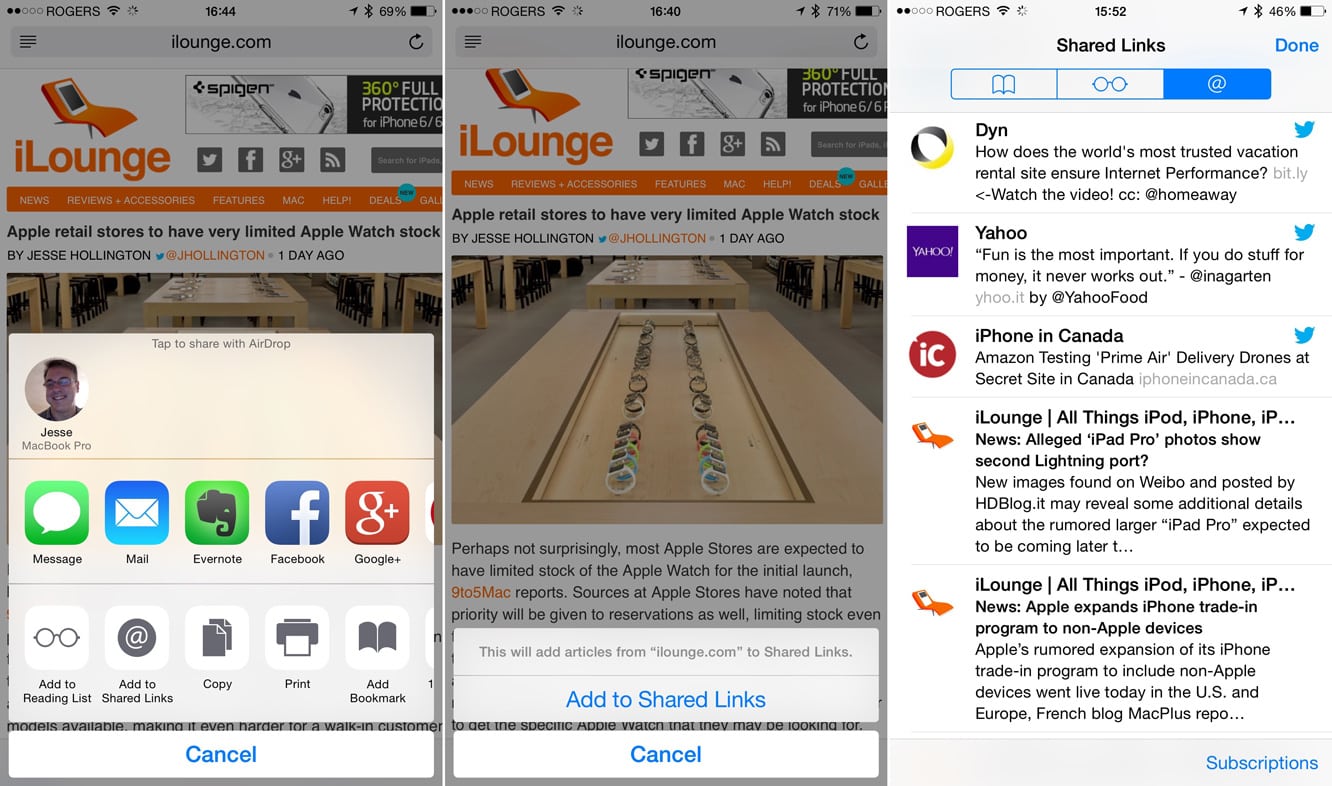
Adding an RSS feed into Safari’s Shared Links section is actually really simple, although it’s somewhat hidden as the button for this feature only appears when visiting sites where an RSS feed is actually available. When you’re on such a site, an “Add to Shared Links” button will appear as an action in the lower row of the iOS 8 Sharing Sheet; tapping this will add the RSS feed published by whatever site you’re on right into your Shared Links section, where articles will appear in stream with your Twitter feed, if enabled.


Adding RSS Feeds to Safari in iOS 8

When viewing the Shared Links section, a “Subscribe” button in the bottom right corner will allow you to view the feeds that have been added along with your Twitter accounts, and from here you can either remove feeds or toggle on or off any Twitter accounts that you want included or excluded from your Shared Links.

One final note to keep in mind, though: Since the “Add to Shared Links” button needs to detect an RSS feed in order to appear, sometimes you’ll need to wait until the site completely finishes loading before it shows up.

So if it’s not appearing, wait a few seconds and try again. Also keep in mind that many sites don’t publish their RSS feeds via the mobile versions of the site — in this case you may need to ask Safari to request the desktop version before the option will appear to add it to your Shared Links.

.


Latest News
The Apple Watch Series 11 46mm GPS Is $100 Off
1 Min Read
Clamshell Style iPhone Being Looked Into By Apple
1 Min Read
Foldable iPhones May Have the Largest Battery Ever
1 Min Read
Apple and TSMC’s 10-Year Collaboration May Be Ending
1 Min Read
The 13-inch M5 iPad Pro 256GB Wi-Fi Is $149 Off
1 Min Read
M5 Pro and M5 Max Chips for the MacBook Pro could Roll Out with macOS 26.3
1 Min Read
Mac Ordering Process Revamped
1 Min Read
Check Signed By Steve Wozniak and Steve Jobs Sold For $2.4 Million
1 Min Read
The Anker 140W 4-Port GaN USB-C Charger is $35 Off
1 Min Read
No iPhone Air 2 This Year, according to Latest Report
1 Min Read
New Report Corroborates Split iPhone Release Dates
1 Min Read
Apple Losing More Researchers As They Plan To Release 2 Siri Versions
1 Min Read

iLounge logo

iLounge is an independent resource for all things iPod, iPhone, iPad, and beyond. iPod, iPhone, iPad, iTunes, Apple TV, and the Apple logo are trademarks of Apple Inc.

This website is not affiliated with Apple Inc.
iLounge © 2001 - 2025. All Rights Reserved.
  • Contact Us
  • Submit News
  • About Us
  • Forums
  • Privacy Policy
  • Terms Of Use
Welcome Back!

Sign in to your account

Lost your password?









