
iLoungeiLounge
  • News
    • Apple
      • AirPods Pro
      • AirPlay
      • Apps
        • Apple Music
      • iCloud
      • iTunes
      • HealthKit
      • HomeKit
      • HomePod
      • iOS 13
      • Apple Pay
      • Apple TV
      • Siri
    • Rumors
    • Humor
    • Technology
      • CES
    • Daily Deals
    • Articles
    • Web Stories
  • iPhone
    • iPhone Accessories
  • iPad
  • iPod
    • iPod Accessories
  • Apple Watch
    • Apple Watch Accessories
  • Mac
    • MacBook Air
    • MacBook Pro
  • Reviews
    • App Reviews
  • How-to
    • Ask iLounge
Font ResizerAa
iLoungeiLounge
Font ResizerAa
Search
  • News
    • Apple
    • Rumors
    • Humor
    • Technology
    • Daily Deals
    • Articles
    • Web Stories
  • iPhone
    • iPhone Accessories
  • iPad
  • iPod
    • iPod Accessories
  • Apple Watch
    • Apple Watch Accessories
  • Mac
    • MacBook Air
    • MacBook Pro
  • Reviews
    • App Reviews
  • How-to
    • Ask iLounge
Follow US

News › Apple Watch

Apple Watch

Activating Cellular Service on the Apple Watch Series 3

Last updated: May 16, 2021 12:44 pm UTC
By Jesse Hollington
Activating Cellular Service on the Apple Watch Series 3

When Apple unveiled the Apple Watch Series 3 last week, the company touted the wearable device’s biggest new feature as the ability to connect directly to the cellular network to place and receive phone calls and Internet access even when away from your iPhone.

Activating Cellular Service on the Apple Watch Series 3

Activating Cellular Service on the Apple Watch Series 3

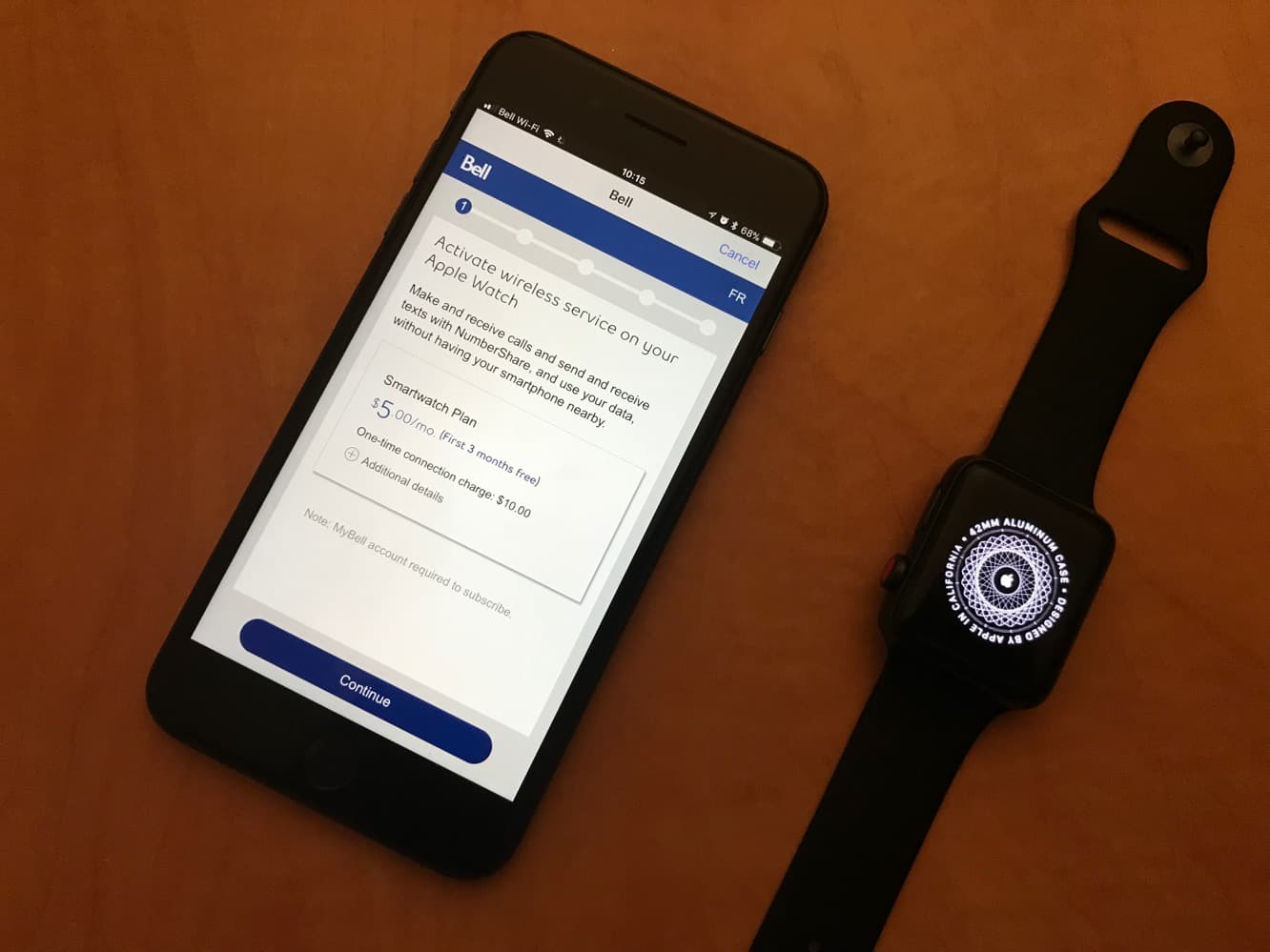
Since the new Apple Watch uses an integrated eSIM and will be sharing the same number as your iPhone, Apple has been able to design the process of activating cellular service on the wearable device to be as simple as possible. While the experience may vary between different carriers, it appears that in mosts cases you won’t need to worry about calling your carrier to activate any kind of new plan — when setting up a new Apple Watch, the setup wizard in the iPhone Watch app on iOS 11 will take you through the process of activating cellular service with your carrier by taking you through a series of carrier-specific screens that open in an integrated browser view.


In our case, activating on Bell Mobility in Canada, we were presented with a series of four screens, first showing us the “Smartwatch” plan fees involved, then prompting us to sign in with our “MyBell” account credentials, asking us to confirm our emergency address, and then showing a final confirmation screen before returning us to a final confirmation in the Watch app. The entire process took under a minute.

Activating Cellular Service on the Apple Watch Series 3

In our case, we also received a text message confirmation from the provider.


Further, despite the fact that the Apple Watch shares the same mobile number as the iPhone for placing and receiving calls, for billing purposes your carrier may assign another phone number as a “device identification number,” and in Bell’s case this number appeared in the e-mail confirmation that arrived, which is unfortunately confusing as it may lead some users to suppose that this is the actual number assigned to the Apple Watch.

Activating Cellular Service on the Apple Watch Series 3

The Apple Watch Series 3 also provides a new “Cellular” section in the Watch iPhone app that allows you to check your data usage. You can also access options for managing your carrier account or removing your carrier plan by tapping on the “i” button to the right of your carrier name; these options will take you to back to carrier-specific pages with options for things like updating your emergency address, viewing your plan info, or reconnecting your cellular service in the event that something has gone wrong.



Latest News
The 14-inch MacBook Pro with M5 Chip 16GB RAM/512GB is $250 Off
1 Min Read
Noise and Static on AirPods Pro 3 Still Unfixed
1 Min Read
New iMac with 24-inch OLED Display May be Brighter With 600 Nits
1 Min Read
The 15-inch M4 MacBook Air 256GB Is $250 Off
1 Min Read
Internal Kernel Debug Kit from Apple Reveals Tests for a MacBook with A15 Chip
1 Min Read
Apple Currently In Talks With Suppliers for Chip Assembly & Packaging of iPhones in India
1 Min Read
Apple Allows Easier Battery Replacement For M5 MacBook Pro with 14-inch Display
1 Min Read
The Apple Watch SE 3 44mm GPS is $50 Off
1 Min Read
20th Anniversary iPhone May Launch in Two Years
1 Min Read
Better Image Generation Capabilities and Apple Music Integration Coming to ChatGPT
1 Min Read
A20 Pro Chip Coming to Next Gen iPad Mini OLED
1 Min Read
Amazon has the AirTag 4 Pack Marked $29 off
1 Min Read

iLounge logo

iLounge is an independent resource for all things iPod, iPhone, iPad, and beyond. iPod, iPhone, iPad, iTunes, Apple TV, and the Apple logo are trademarks of Apple Inc.

This website is not affiliated with Apple Inc.
iLounge © 2001 - 2025. All Rights Reserved.
  • Contact Us
  • Submit News
  • About Us
  • Forums
  • Privacy Policy
  • Terms Of Use
Welcome Back!

Sign in to your account

Lost your password?








