
Due to changing Apple hardware, software, and connector standards, add-on microphone accessories for iPods, iPhones, and iPads have had a tough time catching on. After limited success with $30-$40 monaural add-on mics for iPods, several companies launched $50-$70 stereo mics with seemingly less public interest, leading to a wave of $10-$15 monaural mics and then headphones with integrated microphones. But then Apple began to add monaural microphones into its own devices starting with the iPhone, honing them with noise cancellation until they were hard to beat for most purposes. Still, a handful of companies continued to work on stereo mic accessories for specific applications, including prosumer- or professional-quality recording. Zoom’s new iQ5 Professional Stereo Microphone with Lightning Connector ($100) is the latest and most interesting such mic we’ve seen, packed with an uncommon collection of features but also saddled with familiar connectivity and pricing issues.
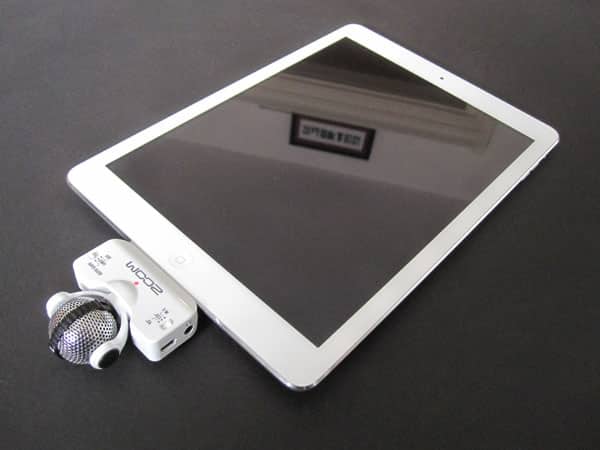
Developed in Japan, iQ5 has the coolest industrial design we’ve yet seen in an Apple microphone accessory: a 1.1” silver metal ball juts out 2.25” from the bottom surface of your Lightning connector-equipped iPad, iPhone, or iPod, attached via a rotating arm to a 2.25”-wide glossy white plastic platform. From the right angle, the ball looks like a robot head wearing a pair of white headphones, with a black stripe dividing its left and right hemispheres; a twist of the headphones lets you change the ball’s orientation for use in video or pure audio recording, and another twist of the ball lets you shift the microphones from facing up to facing forwards.
Two switches are found on the front, with 3.5mm headphone monitor and micro-USB pass-through ports on one side, and a gain knob on the other. Everything feels solidly assembled, if not quite up to the exterior material standards of the best $100 add-ons.

As it turns out, all of the adjustability and the switches are geared towards letting iQ5 work properly under a wide range of conditions. If you want to hold your iOS device directly in a person’s face for audio recording, the microphone-holding ball can orient itself to do that; if you want to turn the ball to assist with video recording, that’s possible, too, and between the three-position microphone width (90-degree/120-degree/app-controlled) switch, three-position (auto/limit/off) gain switch, and side gain knob, you can tweak the microphones’ recording characteristics to your needs in ways that other microphone accessories just haven’t addressed.

In addition to providing realtime level meters for the twin microphones, Zoom’s free Handy Recorder application offers even greater control over iQ5, enabling you to swap the left and right channels, use digital and/or concert/meeting/solo-optimized gain settings, and flip between WAV or various bitrate AAC recording formats. The accessory also works with GarageBand, Voice Memos, and other apps, should you prefer them; due to Handy Recorder’s odd omission of e-mail or other simple audio sharing features in favor of uploading all content to SoundCloud, you may well have reason to prefer another app. It’s surprising—though likely to be fixed in an app update—that apart from SoundCloud, your only other way to extract recordings from Handy Recorder is to use iTunes on a computer to pull the files off one at a time.

The good news with iQ5 is that it performs pretty much as expected, offering superior audio quality and gain control to what Apple’s devices can do on their own.
In addition to a much lower base level of noise than was evident on Apple’s devices, recordings made with the iQ5 were better-balanced and clearer-sounding, with true stereo separation that we could hear when listening through high-quality headphones. Even though the noise-cancelling mics in Apple’s devices work really well to provide intelligible audio under diverse conditions, iQ5’s mics produce recordings that are more natural and broadcast-ready. On the other hand, the stereo separation was both somewhat hard to perceive under normal circumstances and tricky to optimize. By narrowing iQ5’s default 120-degree microphone widths down with the 90-degree setting, stereo became easier to hear but still not ultra-distinct. The L and R markings on the microphone ball are — like camcorders and other stereo microphones — reversed relative to the person speaking, and you may need to play with both the microphone’s orientation and the software stereo settings to optimize it for each type of recording you’re doing. We also noted that making changes to the microphone in the middle of a recording can create some interference in the audio signal, so you’re best off playing with settings before hitting the record button.

An issue iQ5 regrettably shares with many other Lightning accessories is its lack of case compatibility.











