
Pros: An attractively designed color-screened wireless remote control for the iPod, complete with a matching dock, power supply, audio cables, audio and video outputs. Enables iPod control and navigation from a room or so away.
Cons: Significant remote performance and audio quality issues limit appeal of otherwise impressively conceived components. Remote frequently fails to properly sync iPod content, scrolls slowly, resets, and skips tracks. Dock’s analog and optical audio ports don’t deliver sound quality expected for the price or given the purpose of the accessory. Despite nice screen and simple, iPod-style control system, overall quality of execution is significantly below general standards for iPod accessories; serious firmware and engineering fixes are necessary.
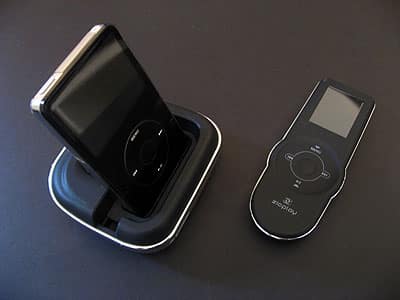
If there’s any accessory that we’ve been waiting too long to see done right, it’s an iPod remote control with its own integrated screen. Several companies have released such devices, most of them wireless and intended to let you fully navigate an iPod that’s connected to a TV or stereo system, but no one’s yet found the right mix of price and performance to satisfy mainstream iPod users. That’s not for lack of trying: five companies have now released “wireless display remotes” priced between $130 and $180.
If there’s any accessory that we’ve been waiting too long to see done right, it’s an iPod remote control with its own integrated screen. Several companies have released such devices, most of them wireless and intended to let you fully navigate an iPod that’s connected to a TV or stereo system, but no one’s yet found the right mix of price and performance to satisfy mainstream iPod users. That’s not for lack of trying: five companies have now released “wireless display remotes” priced between $130 and $180.
Looking solely at the items in its box, you’d think that a company called Zicplay came as close to “right” as any developer that has tackled the genre. Zicplay’s EWOO Remote + Audio Video Dock for iPod ($149, available for $130 and up) includes a wireless remote control that uses an iPod-styled Click Wheel and a 1.8” color screen that’s larger than and nearly as bright as an iPod nano’s. There’s a dock with places to charge and sync your iPod and the remote, plus ports on the back for analog audio out, optical TOSlink audio out, S-Video out, and power. Optical audio ports are unheard of in iPod docks—could Zicplay actually have engineered the first one that’s worthwhile?

No.
Like most of the other display remotes we’ve tested, namely Alive Style’s PopAlive, ABT’s iJet Two-Way, and DLO’s HomeDock Music Remote, the EWOO Remote + Audio Video Dock don’t deliver a good enough experience for the price to merit our general recommendation. Though more expensive, Keyspan’s similar TuneView remains such a superior performer that it’s hard to think of EWOO as even being in the same class, once you put aside their similarities.

Zicplay has several legitimate positives on its side. Its dock and remote are only one step short of beautiful cosmetically, with matte black plastic surfaces and chromed plastic accents that look particularly excellent with black fifth-generation iPods. Each component looks and feels a little shy of ideal in person, due to weight and other small imperfections, but 95% of iPod accessory makers would give anything to produce something as visually striking as this.


Some part of the design is attributable to Zicplay’s willingness to just duplicate Apple’s iPod Click Wheel, albeit with slightly different markings, rather than struggling to innovate some alternative control scheme for its remote control. Like the Click Wheel, EWOO’s remote has five buttons and a touch-sensitive surface, so when an iPod’s in the dock, you can browse its menus in an almost iPod-mirroring fashion, selecting from Music, Photos, Videos, Settings, and Now Playing options. The menus aren’t exactly the same as an iPod’s, but EWOO’s screen displays 8 full lines of text plus a header, which is better by two lines than even Keyspan’s remote, three lines over Alive Style’s, and five over DLO’s. This screen is bright, clear, and easy to read, with a battery indicator and red/yellow/green dock connection indicator in the header. The rechargeable battery lasts for around three days on a full charge, which isn’t great, but isn’t awful; you may want to leave the remote in the dock when it’s not in use.


Zicplay has made a number of other competitively smart choices. The remote is RF-based, using 2.4GHz radio for communication, and so you needn’t point it at the dock in order to navigate your iPod. It lets you navigate music and videos, toggling automatically to a color 4G or 5G iPod’s screen to let you display photographs on a TV, as well. The box includes dock adapters for various iPods, a USB charging cable for the remote, plus dock power and analog audio cables, similar to what Keyspan includes with TuneView.
Its packaging is also amongst the coolest we’ve yet seen for an iPod accessory, with side compartments that slide open together to reveal all the included components. While the dock doesn’t have a USB port for computer synchronization, it’s probably not strictly necessary, either.

The problems started when we actually tried to use EWOO, and as you probably noticed at the top of the review, they were varied enough that we felt compelled to issue the product our exceedingly rare “defective” or D- rating—something we only do when a piece of hardware is so screwy that it’s basically in need of being retooled. To start with the most modest issue, the EWOO Dock emulates earlier Alive Style and DLO designs by offering a spot behind the iPod to charge the remote. Unfortunately, it’s almost always a small struggle to get the remote to seat properly in the dock’s charging slot, and even when the remote’s been seated, it doesn’t feel totally stable.

Despite its good looks, the remote also suffers from the same lack of follow-through in its construction. Zicplay’s Click Wheel alternative is most notable in that it doesn’t click—its four outer buttons don’t deliver much of a tactile sense that they’ve been pressed, and unlike the nicely-calibrated iPod controls, a slight lag in the display means that you generally have no idea how much you’ve scrolled, either. Long lists scroll painfully slowly, as well. No matter how much we liked the 1.8” screen and Click Wheel pairing in concept, we found them less useful for actual navigation than Keyspan’s system in TuneView; it’s obvious that just copying Apple’s interface isn’t enough. A page down feature is basically mandatory in the absence of a variable-speed scrolling mechanism.

There were also some really weird issues with the remote’s performance. Zicplay claims that the remote has 30-meter or 100-foot broadcasting power, but we found that at a distance of fewer than 50 feet away—or 30 feet and a wall—the remote and dock seemed to have even more communication problems than they did when right next to each other. Even when in the same room, the remote would frequently fail to download our iPod’s lists of albums, artists, or songs, or partially display a playlist only to reset to its main screen multiple times. There were times when it would work properly for a while, then the dock would randomly lose synchronization with the remote, and we couldn’t re-initiate it.











