
iLoungeiLounge
  • News
    • Apple
      • AirPods Pro
      • AirPlay
      • Apps
        • Apple Music
      • iCloud
      • iTunes
      • HealthKit
      • HomeKit
      • HomePod
      • iOS 13
      • Apple Pay
      • Apple TV
      • Siri
    • Rumors
    • Humor
    • Technology
      • CES
    • Daily Deals
    • Articles
    • Web Stories
  • iPhone
    • iPhone Accessories
  • iPad
  • iPod
    • iPod Accessories
  • Apple Watch
    • Apple Watch Accessories
  • Mac
    • MacBook Air
    • MacBook Pro
  • Reviews
    • App Reviews
  • How-to
    • Ask iLounge
Font ResizerAa
iLoungeiLounge
Font ResizerAa
Search
  • News
    • Apple
    • Rumors
    • Humor
    • Technology
    • Daily Deals
    • Articles
    • Web Stories
  • iPhone
    • iPhone Accessories
  • iPad
  • iPod
    • iPod Accessories
  • Apple Watch
    • Apple Watch Accessories
  • Mac
    • MacBook Air
    • MacBook Pro
  • Reviews
    • App Reviews
  • How-to
    • Ask iLounge
Follow US

Reviews

Reviews

Review: Zarboo Software SpeakEasy Voice Recorder

Last updated: May 16, 2021 5:10 pm UTC
By Jesse Hollington
Review: Zarboo Software SpeakEasy Voice Recorder

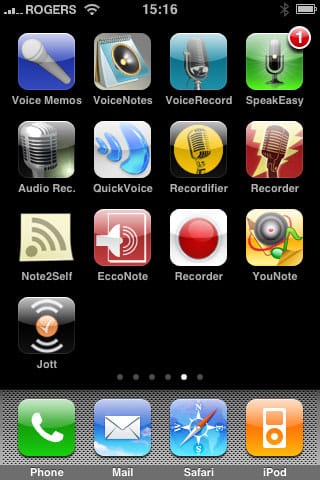
On August 4, 2008, we reviewed a collection of 13 different voice recorder applications for the iPhone in a roundup entitled iPhone Gems: Every Voice Recorder, Reviewed. This review contains a review of one application from that roundup; additional comparative details can be found in the original full story.

Review: Zarboo Software SpeakEasy Voice Recorder

The iPhone comes with a built-in microphone, but didn’t have any voice recording software to take advantage of that feature. Today, less than a month after the opening of the App Store, there are 13 different pieces of voice recorder software. Note that unlike many of the App Store programs, these particular applications are designed specifically for the iPhone, not the iPod touch. Additionally, the base recording quality of all of the apps that we reviewed was roughly equivalent.

A few of the apps we reviewed offered higher-quality recording settings, which resulted in slightly improved fidelity when recording from music sources or from distant sources, such as in a lecture hall. However, for voice recording quality purposes, all of the applications that we reviewed provided acceptable quality with virtually no distinguishable differences.


In terms of space taken up by voice recordings, based on the apps that did provide storage information or transfer of voice memos, you can expect your recordings to take approximately 1MB per minute of recorded audio on average, versus 2.5MB per minute on the iPod 5G’s, classic’s and nano’s low-quality mode. Notably, the numbers are not directly comparable because iPhone recordings are currently made in Apple’s Core Audio Format (CAF) rather than WAV, the format used by iPods. The space consumed will also vary somewhat with applications that provide different quality settings, however with the monaural microphone on the iPhone, there’s no current need to record in stereo fidelity.


A near-term iPhone software update is expected to add MP3 encoding as an alternative to CAF for greater compatibility of the recorded files.

SpeakEasy Voice Recorder is definitely the most polished and professional-looking option among all of the voice recorders that we reviewed, offering more advanced voice recording capabilities within a very attractive user interface. Starting SpeakEasy takes the user to a “Studio” screen with a nice big microphone button to immediately start recording:


Review: Zarboo Software SpeakEasy Voice Recorder

Tapping on the microphone takes the user directly to recording mode:


Review: Zarboo Software SpeakEasy Voice Recorder

A level meter is displayed to track your audio levels and you can also pause and resume recording by tapping the pause button which appears to the immediate left of the level meter. When finished recording, tap the too-large-to-miss STOP button and you are asked what you want to do with this recording:


Review: Zarboo Software SpeakEasy Voice Recorder

Tapping the Save It option provides you with a screen where you can name your recording, add some comments, and assign it to a category. You can also add a photo tag to your recording by tapping the blue image icon at the top-left:


Review: Zarboo Software SpeakEasy Voice Recorder

Note the “Mark as Played” button which also appears in the very top-left corner. SpeakEasy marks all recordings as “New” until you have either listened to them, or marked them as played manually.

SpeakEasy also offers a few additional options which are hidden under the iPhone’s main “Settings” application.



Latest News
The 14-inch MacBook Pro with M5 Chip 16GB RAM/512GB is $250 Off
1 Min Read
Noise and Static on AirPods Pro 3 Still Unfixed
1 Min Read
New iMac with 24-inch OLED Display May be Brighter With 600 Nits
1 Min Read
The 15-inch M4 MacBook Air 256GB Is $250 Off
1 Min Read
Internal Kernel Debug Kit from Apple Reveals Tests for a MacBook with A15 Chip
1 Min Read
Apple Currently In Talks With Suppliers for Chip Assembly & Packaging of iPhones in India
1 Min Read
Apple Allows Easier Battery Replacement For M5 MacBook Pro with 14-inch Display
1 Min Read
The Apple Watch SE 3 44mm GPS is $50 Off
1 Min Read
20th Anniversary iPhone May Launch in Two Years
1 Min Read
Better Image Generation Capabilities and Apple Music Integration Coming to ChatGPT
1 Min Read
A20 Pro Chip Coming to Next Gen iPad Mini OLED
1 Min Read
Amazon has the AirTag 4 Pack Marked $29 off
1 Min Read

iLounge logo

iLounge is an independent resource for all things iPod, iPhone, iPad, and beyond. iPod, iPhone, iPad, iTunes, Apple TV, and the Apple logo are trademarks of Apple Inc.

This website is not affiliated with Apple Inc.
iLounge © 2001 - 2025. All Rights Reserved.
  • Contact Us
  • Submit News
  • About Us
  • Forums
  • Privacy Policy
  • Terms Of Use
Welcome Back!

Sign in to your account

Lost your password?








