
Late last year, ZAGG sent us a new pair of iPhone-compatible earphones called Z.buds ($80), designed to offer an alternative to Apple’s In-Ear Headphones with Remote and Mic, as well as numerous other iPhone-compatible in-canal earphones that have been released over the past year and a half. As we noted in our First Look, we had problems with the Z.buds, and ultimately wound up sending the pair back to ZAGG for replacement; the second pair we’ve tested exhibited the same unusual issue, which we note in our brief review today.
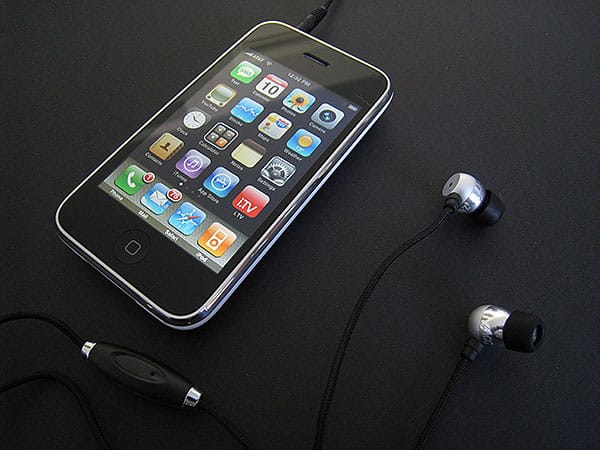
Z.buds combine matte and reflective metallic plastic canalphone housings with a microphone, a call/track control button, and an in-line volume control knob, all connected to one another in a lanyard necklace-style design with thick fabric cabling. The design, which otherwise uses plastic parts that look and feel a bit cheap, didn’t impress us tremendously in black, and does even less for us in the substitute red version that we subsequently received and used for more extended testing. In short, it looks like ZAGG tried to customize a pair of off-the-shelf lanyard headphones to appeal to iPhone users, but didn’t totally think through their value for connection to an iPhone.

Like other fabric lanyards we’ve tested, you’re supposed to wear Z.buds like a necklace, pop the earphones into your ears, and connect the headset to your device. The difference here: unlike the lanyard-friendly iPod shuffle, iPod mini, and iPod nano, which were connected to lanyards and dangled from them as you walked, the iPhone and iPhone 3G are too big to wear.
Still, Z.Buds seems as if it was designed for such a purpose: it has an odd cable that forks at its mid point, with a detachable fabric loop for possible attachment to something like a case, and then another length of cable containing the volume knob and the iPhone/iPhone 3G-compatible plug. Without an iPhone hanging from your neck, the purpose of the necklace appears to be solely to manage the earphones, which you do with three chrome sizer balls that look cheap on the black headset and out of place on the red one. Some users may like the necklace concept, but the design struck us as misguided and not especially well executed.


The lanyard design carries another consequence: once the canalphones are in your ears, their cables fall to the back of your neck, with the microphone and remote control button settling behind your mouth rather than in front of it. This isn’t optimal for either audio or control. In our initial testing of ZAGG’s microphone and Apple’s latest microphone in the same neutral position, we were actually impressed by the comparatively natural, bass-rich sound of the ZAGG mic, but when both mics were worn as their designers apparently intended—Apple’s dangling down near the mouth, and ZAGG’s dangling somewhat behind it—what sonic performance benefits Z.buds might have offered were substantially reduced; Apple’s mic sounded very similar, with a little extra treble for added intelligibility.

A much bigger issue with the mic was one that we couldn’t explain.
We’ve tested literally dozens of iPhone-ready microphones at this point, and to the best of our recollection never had issues getting any of them to work for phone calls, audio recording applications, or the like with our iPhone 3G. Both versions of Z.buds for some reason refused to work properly as a microphone or remote for our iPhone 3G, whether in telephone mode, voice recording mode, or otherwise. This device just ignored the microphone and button presses, even though it recognized every other remote and headset we’ve connected. However, Z.buds worked as both a microphone and remote when we connected it to the original iPhone and a second-generation iPod touch for audio recording. It’s also worth noting that the volume controls, which are analog rather than digital or iPhone-dependent, work regardless of the device you use, and you can use at least the earphones, possibly the mic, with other iPod models as well.

Audio quality through the Z.buds earphones with the foam eartips attached was fine, not much better.











