
While keyboard cases are quite common for the larger iPad, options for the iPad mini today are much more limited. Zagg was one of the first companies to introduce options for the smaller tablet, with two similar designs: Mini 7 ($90) and Mini 9 ($90). Although the keyboards both use the same kind of hard plastic keys and an almost identical layout, most users will feel less cramped on the larger of the two models. Each comes with a Micro-USB cable for charging, and although it may not be immediately obvious, the power and Bluetooth symbols in the top right corner of the keyboard double as physical control buttons. Specific battery life isn’t provided by the company, but Zagg says each cell “will keep the keyboard powered for months at a time.”

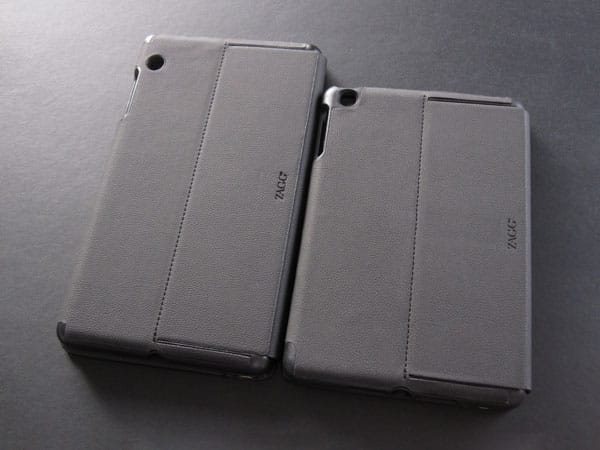
Although they look similar from the outside, Mini 7 and Mini 9 are different in execution. Both are covered in faux leather, and have openings for the iPad mini’s headphone port, side switch, volume buttons, Lightning port, and iSight camera, plus a Micro-USB port for charging. They also each have a fold-out kickstand on the back, which provides a really nice typing angle without taking up a lot of extra space. Although the core of each case is black, they actually use different materials: Mini 7 is a flexible but thick rubber that’s sized properly for the iPad mini, while Mini 9 is a hard plastic shell that oddly leaves about 3/4” of empty space above and below the tablet.


You have to push significantly harder to get the iPad into Mini 9 than Mini 7, so much so that you might see a rainbow effect on the display as pressure is applied. The larger Mini 9 holder omits holes for the Sleep/Wake button, microphone, and speakers, which are seemingly unnecessary when you otherwise have access to them.
Notably, the Mini 7 wakes the iPad when the case is opened, while Mini 9 does not. Of the two, we prefer Mini 7’s materials and iPad mini holder, although there’s a reason Mini 9 is longer: extra keyboard space.


Both models have similar Bluetooth keyboards built into their inside front covers. Among the many keyboards we’ve tested, these are physically some of the best keys: made of hard plastic, we found ourselves really liking their travel distance and and overall tactility. Although the main alphabet and number keys are the same size on both keyboards—1/2” square, slightly smaller than on Apple’s keyboards—there’s a little bit more distance between the keys on Mini 9, which adds up when spread across a row. Mini 7 and Mini 9 each have iOS-specific function keys across the top row, although Mini 7 is missing the photo screen saver button, as well as the cut key. The larger keyboard has enough room to include a separate battery life indicator key, an extra command key, a keyboard switcher button, as well as some split keys that are otherwise combined on Mini 7.


The biggest problem with Mini 7 isn’t the size of the keys, or how cramped they are. Instead, it’s the lack of two specific dedicated keys that proved to be the main issue. We actually found ourselves typing pretty quickly once we got a feel for the layout, but both the commonly-used apostrophe and question mark keys have become secondary functions of the colon/semicolon key and period key, respectively.
This means that you have to stop, find the fn key, and then press the two in combination any time you need to type a contraction, possessive word, or question. We would’ve been OK with either two split keys, or in the case of the former, even having the apostrophe take precedence over the colon; the former gets used much more frequently. Apart from these issues, we were surprised by how well we were able to type on Mini 7. In fact, this entire paragraph was typed using the keyboard and we made relatively few errors without having to really slow our typing speed. Users with larger hands likely won’t feel as comfortable, though.


Mini 9 is a different story: typing on it is just about as good as it gets from moment one. All the keys were right where they should have been, including the apostrophe and question mark. Zagg says that the keyboard is only 10% smaller than a traditional keyboard. Our calculations, measuring from the edge of the first to last key vertically and horizontally, actually place the surface area at about 80% of Apple’s Wireless Keyboard. It’s still a really good size, though, and one that we immediately felt comfortable with when touch-typing.











