
Based upon the earlier Knight S indoor security camera, Y-cam’s new HomeMonitor ($200) is designed to be a standalone — computer-free — indoor video and audio monitoring system, including cloud-based storage for up to seven days of footage, accessible via iOS devices or computers as you see fit. Also available in a $350 weatherproof Outdoor version (not reviewed), each of up to two HomeMonitor cameras can record at up to 640×480 resolution, and up to 30 frames per second, using an array of 30 Infrared LEDs to provide between 36 to 45 feet of night vision capability.
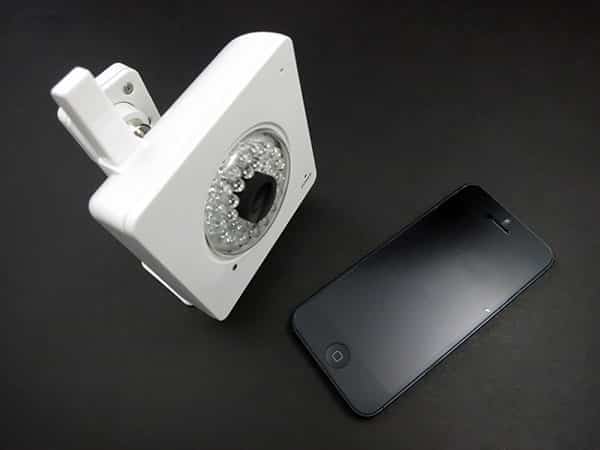
The hardware in the HomeMonitor package begins with the camera itself, a 3.25”-square, 1.25”-deep box with a glossy plastic housing and antenna sticking out the top. Right in the front, centered in the ring of LEDs, is the lens. There’s also a microphone in the top right corner, a status LED directly beneath it in the bottom right, and a light sensor. The back includes ports for a wall power adapter and an Ethernet cable—both packed in, and necessary for the initial setup—plus a screw mount and camera ID, which is important for the set up process. You have to physically connect to your router at first, take note of the camera’s ID, perform a setup procedure for the camera, and then use the camera wirelessly. A metal mounting bracket is included, as are international adapters for the power cube. All in all, it feels like a well-constructed device, though not the smallest, sleekest, or most easily repositioned camera we’ve seen in its class.

We were surprised to find that, despite the promise of being able to “setup a HomeMonitor without a computer directly on your smartphone or tablet,” this functionality isn’t baked into the iOS app.
Instead, it requires the use of a browser on the device; the app won’t even let you access the camera until a user account has been established through some other means. Further, early attempts at installation gave us issues. Although the initial setup process is supposed to be ultra-simple, we had trouble getting our test unit to join two different wireless networks, each time resulting in a notice on the iPhone-formatted website: “use desktop version to finish the setup process.” Subsequent attempts were more successful: after a partially completed setup on a computer’s web browser, we were eventually able to complete the entire process from Safari on an iPad.

HomeMonitor does offer some neat features. Although the lens doesn’t provide as wide of a viewing angle as it could—and some rival products do—Y-Cam makes good use of what it does frame. You can use resizable boxes to set up two separate motion detection zones—say, for two doors to a room—and set each to trigger based on small or large movements. There are also options for a granular motion detection recording schedule, hour by hour, and other time-based controls, but we found that all our time stamps were an hour off due to the beginning of Daylight Savings Time.

The camera is designed to send video over Wi-Fi, using motion sensors to determine when things are taking place in a monitored room; seven days of motion-triggered events are stored for viewing and downloading. By default, you receive an email whenever the sensor has been tripped.
You can also access live streaming video through the web or the iOS app, but we found this to be problematic. The app tends to time out, giving cheeky messages about reestablishing a connection and bandwidth issues before failing to deliver your video. We found the only solution to be logging out and logging back in, an inconvenience. From the app, you can also toggle the camera, motion sensor, and alerts on and off, as well as access your archive.

HomeMonitor offers a feature called SmartBuffer that “starts recording before things happen,” using internal memory. While it likely keeps the camera recording at all times, the feature allows it to deliver footage immediately before an action event, without having to constantly stream action-free content to the cloud. The feature makes the camera more bandwidth-friendly.

With 640×480 resolution, HomeMonitor’s video quality is acceptable by the standards of previous-generation cameras, but has been surpassed by newer devices such as Philips’ In.Sight Wireless HD Baby Monitor, which offers 720p recording. We found the claim of 30 frames per second to be substantially overstated—the real rate was closer to 5 frames per second, with a lag of around 30 seconds versus realtime—but the detail level of the video was fine. You can see what’s there to be seen, even if it’s not the sharpest picture your iOS device is capable of displaying.











