
When XtremeMac introduced the original Luna — as close to a revolutionary alarm clock radio as anything released for the iPod, history shows — we were thrilled; it was our clock of choice until the iPhone came along, bombarding speakers with audio interference and necessitating redesigns. Soon thereafter, XtremeMac showed off two new models called Luna X2 and Luna Voyager ($80), the first a cut-down sequel, and the second a substantially different concept: a travel alarm clock. Turbulent times at XtremeMac saw Luna X2 repeatedly delayed, re-engineered, and apparently only given a small-scale release; now Luna Voyager has actually made it to market, and it’s a qualified success.
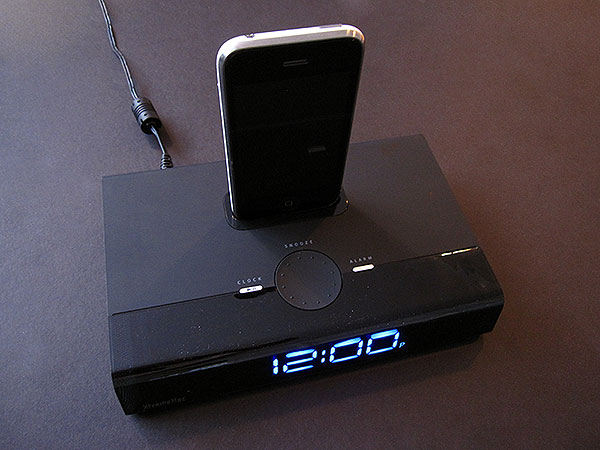
Luna Voyager is, in quick summary, a cool-looking clock and speaker dock with the total area of a small hardcover book: it’s a little under 8” wide, 5” deep, and 1.5” tall, capable of fitting into any backpack, briefcase, or other travel bag with ease. On the front of the almost entirely black unit is a glossy plastic face with a big blue clock in the center, using futuristic digits that resembled the ones on Luna X2, but no calendar date or other information; the sides have silver metal mesh speaker grilles, and the top has a multi-function ratcheting dial and two buttons: one’s for setting the clock or play/pausing the connected iPod or iPhone, and the other is for activating the single alarm. Most of the rest of the unit is a soft-touch matte black body, interrupted by an oversized dark gray battery compartment. XtremeMac notably packages it with a wall adapter, but without a carrying case, a potential issue for those who hope to keep the glossy part of its body in tip-top shape.

An oddity of the battery compartment is that it was designed to be large enough to cover a bunch of AA batteries, but instead has space for only two AAAs, which XtremeMac doesn’t provide in the package; they are only used as backups for the clock.
Our guess based on the design is that Luna Voyager was originally intended to run its speakers off of battery power, too, but the engineering didn’t quite work out, so XtremeMac preserved the compartment as-was while leaving only space for the AAAs. In any case, what this means is that Voyager’s speakers run only off of wall power, via the included adapter, and that you’ll have to supply the batteries if you want to keep the clock stable. In a neat accommodation, however, Luna Voyager automatically can set itself to the time programmed into your iPhone or iPod, and preserve that time until it’s unplugged.


Though Voyager doesn’t do a lot more than play iPod or iPhone audio, keep time, and offer the aforementioned single alarm, those three features all work well enough given the price and size. The speaker quality is somewhere between decent and good, providing significantly louder sound than an iPod nano, iPod touch, iPhone 3G or 3GS can put out through its own speaker, but offering relatively flat, midrange-focused audio rather than anything that impresses with sparkle or thump. Songs sound FM radio-like, which is par or above par for the course with sub-$100 audio systems without clocks, and a little above par for ones with clocks built in; an aux-in port in the back lets you connect 3.5mm audio sources, as well. You can set the alarm to beep, starting quietly and then quickly ratcheting up to something louder, or trigger iPod/iPhone music.
Both worked without a problem in our testing.

What will either sell or sink the Voyager for most people is the clock. We loved it; the blue numbers just look plain cool, and the system’s ability to set itself from a plugged-in iPhone or iPod all but forgives its lack of included AAA batteries, as well as its dependence on those ones rather than a smaller disc-shaped cell to provide continued backup power. But some people won’t like the fact that it has no dimmer settings other than a switch on the unit’s back that turns it off or switches it from 12 to 24 hour mode. This isn’t an issue for us, but users who are looking for the numbers to be anything other than solid-looking and semi-bright may need to look elsewhere, as will those who want a calendar date in addition to the time.

There’s a fair argument to be made that XtremeMac dropped the ball somewhat with Luna Voyager—that it should have been capable of running entirely off of batteries, given its size, and that its sparing feature set will relegate it to niche appeal. The lack of a protective carrying case was also a clear miss for a semi-glossy plastic product designed to travel around in a bag.











