
Pros: An iPod shuffle-specific FM transmitter with an easy-to-use digital FM tuner and power charger.
Cons: High-pitched noise in FM output was very evident in testing, making iPod output unpleasant under many testing conditions, particularly with softer music and lower-volume recordings. Slight color mismatch. Only useful in a car.
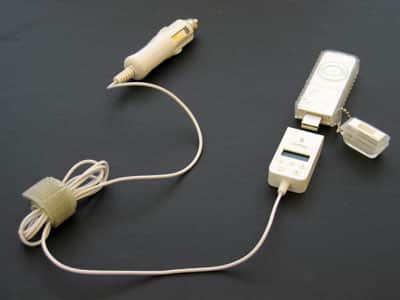
Four months ago, we reviewed and strongly praised XtremeMac’s first iPod FM transmitter, AirPlay (iLounge rating: A), which combined the frequency-flexible, iPod battery-dependent design of Griffin’s popular iTrip with a backlit digital tuner and an almost equally attractive price. AirPlay seemed an instant winner – it performed very well in our testing, was small and looked good, and wasn’t going to break anyone’s budget given its features, the marks of a solid A product.
Then we started to receive complaints – lots of them. Some AirPlay users were hearing high-pitched noises in their audio, and letting us know in droves. Though there’s no FM transmitter that transmits a perfectly clean, static-free signal – a reason we always recommend cassette adapters or wired line-in connections to our readers rather than FM transmission if either is an option – users were insisting that the amount of noise they were hearing was extraordinary. In responsibly addressing these comments in the AirPlay review thread, XtremeMac reasonably pointed out the performance limitations and noise inherent in all FM transmitters, but said that it would work on an improved version of AirPlay that would sound even better.

Since that time, we’ve felt conflicted. Our own AirPlay unit has continued to work wonderfully, without any issues, and as noted by XtremeMac, other reviewers have reported the same findings as we did.
However, having recently tested a store-bought AirPlay, we’ve heard the exact sound that our readers were complaining about, and it was unquestionably annoying. Now, with the release of the new AirPlay FM Transmitter for the iPod shuffle ($49.95), we’re hearing the same noise – and finding the device less useful than it’s predecessor, besides.
Design and Features
The new AirPlay is a glossy white FM transmitter that attaches to the iPod shuffle’s bottom USB plug, adding a small LCD screen, five buttons, a four-foot long gray cable, and a white and metal car charger in the process. XtremeMac’s logo and the AirPlay name appear in gray on the front, while a few details are found in small text on the back. The white plastic just narrowly misses a proper color match with the brighter body of the iPod shuffle.
AirPlay is billed as “the first FM Transmitter that allows you to play audio from iPod shuffle through your car’s FM radio,” but that’s not exactly true. Even ignoring all of the FM transmitters that aren’t specifically marketed for the iPod, Belkin’s TuneCast II (iLounge rating: B+) also works with the iPod shuffle, and features virtually identical digital FM tuning functionality. That’s one of two key advantages of both AirPlay models – they both use blue-backlit digital FM tuners – while the other is that they don’t require bulky external battery packs. By comparison, the TuneCast II is a AAA-battery hog, and is a bit larger than the iPod shuffle, dangling awkwardly off of its top when connected.

Each AirPlay’s tuner runs from 88.1 to 107.9, with two buttons (+ and -) that make it easy to tune upwards and downwards between stations when you’re on the go. AirPlay shuffle even has three memory buttons (labeled 1-3) that can instantly pull up stations you’ve stored. As before, it will remain on your last station if you disconnect it from power and then reconnect it.
Our only issue with the tuning is that it doesn’t tune down to 87.9, a channel that’s virtually guaranteed to be empty no matter where you travel in the United States, so you’ll need to look around for a locally empty station.

While it doesn’t use a separate battery pack, the new AirPlay differs from its predecessor in that it doesn’t run off of the iPod’s battery; instead, you need to plug it in to your car’s power adapter, then connect it to the shuffle’s USB port. This design has predictable consequences and benefits: you can’t use AirPlay shuffle unless you’re in a car, one of the best features of the predecessor’s iPod battery-drawing feature, and since AirPlay doesn’t come with a mount, you’ll need to find one or keep the cabled shuffle in a cupholder, seat, or your lap. On the bright side, you can simultaneously recharge and broadcast from the shuffle, which wasn’t possible with the last AirPlay unless you bought a separate accessory. The $10 premium is a fair additional price to pay for this feature, though we would have strongly preferred an untethered, truly portable AirPlay for the iPod shuffle instead.
Performance and Conclusions
Given that it connects to the iPod shuffle’s USB plug, one of the surprises in the AirPlay shuffle is that you still need to use the iPod’s volume controls to adjust your listening level – unlike any older iPod, they work to control output levels from the iPod’s bottom as well as its top. The “appropriate” volume level depends on the type of music you’re listening to and its previously recorded volume, but something above 50% appears to be right for most songs.
However, in some cases, we found that literally 100% volume was necessary in using the AirPlay shuffle. That’s because of the aforementioned audio noise, a high-pitched squeal with accompanying static that pervaded virtually all of the music we heard in a closed car. It fluctuated mildly in strength from moment to moment, but could be heard easily at any quiet part of a song, between tracks, and when the iPod shuffle was paused. With volume at maximum and car windows open, we heard less of the interference than at other times, but under many circumstances we found it so irritating by comparison with the clean signal of a cassette tape adapter that we just had to turn it off.











