
iLoungeiLounge
  • News
    • Apple
      • AirPods Pro
      • AirPlay
      • Apps
        • Apple Music
      • iCloud
      • iTunes
      • HealthKit
      • HomeKit
      • HomePod
      • iOS 13
      • Apple Pay
      • Apple TV
      • Siri
    • Rumors
    • Humor
    • Technology
      • CES
    • Daily Deals
    • Articles
    • Web Stories
  • iPhone
    • iPhone Accessories
  • iPad
  • iPod
    • iPod Accessories
  • Apple Watch
    • Apple Watch Accessories
  • Mac
    • MacBook Air
    • MacBook Pro
  • Reviews
    • App Reviews
  • How-to
    • Ask iLounge
Font ResizerAa
iLoungeiLounge
Font ResizerAa
Search
  • News
    • Apple
    • Rumors
    • Humor
    • Technology
    • Daily Deals
    • Articles
    • Web Stories
  • iPhone
    • iPhone Accessories
  • iPad
  • iPod
    • iPod Accessories
  • Apple Watch
    • Apple Watch Accessories
  • Mac
    • MacBook Air
    • MacBook Pro
  • Reviews
    • App Reviews
  • How-to
    • Ask iLounge
Follow US

Reviews

Reviews

Review: Wren V5US Speaker

Last updated: May 19, 2021 9:37 pm UTC
By Phil Dzikiy
Review: Wren V5US Speaker

We could say Wren’s V5US ($500) speaker looked familiar to us when it arrived, but that would probably be understating the matter. Wren’s newest speaker has the same shape and design as the previous two Wren speakers we’ve reviewed — the Bluetooth Wren V5BT, and the previous AirPlay-only V5AP. Sometime after that, Wren also released the V5PF — instead of AirPlay or Bluetooth, that edition of the speaker used DTS Play-Fi, a newer lossless format targeted more toward Android users and not natively supported by Apple devices (DTS can be accessed in iOS through a Play-Fi app). And now, the inevitable: V5US does it all — AirPlay, aptX Bluetooth, and DTS Play-Fi, which lets users link multiple speakers to seamlessly play music in different rooms. There’s also an aux-in jack to connect devices that way. So V5US is versatile, but it’s also launching at $100 more than the original price of the V5AP and V5BT.

Review: Wren V5US Speaker

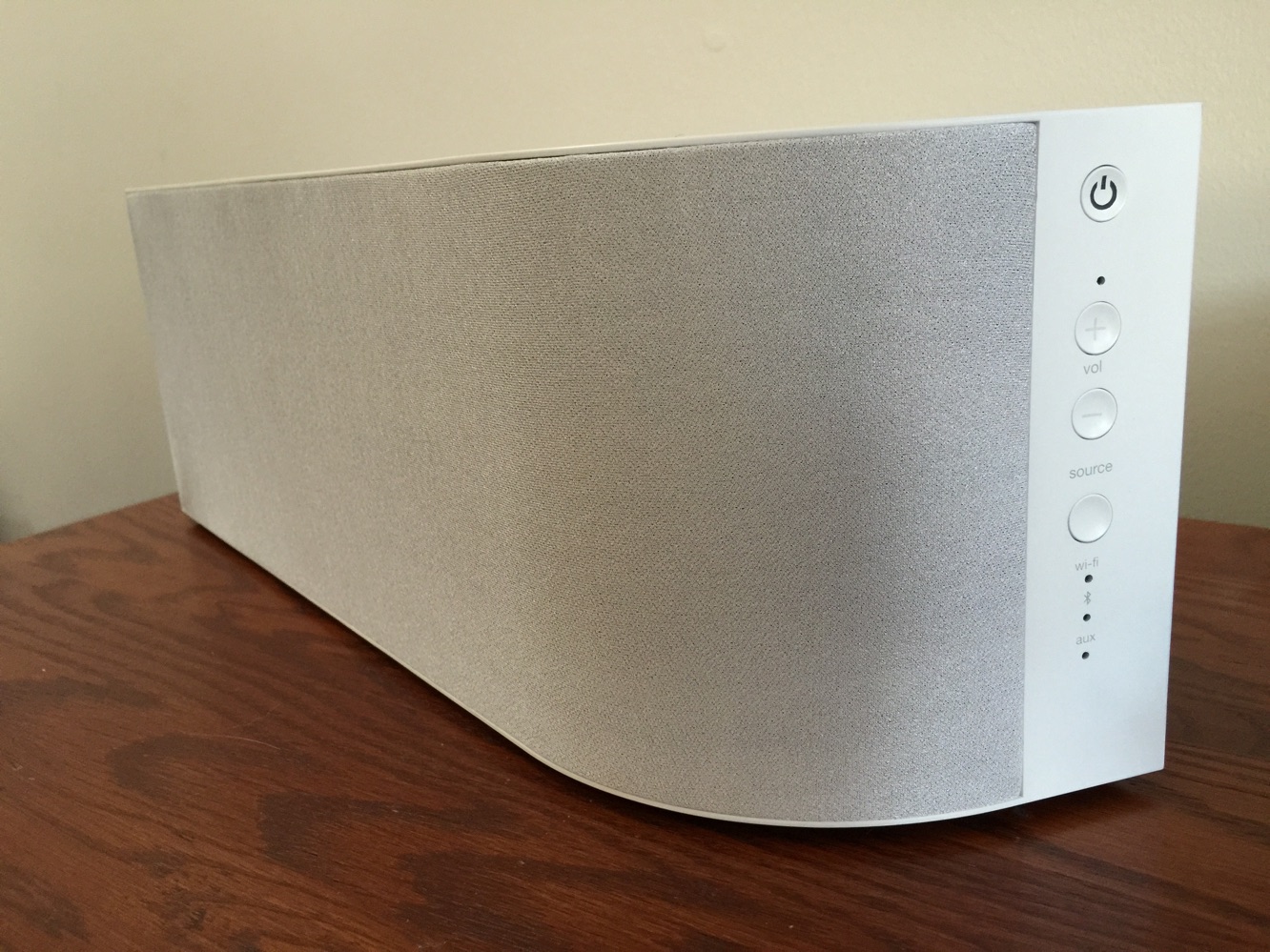
Again, Wren’s speaker has the same shape as its previous iterations — though the colors are now different — and is the same size.

The speaker is encased inside a handsome wooden enclosure, and it’s the kind of design you’ll be proud of displaying. On the front-facing side of the speaker, there’s a power button, volume buttons, and a source button, which allows users to switch between Wi-Fi, Bluetooth, and aux-in. On the back, there’s a setup button, aux-in port, USB service port — oddly, this port can no longer charge devices as it did in the past — a reset button, and an equalizer switch. The equalizer switch lets users adjust settings based on where the speaker is placed, such as in a corner or against a wall. V5US also comes with a remote.


Review: Wren V5US Speaker

V5US has the same two 3” drivers and two tweeters as it did in the previously reviewed models, so, for the most part, it sounds the same. (This is especially the case if you’re using the speaker to stream Bluetooth music from an iOS device.) It’s a strong-sounding speaker with a nice overall balance.

And it can get loud enough to fill a large space. But if you’re only using Bluetooth, you might as well stick with the older, Bluetooth-only speaker. DTS Play-Fi and AirPlay will deliver lossless sound, but they come with their own issues.


Review: Wren V5US Speaker

Users wishing to stream Play-Fi sound on V5US must first download the app, then go through a setup process that involves putting in a Wi-Fi password, naming the speaker, and a few other things, such as downloading a firmware update. The Play-Fi app will transfer all your purchased music into the app for playback, but if you commonly use other music apps, you’ll likely be out of luck, and will have no choice but to use AirPlay or Bluetooth. The Play-Fi app itself is a mixed bag: the music sounds very good, but the app is a bit slow, and we experienced connection issues a number of times. Most iOS users will find themselves returning to AirPlay or Bluetooth.



Latest News
The 14-inch MacBook Pro with M5 Chip 16GB RAM/512GB is $250 Off
1 Min Read
Noise and Static on AirPods Pro 3 Still Unfixed
1 Min Read
New iMac with 24-inch OLED Display May be Brighter With 600 Nits
1 Min Read
The 15-inch M4 MacBook Air 256GB Is $250 Off
1 Min Read
Internal Kernel Debug Kit from Apple Reveals Tests for a MacBook with A15 Chip
1 Min Read
Apple Currently In Talks With Suppliers for Chip Assembly & Packaging of iPhones in India
1 Min Read
Apple Allows Easier Battery Replacement For M5 MacBook Pro with 14-inch Display
1 Min Read
The Apple Watch SE 3 44mm GPS is $50 Off
1 Min Read
20th Anniversary iPhone May Launch in Two Years
1 Min Read
Better Image Generation Capabilities and Apple Music Integration Coming to ChatGPT
1 Min Read
A20 Pro Chip Coming to Next Gen iPad Mini OLED
1 Min Read
Amazon has the AirTag 4 Pack Marked $29 off
1 Min Read

iLounge logo

iLounge is an independent resource for all things iPod, iPhone, iPad, and beyond. iPod, iPhone, iPad, iTunes, Apple TV, and the Apple logo are trademarks of Apple Inc.

This website is not affiliated with Apple Inc.
iLounge © 2001 - 2025. All Rights Reserved.
  • Contact Us
  • Submit News
  • About Us
  • Forums
  • Privacy Policy
  • Terms Of Use
Welcome Back!

Sign in to your account

Lost your password?








