
When we first learned about the Smart Kid Scale ($180, aka WS-40), developer Withings was showing it at the 2012 CES as the “Smart Baby Scale,” and suggesting that it would use the same iOS app as the company’s original (and less expensive) adult-focused Connected Scale. A little over one year later, a tweaked version of the accessory finally began to trickle into stores under its current name, and there’s a new app, too: the Withings Baby Companion. While the Smart Kid Scale’s high price tag seriously limits its appeal, the hardware and software have evolved a bit to become more appealing than when the product was first shown.
At its core, the Smart Kid Scale is a wireless digital scale designed specifically for measuring childrens’ weight from ages 0 to 8. Featuring a digital display with centigram-level precision, the scale is built to handle weights ranging from 0 to 55 pounds, even including low-pound measurements for babies. Withings ships the Smart Kid Scale with a two-piece baby-sized tray that attaches directly to the rest of the scale as needed, then detaches once the child is capable of standing. When used with the tray, the scale requires a single tap on its top-mounted power button to set tare weight—accounting for the added weight of the tray—and then is ready to display accurate measurements on the screen. The tray can be temporarily locked in place with two rotating pins underneath the scale.
With the tray removed, no tap of the button is necessary to measure weight; a child just steps on and the process stops once they’re still enough that major weight fluctuations end.

So what distinguishes the Smart Kid Scale from common digital baby and toddler scales that sell for well under $100? Start with the fancier design and frills. Made from white and clear plastic, the scale doesn’t look hugely different from non-iOS alternatives when the tray is installed, but when it’s off, the relatively compact 11” by 9.1” rounded box design shows obvious Apple inspirations, including a thick clear top layer around the display and edges. In addition to the power button, a swipe bar lets you move left or right through a limited number of menu choices to set the units of measurement and Bluetooth pairing without relying on an iOS device. A recent firmware update enabled the scale to indicate pounds, ounces, and fractions of an ounce rather than just decimal fractions of pounds or kilograms.

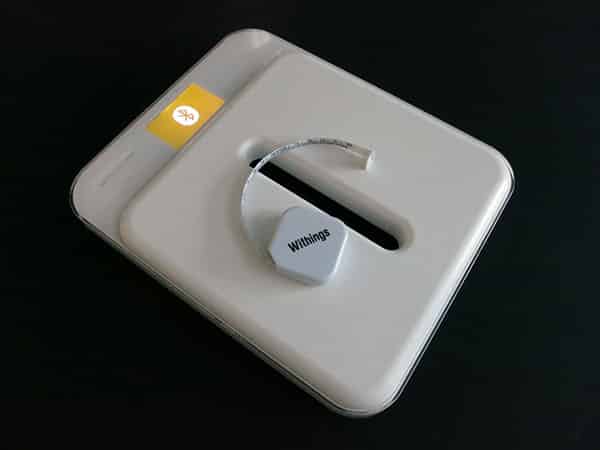
Moving plastic feet permanently attached to the bottom enable the scale to work on uneven surfaces, and four AAA batteries are included for power. Withings also packs in a retractable 60-inch/150-centimeter plastic tape measure for measuring the child’s length/height. The last tape measure it included with a scale lasted for around two years of fairly active use before breaking, and this one has been slightly redesigned for improved ergonomics without obviously impacting the quality of the components.

Smart Kid Scale’s other benefits include Bluetooth/Wi-Fi support, and the app. Initial pairing with your iOS device is accomplished via Bluetooth, which prompts you to install the Withings Baby Companion tracking app.
Once that’s complete, the app can automatically transfer your iOS device’s Wi-Fi settings to the scale, or manually set it up on a different network if necessary. Using Wi-Fi, weight measurements can be synchronized to Withings’ Internet-based tracking service without requiring the iOS device to make a Bluetooth connection directly to the scale, though both remain options.


On a positive note, the Withings Baby Companion is really nicely designed in most regards. Each child gets a personal profile within the app, optionally including a photo, age, height, and bottle or breast feeding details if you supply them manually. The app uses past weight ranges to automatically assign newly recorded scale measurements to a given name and profile, prompting you for manual assistance whenever new weight measurements aren’t obviously assignable. It can also display adult weight and blood pressure measurements taken from the company’s other products, though it points you to the Withings Health Mate app for additional details.

The only major issue we had with the app was its handling of wireless connectivity. During testing, we noticed that Internet-synchronized results weren’t automatically pushed to the already-running app, or achieved through an easy refresh button; rather, new results synchronized when the app is freshly loaded, or quit and restarted. Bluetooth syncing similarly requires some manual screwing around with settings, which really shouldn’t be necessary.











