
Wireless portable hard drives began to take off years ago, fueled by early solid-state options such as Kingston’s Wi-Drive, then miniature conventional hard drives such as G-Technology’s G-Connect and Seagate’s Wireless Plus. Over the past three years, prices have come down somewhat, and storage capacities have grown considerably. That’s why Western Digital was able to launch My Passport Wireless ($180-$220) at an aggressive 1TB price point, along with a slightly more expensive 2TB capacity that’s presently unmatched by rivals. (A $130 500GB version was also announced, but does not actually appear to be available for purchase.) The overall package isn’t a complete slam dunk, but individual features will definitely appeal to specific groups of people.
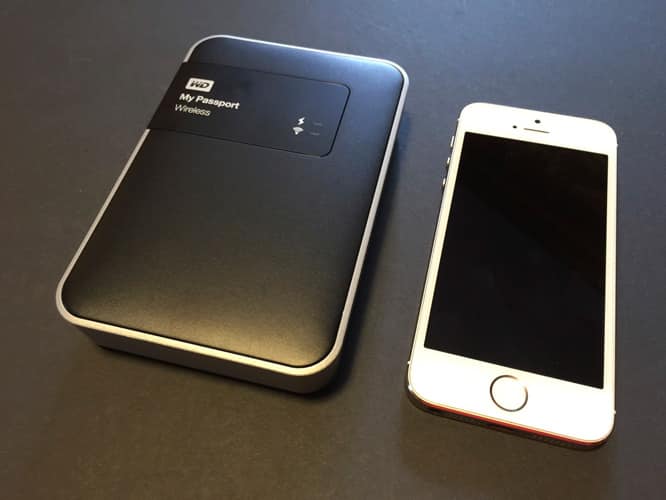
Previous My Passport hard drives have been small and ready to take pretty much anywhere—except that they depend on your computer for both connectivity and power. As its name suggests, My Passport Wireless is capable of operating autonomously as a completely wire-free media server. Made entirely from plastic, it contains a small traditional hard drive, a six-hour rechargeable battery, and 802.11n MIMO Wi-Fi hardware. Western Digital claims that it can stream media content to up to eight devices, or HD media content to four devices, each using the company’s My Cloud iOS app to browse content.
One USB 3.0 cable and a wall adapter are included for times when you’re able to connect to a data and/or power source.

By comparison with Seagate’s Wireless Plus, My Passport Wireless’s 3.3” wide by 5” deep by 0.85” deep chassis is narrower and a little taller, but entirely self-contained. Seagate requires you to carry around a small dock to make its drive USB-ready, but Western Digital sandwiches a USB port between power and WPS buttons on one of the unit’s short edges. Another neat trick is the integration of an SD card slot into one of My Passport Wireless’s longer edges, a feature that’s rarely found on wireless hard drives. You can also use My Passport Wireless as a Wi-Fi hub, or get it to join your existing wireless network.

In hands-on testing, My Passport Wireless had a couple of major functional advantages over competing hard drives, and a couple of major disadvantages. On the positive side, Western Digital’s software is pretty easy to use — the drive’s web interface at Mypassport.local is very straightforward for setup and easy to get back to as needed to make changes.
Similarly, the My Cloud app is attractively designed with an iOS-style simplified interface, stripped of unnecessarily techie options, and capable of providing quick access to media content stored on the drive.

Another advantage of My Passport Wireless is the SD card reader, which enables the drive to operate as an on-the-road backup device for your digital photos. While we originally thought the reader would provide instant streaming access to the card’s contents, it actually needs to back up the card to the hard drive — a process that thankfully can be automated with or without card-wiping every time you insert an SD card — before you can share its content over the same Wi-Fi connection. The SD card functionality isn’t as simple as it could be — you need to locate the card reader within a settings menu, transfer content from the card to the drive, then refresh the media directory in order to browse thumbnails of the content — it does work, even with Eye-Fi cards, which we were concerned might impact My Passport Wireless’s own Wi-Fi functionality.

My Passport Wireless’s two issues are streaming speed and battery life. We tested the drive when it was operating as a standalone wireless server, and when it was connected to an existing home network, and found little difference between them in performance. High-definition videos always required excessive buffering and re-buffering time, even when only one device was connected for streaming. The drive was also slow when it came to serving thumbnails and sharing full-resolution photos — 10-second pauses to display photos were the norm, rather than the exception.











