
iLoungeiLounge
  • News
    • Apple
      • AirPods Pro
      • AirPlay
      • Apps
        • Apple Music
      • iCloud
      • iTunes
      • HealthKit
      • HomeKit
      • HomePod
      • iOS 13
      • Apple Pay
      • Apple TV
      • Siri
    • Rumors
    • Humor
    • Technology
      • CES
    • Daily Deals
    • Articles
    • Web Stories
  • iPhone
    • iPhone Accessories
  • iPad
  • iPod
    • iPod Accessories
  • Apple Watch
    • Apple Watch Accessories
  • Mac
    • MacBook Air
    • MacBook Pro
  • Reviews
    • App Reviews
  • How-to
    • Ask iLounge
Font ResizerAa
iLoungeiLounge
Font ResizerAa
Search
  • News
    • Apple
    • Rumors
    • Humor
    • Technology
    • Daily Deals
    • Articles
    • Web Stories
  • iPhone
    • iPhone Accessories
  • iPad
  • iPod
    • iPod Accessories
  • Apple Watch
    • Apple Watch Accessories
  • Mac
    • MacBook Air
    • MacBook Pro
  • Reviews
    • App Reviews
  • How-to
    • Ask iLounge
Follow US

Reviews

Reviews

Review: WebMessenger by CallWave

Last updated: May 13, 2021 6:55 am UTC
By Charles Starrett
Review: WebMessenger by CallWave

This review originally appeared within iLounge’s iOS Gems series within the compilation article, iPhone Gems: The Best Instant Messaging Apps. Additional details may be found in the original article.


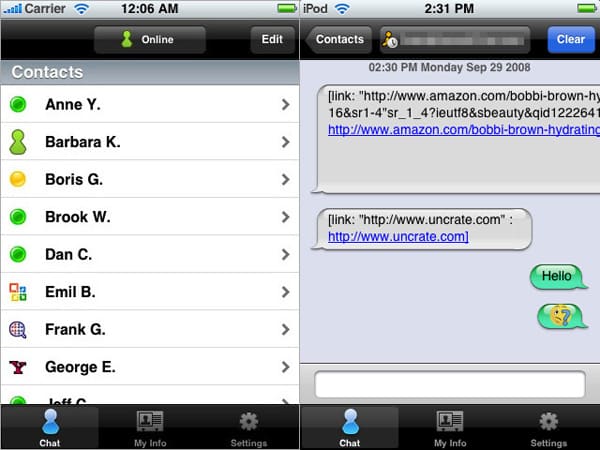
WebMessenger (Free) is yet another multi-platform IM application for the iPhone and iPod touch that requires the user to sign up for the company’s own service. In our testing, the initial account set up was quite lengthy, and included mandatory entry of the user’s phone number, something we found to be completely unacceptable. The app itself uses a bottom-tabbed interface to allow users to switch between chat, info, and setting screens.
Review: WebMessenger by CallWave

Using the settings screen, users can turn options for audible alerts and show offline contacts on and off, and set up different accounts—the app supports Jabber, Google Talk, AIM, ICQ, MSN, and Yahoo!. Once an account has been set up, the user needs to tap on their username and tap a button to import their buddy list in order for their contacts to appear in WebMessenger, a process that strikes us as being more complex than necessary. The info screen simply shows the user’s WebMessenger account information, along with a button to edit said info.


Like many of its competitors, WebMessenger lists all available contacts (and those offline, if the setting is turned on) for all available services in one big list, with a button to toggle the user’s status and an edit button at the top. Tapping on a contact opens a new chat window, with a navigation bar at the top offering a back button, a button to view the current user’s info, and a clear all messages button.

While WebMessenger does notice incoming URLs, underlining them and displaying them as links, the links don’t work. An empty text field at the bottom of the page brings up the keyboard, with buttons for emoticons on the left and a chat bubble button for sending the message to the right. Messages are displayed in the main portion of this screen inside bubbles reminiscent of Apple’s SMS and iChat applications.


Review: WebMessenger by CallWave

While it does allow for multi-platform chatting, we did not like WebMessenger’s overly-complex sign-up procedure, nor the mandatory submission of a telephone number — luckily, we were able to use the old standby 555-555-5555. The process of adding new chat accounts is similarly complicated, with users having to manually import their buddy lists for each service.



Latest News
The AirPods Pro 3 is $20 Off
1 Min Read
Exynos 2600 Chip 2nm Process Revealed by Samsung
1 Min Read
New Celebrity Ad Campaign Featuring Travis Scott Released by Beats
1 Min Read
Australia Getting Hypertension Notification Feature
1 Min Read
The 14-inch MacBook Pro with M5 Chip 16GB RAM/512GB is $250 Off
1 Min Read
Noise and Static on AirPods Pro 3 Still Unfixed
1 Min Read
New iMac with 24-inch OLED Display May be Brighter With 600 Nits
1 Min Read
The 15-inch M4 MacBook Air 256GB Is $250 Off
1 Min Read
Internal Kernel Debug Kit from Apple Reveals Tests for a MacBook with A15 Chip
1 Min Read
Apple Currently In Talks With Suppliers for Chip Assembly & Packaging of iPhones in India
1 Min Read
Apple Allows Easier Battery Replacement For M5 MacBook Pro with 14-inch Display
1 Min Read
The Apple Watch SE 3 44mm GPS is $50 Off
1 Min Read

iLounge logo

iLounge is an independent resource for all things iPod, iPhone, iPad, and beyond. iPod, iPhone, iPad, iTunes, Apple TV, and the Apple logo are trademarks of Apple Inc.

This website is not affiliated with Apple Inc.
iLounge © 2001 - 2025. All Rights Reserved.
  • Contact Us
  • Submit News
  • About Us
  • Forums
  • Privacy Policy
  • Terms Of Use
Welcome Back!

Sign in to your account

Lost your password?








