
Most of the products we review are the original designs of the companies selling them, but we sometimes make exceptions for particularly unique items that were developed by one company for resale by others. VuPoint Solutions’ Photo Cube Wi-Fi ($200, aka IPWF-P30-VP) is a prime example: just like its 2011 predecessor Photo Cube, this miniature iOS-compatible printer is sold in different regions by different companies under different names, and even works with multiple iOS apps. The latter fact actually turns out to be a major aide to Photo Cube Wi-Fi, as VuPoint’s own iOS application is currently messed up, which will force some customers to rely on Bolle Photo WiFi — a free, nearly identical app released by the printer’s Korean creator, Prinics.
The original Photo Cube was a simple, budget-priced photo printer designed primarily for iPhone and iPod touch users, reliant on a physical device connection and therefore incompatible with Apple’s wireless AirPrint standard. White and gray in color, it measured roughly 6.9” wide, 6.1” deep, and 3.9” tall, with a recessed iPhone/iPod touch dock on the top and a USB port on the side. This small size made it easy to place pretty much anywhere, and a reasonably cabled wall power adapter was included to provide it with power. Photo prints pop fully out of the front after making separate passes for three different ink colors and a sealing layer.

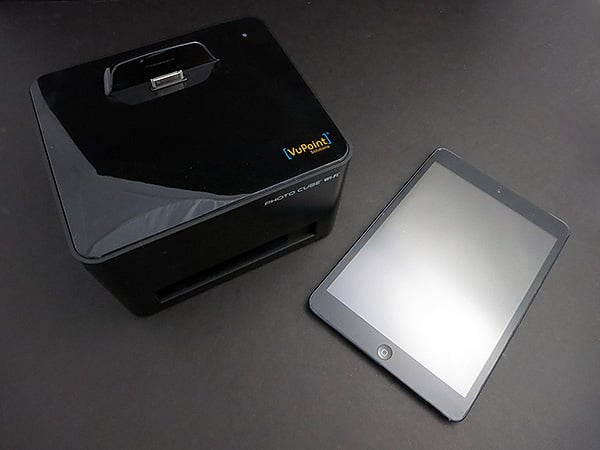
Photo Cube Wi-Fi preserves the same dimensions but swaps the two-tone housing for a glossy black top and matte black body, gaining around 0.7” of additional height solely due to a redesigned triangular docking area that’s now somewhat iPad-compatible. Regrettably, this port is a Dock Connector—and a not particularly case-friendly one, at that—rather than a Lightning plug, a detail that is neither surprising nor ideal for a late-2012/early-2013 accessory. Given that none of Apple’s latest-generation devices uses a Dock Connector, we considered skipping right over Photo Cube Wi-Fi to wait for a sequel, but as this model’s name suggests, you can also print wirelessly.

AirPrint? No: Photo Cube Wi-Fi does include 802.11b/g, but instead of supporting Apple’s wireless printing standard, Photo Cube Wi-Fi again requires its own free app for formatting and outputting photos—an app that hasn’t changed much from the non-Wi-Fi version we covered before.
You load the app, choose one or multiple pictures to print on each borderless 4” by 6” piece of photo paper, then connect your iOS device to start printing. Photo Cube Wi-Fi gives you the option to dock your device up top, connect it with a self-provided USB cable to the printer’s right side, or establish a wireless connection.

On the good news front, the app and printer are generally quite capable of handling the simple printing tasks thrown at them. Photo Cube Wi-Fi uses the exact same all-in-one ink and paper cartridges as Photo Cube, which are capable of printing 36 borderless photos per package, and still sell for around $20—roughly 55 cents per photo, with no need to buy separate paper and ink refills. As before, print time is under one minute per picture, using a 300dpi three-layer inking process followed by a color-sealing layer. Undercutting the newer model’s value somewhat is the fact that it ships with a “trial cartridge” containing enough materials for only 10 photos, so you should expect to need another cartridge more quickly than with the original model. VuPoint’s app includes a collection of different “designs” ranging from greeting cards to ID photo and collage printing tools, making it easy to print multiple images on each piece of paper.

Photo Cube Wi-Fi’s print quality is somewhere between adequate and good by current standards. As we noted in our prior reviews, the photos are nice enough to place in picture frames, and so long as you’re starting with good images, the results won’t look pixelated or grainy—direct from iPad, iPhone, or iPod touch images will vary dramatically from model to model, particularly based on lighting conditions. However, even if you have great photos as inputs, Photo Cube Wi-Fi’s 300dpi output resolution is lower than comparably-priced AirPlay printers, and the color rendition continues to leave something to be desired.
While whites tended to be pretty white, blacks are less than deep, with so-so contrast, and pictures tended to have a slight yellow cast. Fleshtones and light greens leaned a little yellow, medium greens skewed blue, and reds are slightly orange. Further, unlike the original Photo Cube, our Wi-Fi unit left two pixels worth of white at the left edge of each photo. In short, you could do better with a fancier printer or by having pictures developed at a photo lab, but these are quick and convenient.
The bad news is that setup of the printer’s signature Wi-Fi feature doesn’t work quite right with the Photo Cube Wi-Fi app. You’re supposed to load the app, enter a setup menu to share the iOS device’s Wi-Fi settings with the printer, then dock or cable-connect the device to the printer for a one-time transfer of those settings. Our experience with VuPoint’s currently one-star-rated app was the same as has been reported by numerous App Store users: even after making the connection, nothing happened—the printer just sat there, unable to set itself up for wireless printing. We reached out to VuPoint to ask about a fix, and the company never responded.

Yet based on our experience with the Bolle version of the first Photo Cube’s app, we downloaded the new Bolle Photo WiFi app and found that it worked just as expected—wireless settings were properly shared from the iOS device to the printer, and printing worked just as well over Wi-Fi as it did through a wired connection. The Bolle app is almost entirely identical to VuPoint’s, clearly created by the same developer, but for whatever reason doesn’t have the VuPoint app’s connectivity bug.











