
iLoungeiLounge
  • News
    • Apple
      • AirPods Pro
      • AirPlay
      • Apps
        • Apple Music
      • iCloud
      • iTunes
      • HealthKit
      • HomeKit
      • HomePod
      • iOS 13
      • Apple Pay
      • Apple TV
      • Siri
    • Rumors
    • Humor
    • Technology
      • CES
    • Daily Deals
    • Articles
    • Web Stories
  • iPhone
    • iPhone Accessories
  • iPad
  • iPod
    • iPod Accessories
  • Apple Watch
    • Apple Watch Accessories
  • Mac
    • MacBook Air
    • MacBook Pro
  • Reviews
    • App Reviews
  • How-to
    • Ask iLounge
Font ResizerAa
iLoungeiLounge
Font ResizerAa
Search
  • News
    • Apple
    • Rumors
    • Humor
    • Technology
    • Daily Deals
    • Articles
    • Web Stories
  • iPhone
    • iPhone Accessories
  • iPad
  • iPod
    • iPod Accessories
  • Apple Watch
    • Apple Watch Accessories
  • Mac
    • MacBook Air
    • MacBook Pro
  • Reviews
    • App Reviews
  • How-to
    • Ask iLounge
Follow US

Reviews

Reviews

Review: Vicks SmartTemp Wireless Smartphone Thermometer

Last updated: May 19, 2021 9:30 pm UTC
By Phil Dzikiy
Review: Vicks SmartTemp Wireless Smartphone Thermometer

With each passing year, Bluetooth finds its way into more products which never seemed to need Bluetooth before. Sometimes Bluetooth functionality is beneficial, or downright innovative. Other times, we’re left wondering what the point is. Vicks has introduced its SmartTemp Wireless Smartphone Thermometer ($25), a Bluetooth body temperature thermometer which requires a smartphone and the company’s free app to take readings. The app does more than that, of course — it can set up individualized profiles for family members, save a history of temperature readings, and set up reminders for the last reading or dosage. SmartTemp takes its readings in 8 seconds, which isn’t the slowest thermometer out there, but it’s certainly not the quickest, either. Vicks claims the thermometer has “professional accuracy” as with its other, non-Bluetooth thermometers.

Review: Vicks SmartTemp Wireless Smartphone Thermometer

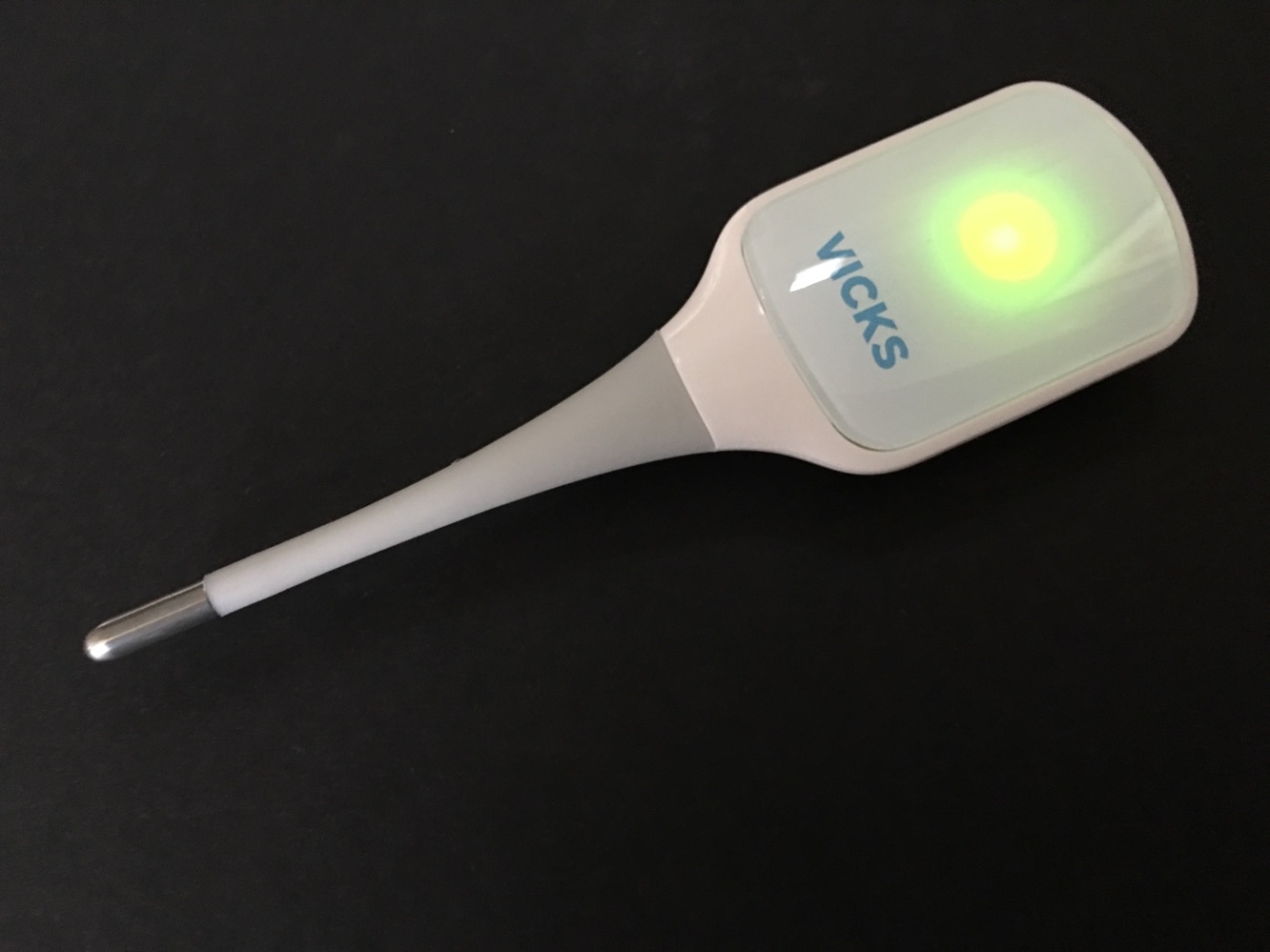
SmartTemp is 4.5” long, which is pretty much standard thermometer size. There’s no actual screen to read the temperature on the thermometer itself — that’s done on the app — all you see is a glowing light that only tells you if the device is on and connected, or that a reading is being taken.

A small power button is located on top of the thermometer, and the tip of the thermometer is flexible, which is nice. Like many digital thermometers, SmartTemp can be used orally, under the arm, or rectally. Our professional advice is to pick one method and stick with it…especially if you’re opting to use it as a rectal thermometer. An inexpensive CR2032 coin cell battery is used to power SmartTemp, and it can be swapped out on the back of the thermometer. A plastic cap is also included for storage.


Review: Vicks SmartTemp Wireless Smartphone Thermometer

SmartTemp’s app is the biggest reason to buy the thermometer — it has to be, considering you can get quick readings directly on competing thermometers. The app’s history feature stores the last readings taken by the thermometer, either as one list, or by family member. Users can store temperatures for weeks, months, or years, though that likely won’t be necessary to most people. You can also add notes, or symptom and medication info to each reading.

Other useful options include the ability to set reminders for temperature readings, and to check the thermometer’s battery life from within the app.


Review: Vicks SmartTemp Wireless Smartphone Thermometer

The most important factors with any thermometer, however, are accuracy and ease of use. While adults may find SmartTemp easy to use, those with kids may prefer a different, quicker thermometer. (We got a number of “invalid measurement” readings when SmartTemp was tested on a 3-year-old.) In our experience, using SmartTemp orally got us the best readings. When compared to a more expensive ear thermometer, SmartTemp’s oral readings were within .1 to .3 degrees Fahrenheit. The underarm temperature readings appeared off by comparison. As we didn’t test rectally, we’d recommend it for oral use. One welcome touch is that you can take temperature readings while the app is closed, and once the app is re-opened, it will alert users to any new readings taken during that time. Note that the thermometer turns off on its own after a few minutes of non-use.

Review: Vicks SmartTemp Wireless Smartphone Thermometer

SmartTemp is an interesting case.


Latest News
The Apple Watch Series 11 46mm GPS Is $100 Off
1 Min Read
Clamshell Style iPhone Being Looked Into By Apple
1 Min Read
Foldable iPhones May Have the Largest Battery Ever
1 Min Read
Apple and TSMC’s 10-Year Collaboration May Be Ending
1 Min Read
The 13-inch M5 iPad Pro 256GB Wi-Fi Is $149 Off
1 Min Read
M5 Pro and M5 Max Chips for the MacBook Pro could Roll Out with macOS 26.3
1 Min Read
Mac Ordering Process Revamped
1 Min Read
Check Signed By Steve Wozniak and Steve Jobs Sold For $2.4 Million
1 Min Read
The Anker 140W 4-Port GaN USB-C Charger is $35 Off
1 Min Read
No iPhone Air 2 This Year, according to Latest Report
1 Min Read
New Report Corroborates Split iPhone Release Dates
1 Min Read
Apple Losing More Researchers As They Plan To Release 2 Siri Versions
1 Min Read

iLounge logo

iLounge is an independent resource for all things iPod, iPhone, iPad, and beyond. iPod, iPhone, iPad, iTunes, Apple TV, and the Apple logo are trademarks of Apple Inc.

This website is not affiliated with Apple Inc.
iLounge © 2001 - 2025. All Rights Reserved.
  • Contact Us
  • Submit News
  • About Us
  • Forums
  • Privacy Policy
  • Terms Of Use
Welcome Back!

Sign in to your account

Lost your password?










