
iLoungeiLounge
  • News
    • Apple
      • AirPods Pro
      • AirPlay
      • Apps
        • Apple Music
      • iCloud
      • iTunes
      • HealthKit
      • HomeKit
      • HomePod
      • iOS 13
      • Apple Pay
      • Apple TV
      • Siri
    • Rumors
    • Humor
    • Technology
      • CES
    • Daily Deals
    • Articles
    • Web Stories
  • iPhone
    • iPhone Accessories
  • iPad
  • iPod
    • iPod Accessories
  • Apple Watch
    • Apple Watch Accessories
  • Mac
    • MacBook Air
    • MacBook Pro
  • Reviews
    • App Reviews
  • How-to
    • Ask iLounge
Font ResizerAa
iLoungeiLounge
Font ResizerAa
Search
  • News
    • Apple
    • Rumors
    • Humor
    • Technology
    • Daily Deals
    • Articles
    • Web Stories
  • iPhone
    • iPhone Accessories
  • iPad
  • iPod
    • iPod Accessories
  • Apple Watch
    • Apple Watch Accessories
  • Mac
    • MacBook Air
    • MacBook Pro
  • Reviews
    • App Reviews
  • How-to
    • Ask iLounge
Follow US

Reviews

Reviews

Review: Uzibull ShockWave for iPad 2, iPad (3rd/4th-Gen)

Last updated: May 16, 2021 8:06 pm UTC
By Nick Guy
Review: Uzibull ShockWave for iPad 2, iPad (3rd/4th-Gen)

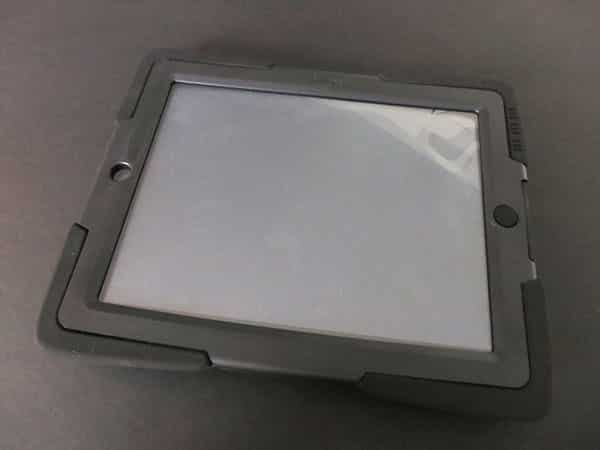
Sometimes styling its name as ÜZBL, Uzibull is back with its latest iPad case, ShockWave ($59), which features a very similar aesthetic to the last products we saw from the company. This one’s far more ruggedized, though, matching the general style and concept of cases such as Griffin’s Survivor. The case splits into three pieces, with a hard plastic frame to hold the tablet, followed by a rubber outer layer that protects the back, sides, and front edges, then a plastic removable screen cover.

Review: Uzibull ShockWave for iPad 2, iPad (3rd/4th-Gen)

Included with our review unit of ShockWave was an instruction sheet, with all seven images dedicated solely to snapping the iPad into the plastic frame. We can’t ever recall a company providing so much information about what is normally such a basic part of installation. It walks you through which end to start with—“short end port side”—all the way to inspecting that the iPad is seated properly. While useful information isn’t a bad thing, the fact that so many instructions were needed is one of two signs that the design was a bit too complicated. Once the iPad is in the tray, the next layer is the rubber skin, and then the screen protector.


Snapping that last piece in place takes some patience and a few tries, as does removing it. Uzibull actually says on its instruction sheet that “the case is intentionally not easy to remove,” which seems more like rationalization than reality.


Review: Uzibull ShockWave for iPad 2, iPad (3rd/4th-Gen)

Review: Uzibull ShockWave for iPad 2, iPad (3rd/4th-Gen)

When it’s all put together, the case is pretty large, but that’s to be expected from a design of this type. The rubber extends out at the corners, adding extra drop protection, while ridges on the back add some grip. We’d feel totally comfortable handing a child a full-sized iPad in ShockWave, or putting it in a situation where it might otherwise get knocked around or dropped. One of the better thought-out aspects of the case is the rubber foot on the bottom of the built-in stand. It holds the tablet at a 55° landscape angle, preventing it from slipping or scuffing. The stand snaps securely into the back of the case when it’s not in use, sitting flush against the plastic surrounding it.


Review: Uzibull ShockWave for iPad 2, iPad (3rd/4th-Gen)

For the most part, Uzibull got button and port protection access right, although it isn’t as protective as it could be.

Its raised Home Button works just as it should, even for double clicks. The Sleep/Wake and volume buttons are deeply recessed beneath the material, but raised protectors help maintain a good degree of tactility. Headphone and Dock Connector/Lightning port coverage is set up in a similar way. Neither is covered to prevent dirt or splashes from getting in. The ports are deep down there, but you should be able to connect most plugs; there will be some limitations with large, angled headphone connectors. There is one place where the thickness of the material presents a real issue though, and that’s with the side switch: the opening is so narrow and deep that you mightn’t be able to flip it. We were only able to do so with a pinky, and even that was hit and miss.


Review: Uzibull ShockWave for iPad 2, iPad (3rd/4th-Gen)

Review: Uzibull ShockWave for iPad 2, iPad (3rd/4th-Gen)

ShockWave’s screen protector thankfully doesn’t impact the touch sensitivity of the iPad’s display.



Latest News
The 14-inch MacBook Pro with M5 Chip 16GB RAM/512GB is $250 Off
1 Min Read
Noise and Static on AirPods Pro 3 Still Unfixed
1 Min Read
New iMac with 24-inch OLED Display May be Brighter With 600 Nits
1 Min Read
The 15-inch M4 MacBook Air 256GB Is $250 Off
1 Min Read
Internal Kernel Debug Kit from Apple Reveals Tests for a MacBook with A15 Chip
1 Min Read
Apple Currently In Talks With Suppliers for Chip Assembly & Packaging of iPhones in India
1 Min Read
Apple Allows Easier Battery Replacement For M5 MacBook Pro with 14-inch Display
1 Min Read
The Apple Watch SE 3 44mm GPS is $50 Off
1 Min Read
20th Anniversary iPhone May Launch in Two Years
1 Min Read
Better Image Generation Capabilities and Apple Music Integration Coming to ChatGPT
1 Min Read
A20 Pro Chip Coming to Next Gen iPad Mini OLED
1 Min Read
Amazon has the AirTag 4 Pack Marked $29 off
1 Min Read

iLounge logo

iLounge is an independent resource for all things iPod, iPhone, iPad, and beyond. iPod, iPhone, iPad, iTunes, Apple TV, and the Apple logo are trademarks of Apple Inc.

This website is not affiliated with Apple Inc.
iLounge © 2001 - 2025. All Rights Reserved.
  • Contact Us
  • Submit News
  • About Us
  • Forums
  • Privacy Policy
  • Terms Of Use
Welcome Back!

Sign in to your account

Lost your password?








