
Pros: A portable amplifier that boosts the iPod’s volume, runs off its own batteries, and splits the iPod’s headphone port into two. Simple operation.
Cons: Adds audible base level of noise to all iPod output with typical headphones, provides less amplification and lower overall sound quality than another (more expensive) iPod amplifier. Not a useful accessory for most iPod owners.
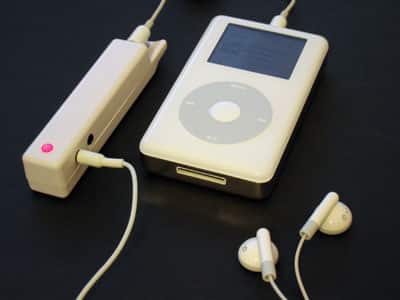
Headphone enhancement devices are nothing new: they all claim to add a bit of extra zing to the standard audio you hear from an iPod. Regardless of price, we haven’t been especially impressed by the ones we’ve tried so far. Griffin’s EarJams (iLounge rating: B-) on the very low-end are supposed to bump up the bass in Apple’s iPod pack-ins, while Simpl Acoustics’ A1 (iLounge rating: C) was an expensive headphone jack amplifier that promised better sound from any pair of attached headphones. The EarJams aimed low and hit low, delivering cheap bass enhancement that was muddy and unimpressive. Simpl’s $150 A1 aimed higher, but did little more than boost the iPod’s volume without draining its battery, and added a bit of distortion to the iPod’s audio signal in the process.
Before we recommend (rating B or higher) any audio enhancement add-on to our average readers, it has to offer a benefit that such average readers might want, at a reasonable price. For these devices, that can be a high hurdle. In our own experiences – and by virtually all accounts – an unassisted iPod with a good pair of headphones will do a spectacular job of catering to the audio needs of typical users, and there’s little need to put a device between your iPod and such headphones (or your headphones and your ears) to get wonderful sound.
[If you don’t have a good pair of headphones yet and are willing to spend the cash, see our online reviews, read our Guide to picking a good price/performance pair for your needs, and make an investment you’l feel comfortable with. By comparison, you could spend your money on pricey amplifiers, bass-boosters, or artificial 3D spacializers, but we think that they’re designed for specific niche audiences. We acknowledge that there is a small group of vocal audiophiles who insist that the iPod be connected to obscure pairs of inefficient, high-impedence headphones and follow-on amplifiers, but we respectfully disagree. However, if you’re one of those people and want to do that, you’ll probably still want the best possible components for the job.]

Upbeat Audio’s Boosteroo Revolution ($79.99) is clearly designed to appeal to a narrow niche of people. The company’s web site suggests that it’s made for you if you “love your iPod,” but find that “sometimes it just is not loud enough to really enjoy your favorite music,” which given the iPod’s built-in amplifier shouldn’t be the case unless you’re using inefficient phones or trying to listen to music while riding on a motorcycle. Specifically, Upbeat claims that it will deliver 10 or more decibels of additional amplification to the least efficient (60- or greater-ohm) headphones without additional distortion, and greater amplification to more efficient ones. Less plausibly, it promises to image two-channel sound into “high-definition three-channel surround sound,” a marketing claim that will be fascinating to watch people attempt to quantify.

At more than twice the price of the company’s earlier Boosteroo, a AA-battery powered amplifier which interestingly included the ability to split an audio player’s signal between up to three devices, the Revolution is smaller (shorter only a little thicker than a large highlighter pen), uses AAAA (yes, AAAA) batteries to run for around 20 hours (down from 36), and supports audio splitting for only two devices. Also unlike its clear-cased predecessor, it’s made in a white glossy package that generally matches full-sized iPods. An extruded kangaroo logo and the word Revolution are its only front external markings; Boosteroo is extruded on its rear battery compartment.
There’s a hole at the top, presumably for attachment to a lanyard (not included), and two cords of different lengths are included for iPod attachment.
While not the slickest industrial design we’ve seen, the simplicity of its controls may appeal to some. It features a red LED light that turns on and indicates battery drain whenever it’s connected to an input cable – no on-off switch, dials, or buttons are used. You can connect two headphone plugs next to each other on one of its faces, plug your iPod input in to one of its ends, and carry it in a pocket wherever you go.

Marketing claims and aesthetics aside, Revolution does three potentially positive things – it makes your iPod’s headphone jack output louder, adds the tiniest hint of reverb to provide the slight sensation of “surround sound,” and lets you split one headphone jack into two, all without adding to your iPod’s battery drain. Upbeat claims that it will boost volume by “up to 400%” on any audio source with a standard headphone jack; however, with full-sized iPods and minis, we saw an approximate doubling of standard volume levels, such that use of the Revolution requires 25% iPod volume rather than 50% to be at an “average” listening level with Apple’s own phones; even less volume with more efficient phones. It actually provides less amplification than Simpl’s A1, and adds that hint of artificial spacialization, neither of which will appeal to serious listeners looking for pure, accurate sound.
Revolution also does two somewhat negative things. First, and as with Simpl’s A1, it adds a bit of base-level noise to the audio that’s apparent with virtually any set of headphones you connect. The noise is quite noticeable by comparison with the iPod’s standard silence – even when using Apple’s packed-in phones – and then even by comparison with A1. Second, it modestly clips the lowest-end bass notes – by comparison, Simpl’s A1 modestly boosts bass.











