
iLoungeiLounge
  • News
    • Apple
      • AirPods Pro
      • AirPlay
      • Apps
        • Apple Music
      • iCloud
      • iTunes
      • HealthKit
      • HomeKit
      • HomePod
      • iOS 13
      • Apple Pay
      • Apple TV
      • Siri
    • Rumors
    • Humor
    • Technology
      • CES
    • Daily Deals
    • Articles
    • Web Stories
  • iPhone
    • iPhone Accessories
  • iPad
  • iPod
    • iPod Accessories
  • Apple Watch
    • Apple Watch Accessories
  • Mac
    • MacBook Air
    • MacBook Pro
  • Reviews
    • App Reviews
  • How-to
    • Ask iLounge
Font ResizerAa
iLoungeiLounge
Font ResizerAa
Search
  • News
    • Apple
    • Rumors
    • Humor
    • Technology
    • Daily Deals
    • Articles
    • Web Stories
  • iPhone
    • iPhone Accessories
  • iPad
  • iPod
    • iPod Accessories
  • Apple Watch
    • Apple Watch Accessories
  • Mac
    • MacBook Air
    • MacBook Pro
  • Reviews
    • App Reviews
  • How-to
    • Ask iLounge
Follow US

Reviews

Reviews

Review: Udoq Docking System

Last updated: May 16, 2021 11:20 am UTC
By Jesse Hollington
Review: Udoq Docking System

Although wireless charging is all the rage these days, that only helps users with the very latest iPhones, and — for now at least — doesn’t help you to charge your iPad. Hence, there’s still a call for traditional docking solutions, and if you’re in a family with multiple iPhones, iPads, and other portable electronic devices, finding places to charge them can sometimes be a problem. This is the need that udoq aims to address with its new all-in-one modular docking station that’s capable of handling multiple electronic devices all in one central location, all charging from a single power outlet.

Review: Udoq Docking System

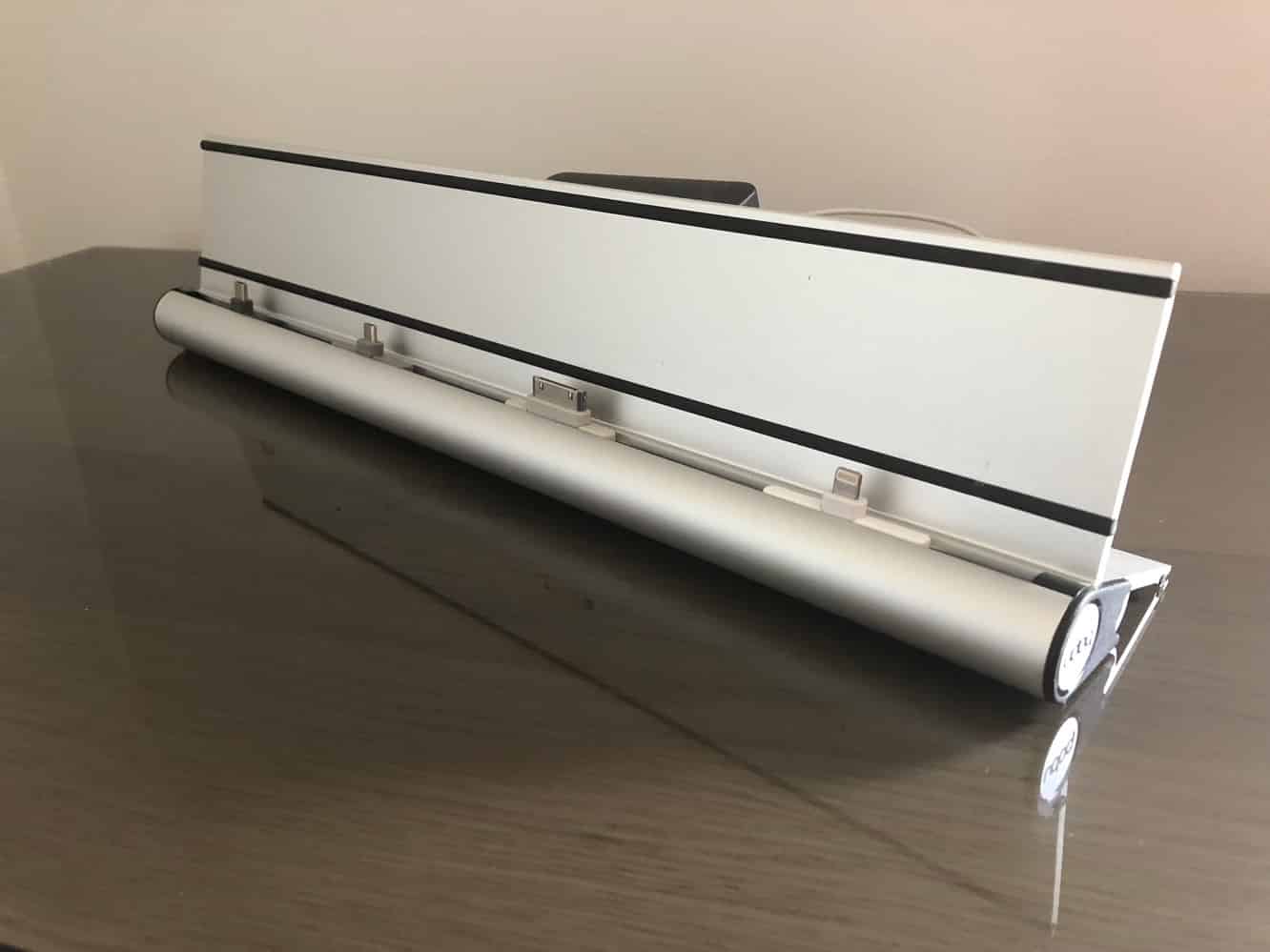
Udoq’s eponymous product is actually a modular design that allows you to mix and match the components you need to build a custom docking solution of your choice, although the company sells a number of sets that include all of the elements for common configurations.

An aluminum stand/rail provides the base to which you add as many charging modules as you need, or can fit — four lengths of rail are available to choose from depending on how many devices you want to charge and how much physical space you have available. We received the udoq 400 for our review, which measures just under 16 inches long — the “400” in the title is actually the length in millimetres, and the other sizes are the udoq 250 (9.84 inches), udoq 550 (21.65 inches), and udoq 700 (27.56 inches).


Review: Udoq Docking System

The udoq rail allows you to insert any number of adapters simply by sliding them in from either end and positioning them appropriate to the size of the device you want to charge, and the company sells adapters for Lightning, micro USB, USB-C, and even the old-school 30-pin Dock Connector — a nice touch for users who may legitimately still have older iPad or iPhone models, or even an iPod classic to mix in with their modern iOS device collection. The adapters come with a standard USB cable on one end that can be routed through the rail channel to a compartment on the back, and udoq has also very thoughtfully designed the connectors to be adjusted in height, so unlike many docks you won’t need to worry about removing your iPad or iPhone from all but the most bulky cases.


Review: Udoq Docking System

The compartment the rear of the rail houses a USB power hub that all of the docking adapter cables are routed back to, allowing a single power cable to be sent out the back of the udoq and plugged into the wall.

The compartment is large enough to allow the cables to be bundled up inside, and a cover snaps on the top to keep everything neatly hidden.

Review: Udoq Docking System

In addition to the standard plug docks, udoq also sells an Apple Watch charging cable adapter, although like many Apple Watch docks, this is only a plastic mount for the Apple’s own Apple Watch charger, so you’ll need to supply your own. A Qi Wireless Charging module is also in development. Support adapters can be purchased for larger devices or those that charge from a port in the side (and therefore have to be docked in landscape mode).



Latest News
The 14-inch MacBook Pro with M5 Chip 16GB RAM/512GB is $250 Off
1 Min Read
Noise and Static on AirPods Pro 3 Still Unfixed
1 Min Read
New iMac with 24-inch OLED Display May be Brighter With 600 Nits
1 Min Read
The 15-inch M4 MacBook Air 256GB Is $250 Off
1 Min Read
Internal Kernel Debug Kit from Apple Reveals Tests for a MacBook with A15 Chip
1 Min Read
Apple Currently In Talks With Suppliers for Chip Assembly & Packaging of iPhones in India
1 Min Read
Apple Allows Easier Battery Replacement For M5 MacBook Pro with 14-inch Display
1 Min Read
The Apple Watch SE 3 44mm GPS is $50 Off
1 Min Read
20th Anniversary iPhone May Launch in Two Years
1 Min Read
Better Image Generation Capabilities and Apple Music Integration Coming to ChatGPT
1 Min Read
A20 Pro Chip Coming to Next Gen iPad Mini OLED
1 Min Read
Amazon has the AirTag 4 Pack Marked $29 off
1 Min Read

iLounge logo

iLounge is an independent resource for all things iPod, iPhone, iPad, and beyond. iPod, iPhone, iPad, iTunes, Apple TV, and the Apple logo are trademarks of Apple Inc.

This website is not affiliated with Apple Inc.
iLounge © 2001 - 2025. All Rights Reserved.
  • Contact Us
  • Submit News
  • About Us
  • Forums
  • Privacy Policy
  • Terms Of Use
Welcome Back!

Sign in to your account

Lost your password?








