
Want to mount an iPad on your desk? That’s easy: all-plastic stands are available for $20, with metal options running from $30-$40, while combination stands and cases can be had for a little more. But some people want more sophisticated solutions and are willing to pay for them, so some enterprising third-party developers have come up with stands that look nicer and cost more — sometimes a lot more. Today, we’re reviewing two such options: FLOS’s docking lamp D’E-light, and Twelve South’s HoverBar ($80), each of which suspends an iPad 2 well above the surface of a desk or table. D’E-light also works with the original iPad, all iPhones, and most iPods.
Before we discuss each of these options in detail, it’s worth pointing out that they’re both decidedly niche solutions. D’E-light’s nearly $400 price is at least $300 higher than the most expensive Apple device-compatible lamps we’ve previously seen, attributable to its internationally famous designer Phillippe Starck. We’re fans of Starck’s designs, and really love the way that D’E-light looks, but there’s no getting around the fact that FLOS is charging a modern art premium for this model; consequently, you’d really have to be a Starck fan to even consider it.
By comparison, HoverBar isn’t outrageously expensive, but it’s currently very iPad model-specific, and designed primarily to be attached to an Apple iMac or monitor. Like D’E-light, you can use it elsewhere on a table or a desk, though you’ll have to clamp it to the edge. Most iPad stands out there have no such limitations.

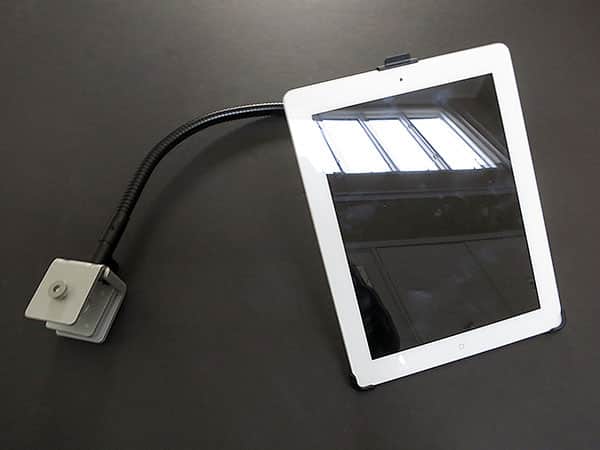
The pitch with HoverBar is simple: why keep an iPad 2 glued to your desk or on your lap when you can have it float in the air, suspended from behind by a gooseneck mount? Twelve South shows HoverBar working in a variety of different scenarios: off to the side or above Apple’s desktop computers and monitors, holding an iPad 2 under a cabinet or above the surface of a desk, and even hanging the iPad 2 above one of Apple’s laptop computers. While previously-released mounts such as Belkin’s Kitchen Cabinet Mount have tackled one of these use scenarios, HoverBar is decidedly more ambitious, and also a little more expensive.

These varied mounting feats are all achieved with the same several pieces: a rubber-padded metal clamp that attaches to a flat surface—the leg of an Apple monitor or iMac, the overhanging edge of a desk, and so on—plus a 22-inch-long gooseneck arm, and a hard plastic iPad 2 frame. You attach the pieces to each other, use an included Allen wrench to tighten the clamp, and then adjust both the arm and a ball joint behind the iPad 2 frame to achieve the height and viewing angle you prefer. Twelve South also includes a collection of cord managing clips in the package so that you can keep your iPad 2 charged or synced with your own cable, held in place against the gooseneck arm rather than dangling below it.

While the idea behind HoverBar is a pretty good one, we found its stability to be less than optimal. Even after following the company’s instructions to a T, using unusual strength and an included silicone grip pad to twist the screw-based gooseneck mount into the clamp, we found that the weight of the iPad 2 had a tendency to move the bar down from high positions and sometimes shake the iMac—we saw USB device disconnection warnings several times when we were placing the iPad in the plastic frame. Twelve South chose to use a heavy, durable metal gooseneck in HoverBar, and though the material choice is great, it can add a fair bit of weight to one side of an otherwise stable machine.

Moreover, if the gooseneck arm isn’t screwed in tight enough, or gets bent the wrong way, your iPad 2 will find itself floating down to the surface of the table below. The more you play with the angle of your iPad 2 after the initial mounting process, the more likely it will be to sag. HoverBar really could have benefitted from a ball bearing-like locking mechanism to insure that the gooseneck arm and clamp are joined perfectly together.

We also found HoverBar’s practicality to be questionable, though this will vary dramatically from user to user based largely on the place where the mount is intended to be used. Put aside the fact that it demands you do away with iPad 2 cases—some users will mind that more than others.











