
iLoungeiLounge
  • News
    • Apple
      • AirPods Pro
      • AirPlay
      • Apps
        • Apple Music
      • iCloud
      • iTunes
      • HealthKit
      • HomeKit
      • HomePod
      • iOS 13
      • Apple Pay
      • Apple TV
      • Siri
    • Rumors
    • Humor
    • Technology
      • CES
    • Daily Deals
    • Articles
    • Web Stories
  • iPhone
    • iPhone Accessories
  • iPad
  • iPod
    • iPod Accessories
  • Apple Watch
    • Apple Watch Accessories
  • Mac
    • MacBook Air
    • MacBook Pro
  • Reviews
    • App Reviews
  • How-to
    • Ask iLounge
Font ResizerAa
iLoungeiLounge
Font ResizerAa
Search
  • News
    • Apple
    • Rumors
    • Humor
    • Technology
    • Daily Deals
    • Articles
    • Web Stories
  • iPhone
    • iPhone Accessories
  • iPad
  • iPod
    • iPod Accessories
  • Apple Watch
    • Apple Watch Accessories
  • Mac
    • MacBook Air
    • MacBook Pro
  • Reviews
    • App Reviews
  • How-to
    • Ask iLounge
Follow US

Reviews

Reviews

Review: Twelve South HoverBar 3 for iPad

Last updated: May 16, 2021 7:56 pm UTC
By Nick Guy
Review: Twelve South HoverBar 3 for iPad

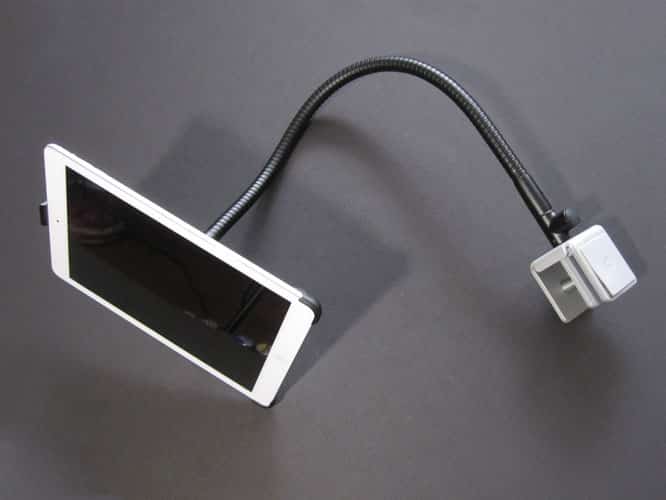
Once again, Twelve South is back with a sequel to an earlier product. This time, it’s HoverBar 3 ($100); we previously covered HoverBar for iPad 2. It’s the same concept as before, although this time, the mounting bar is compatible with every iPad except for the first-generation model thanks to three different clips. Twelve South also now includes a stand it calls Sidekick, which can prop up a tablet in landscape or portrait orientation. With these added features, the price has jumped $20.

Review: Twelve South HoverBar 3 for iPad

Inside HoverBar 3’s box are 13 distinct pieces, although they don’t all get used at once. The core of the system is the clamp and gooseneck system. Those two pieces screw together—a silicone pad is included to help you tighten them by hand— with perpendicular joints based on whether you’re attaching to a horizontal surface such as a desk, or a vertical one, including an iMac’s leg. The metal arm is 22 inches long, and highly positionable without being loose.


We found that it took some muscle to put it where we wanted it, but once we did, it stayed in place, not sinking when the iPad was attached. The clamp must be tightened using the included hex wrench, and can fit around any surface up to one inch thick.


Review: Twelve South HoverBar 3 for iPad

Review: Twelve South HoverBar 3 for iPad

As mentioned, three different iPad clips are included in the set. One is for the iPad Air, one is for second-, third-, and fourth-generation iPads, and the last fits both iPad minis. They’re very similar to the plastic holder from before, fitting around the bottom corners of the tablet and clipping onto the top right in the center; there are holes for the microphones. A 1.5” circular plastic clip connector snaps onto the back of the clip you’re using, and fits onto the ball joint at the end of the mount. Then you simply use the matching collar to screw it into place for a secure hold. Your iPad can be used in landscape or portrait orientation.


Unfortunately, the setup still precludes the use of any sort of case with the system, although you can use a Smart Cover. Four clips are included for cable management.


Review: Twelve South HoverBar 3 for iPad

The truly new piece of this solution is the Sidekick stand. It can be used when you unscrew the clip from the gooseneck, and remove the clip connector, but leave the clip on the iPad. The plastic stand fits onto the same mount as the clip connector, with a rubber non-slip base resting on your desk or table. It can rotate all the way around, clicking into place every 18 degrees. It’s a bit of a hassle to switch back and forth between the modes, but we appreciate that the feature is there when it would have been easier to leave it out. To us, it’s better to have an option than not.



Latest News
The 14-inch MacBook Pro with M5 Chip 16GB RAM/512GB is $250 Off
1 Min Read
Noise and Static on AirPods Pro 3 Still Unfixed
1 Min Read
New iMac with 24-inch OLED Display May be Brighter With 600 Nits
1 Min Read
The 15-inch M4 MacBook Air 256GB Is $250 Off
1 Min Read
Internal Kernel Debug Kit from Apple Reveals Tests for a MacBook with A15 Chip
1 Min Read
Apple Currently In Talks With Suppliers for Chip Assembly & Packaging of iPhones in India
1 Min Read
Apple Allows Easier Battery Replacement For M5 MacBook Pro with 14-inch Display
1 Min Read
The Apple Watch SE 3 44mm GPS is $50 Off
1 Min Read
20th Anniversary iPhone May Launch in Two Years
1 Min Read
Better Image Generation Capabilities and Apple Music Integration Coming to ChatGPT
1 Min Read
A20 Pro Chip Coming to Next Gen iPad Mini OLED
1 Min Read
Amazon has the AirTag 4 Pack Marked $29 off
1 Min Read

iLounge logo

iLounge is an independent resource for all things iPod, iPhone, iPad, and beyond. iPod, iPhone, iPad, iTunes, Apple TV, and the Apple logo are trademarks of Apple Inc.

This website is not affiliated with Apple Inc.
iLounge © 2001 - 2025. All Rights Reserved.
  • Contact Us
  • Submit News
  • About Us
  • Forums
  • Privacy Policy
  • Terms Of Use
Welcome Back!

Sign in to your account

Lost your password?








