
iLoungeiLounge
  • News
    • Apple
      • AirPods Pro
      • AirPlay
      • Apps
        • Apple Music
      • iCloud
      • iTunes
      • HealthKit
      • HomeKit
      • HomePod
      • iOS 13
      • Apple Pay
      • Apple TV
      • Siri
    • Rumors
    • Humor
    • Technology
      • CES
    • Daily Deals
    • Articles
    • Web Stories
  • iPhone
    • iPhone Accessories
  • iPad
  • iPod
    • iPod Accessories
  • Apple Watch
    • Apple Watch Accessories
  • Mac
    • MacBook Air
    • MacBook Pro
  • Reviews
    • App Reviews
  • How-to
    • Ask iLounge
Font ResizerAa
iLoungeiLounge
Font ResizerAa
Search
  • News
    • Apple
    • Rumors
    • Humor
    • Technology
    • Daily Deals
    • Articles
    • Web Stories
  • iPhone
    • iPhone Accessories
  • iPad
  • iPod
    • iPod Accessories
  • Apple Watch
    • Apple Watch Accessories
  • Mac
    • MacBook Air
    • MacBook Pro
  • Reviews
    • App Reviews
  • How-to
    • Ask iLounge
Follow US

Reviews

Reviews

Review: Twelve South BookBook for iPad 2/iPad (3rd-Gen)

Last updated: May 17, 2021 9:59 am UTC
By Nick Guy
Review: Twelve South BookBook for iPad 2/iPad (3rd-Gen)

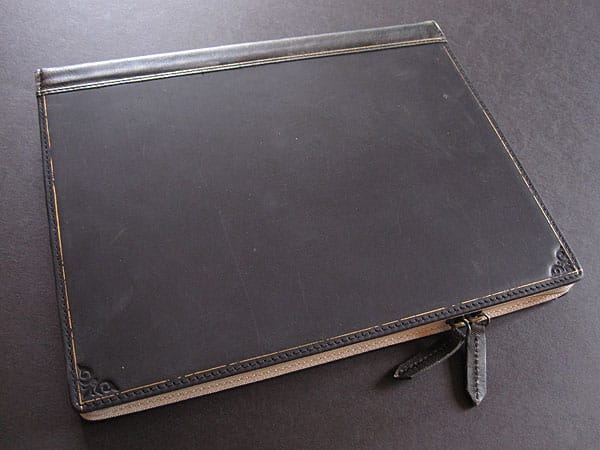
Beautiful. That’s the first word that came to mind upon seeing Twelve South’s new BookBook for iPad ($80) and the impression only grew stronger when we got our hands on it and had a chance to really use it. With support for the iPad 2 and third-generation iPad, this is actually a significantly revised second version of the case. The company made some dramatic changes, making it more protective and functional. Compared to BookBook for iPhone, MacBook Pro, and MacBook Air, it’s the strongest member of the family so far. BookBook for iPad is available in Vintage Brown, Vibrant Red, and Classic Black.


Review: Twelve South BookBook for iPad 2/iPad (3rd-Gen)

From the outside, this BookBook is virtually indistinguishable from its predecessor. It’s made of very high quality reinforced leather with gold trim. As with other Twelve South cases, a little bit of weathering is a good thing here; it adds character.

The spine looks just like that on an old book, with more gold accents including the phrases “BOOK BOOK” and “VOL XII,” the latter of which represents the company’s name. It would fit in perfectly with other tomes on a shelf. A zipper takes up the remaining three-quarters of the edge, with a pair of pulls attached to brass rings.


Review: Twelve South BookBook for iPad 2/iPad (3rd-Gen)

Review: Twelve South BookBook for iPad 2/iPad (3rd-Gen)

Opening the case reveals a whole new setup for holding and using your iPad. Gone are the lazy-feeling elastic band and leather corners. They’ve been replaced with a soft, thin leather frame on the right side; a pair of snaps on the left edge holds it place against the suede-lined interior. While many holders of this style leave the corners or edges exposed, this one covers all of the iPad’s aluminum back and sides as well as some of the bezel. To insert the tablet, you simply lift the frame off and slide the device in through the other edge, followed by a flap that helps keep it in place.


Review: Twelve South BookBook for iPad 2/iPad (3rd-Gen)

Review: Twelve South BookBook for iPad 2/iPad (3rd-Gen)

Review: Twelve South BookBook for iPad 2/iPad (3rd-Gen)

The openings for the ports and buttons are just a little rough, but allow for easy and full access.

Using the iSight camera without removing the iPad is the most problematic aspect of BookBook. The hole is large enough, but the setup requires the rest of the case dangle below for landscape shots or be held awkwardly in portrait mode. For those who rely on their iPads for photography this may be a deal breaker, but for everyone else it’s just a minor inconvenience. We were surprised, however, by how comfortable the case feels with the front cover folded underneath. It’s well suited for both one- and two-handed use.


Review: Twelve South BookBook for iPad 2/iPad (3rd-Gen)

Review: Twelve South BookBook for iPad 2/iPad (3rd-Gen)

BookBook supports typing and viewing angles, both in pretty intuitive ways. For the former, simply unsnap the frame and fold out the small stand attached to the back. Position that stand against the male end of the snaps and it holds its position, securely and at a comfortable angle. For video viewing, one simply leans the holder against the edge of the front cover.



Latest News
The 14-inch MacBook Pro with M5 Chip 16GB RAM/512GB is $250 Off
1 Min Read
Noise and Static on AirPods Pro 3 Still Unfixed
1 Min Read
New iMac with 24-inch OLED Display May be Brighter With 600 Nits
1 Min Read
The 15-inch M4 MacBook Air 256GB Is $250 Off
1 Min Read
Internal Kernel Debug Kit from Apple Reveals Tests for a MacBook with A15 Chip
1 Min Read
Apple Currently In Talks With Suppliers for Chip Assembly & Packaging of iPhones in India
1 Min Read
Apple Allows Easier Battery Replacement For M5 MacBook Pro with 14-inch Display
1 Min Read
The Apple Watch SE 3 44mm GPS is $50 Off
1 Min Read
20th Anniversary iPhone May Launch in Two Years
1 Min Read
Better Image Generation Capabilities and Apple Music Integration Coming to ChatGPT
1 Min Read
A20 Pro Chip Coming to Next Gen iPad Mini OLED
1 Min Read
Amazon has the AirTag 4 Pack Marked $29 off
1 Min Read

iLounge logo

iLounge is an independent resource for all things iPod, iPhone, iPad, and beyond. iPod, iPhone, iPad, iTunes, Apple TV, and the Apple logo are trademarks of Apple Inc.

This website is not affiliated with Apple Inc.
iLounge © 2001 - 2025. All Rights Reserved.
  • Contact Us
  • Submit News
  • About Us
  • Forums
  • Privacy Policy
  • Terms Of Use
Welcome Back!

Sign in to your account

Lost your password?








