
iLoungeiLounge
  • News
    • Apple
      • AirPods Pro
      • AirPlay
      • Apps
        • Apple Music
      • iCloud
      • iTunes
      • HealthKit
      • HomeKit
      • HomePod
      • iOS 13
      • Apple Pay
      • Apple TV
      • Siri
    • Rumors
    • Humor
    • Technology
      • CES
    • Daily Deals
    • Articles
    • Web Stories
  • iPhone
    • iPhone Accessories
  • iPad
  • iPod
    • iPod Accessories
  • Apple Watch
    • Apple Watch Accessories
  • Mac
    • MacBook Air
    • MacBook Pro
  • Reviews
    • App Reviews
  • How-to
    • Ask iLounge
Font ResizerAa
iLoungeiLounge
Font ResizerAa
Search
  • News
    • Apple
    • Rumors
    • Humor
    • Technology
    • Daily Deals
    • Articles
    • Web Stories
  • iPhone
    • iPhone Accessories
  • iPad
  • iPod
    • iPod Accessories
  • Apple Watch
    • Apple Watch Accessories
  • Mac
    • MacBook Air
    • MacBook Pro
  • Reviews
    • App Reviews
  • How-to
    • Ask iLounge
Follow US

Reviews

Reviews

Review: Tuff-Luv Scribe Folio Stasis Case for iPad 2

Last updated: May 17, 2021 11:55 am UTC
By Nick Guy
Review: Tuff-Luv Scribe Folio Stasis Case for iPad 2

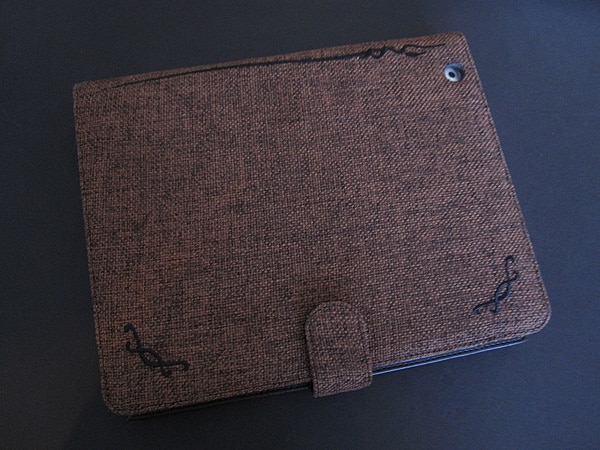
Tuff-Luv’s Tri-Axis Stasis and Multi-View Stasis were among our favorite early cases for the iPad 2; they were also some of the first third-party options to incorporate the Smart Cover-like magnet system to wake and sleep the tablet. We not only liked the form and functionally, but also the nice array of materials the British company offered the case in. Now Tuff-Luv has taken a very similar approach with its Scribe Folio Stasis Case (£40-£55/$60-$80). Available in faux leather, real leather, or natural hemp, Scribe has two big differences over its predecessors: its designed to hold an A5 pad of paper in addition to your iPad 2, and there’s a pull out “document wallet” hidden inside.


Review: Tuff-Luv Scribe Folio Stasis Case for iPad 2

While it can be positioned either way, the camera hole on the back of the case dictates that the tablet be held on the right side of the case. The frame is exactly the same as the one on Tri-Axis and Multi-View. All four of the tablet’s corners are exposed, and there are also openings for the microphone, speaker, and Dock Connector port.

A small Velcro on the right side holds it securely in place. This somewhat squared-off frame isn’t our favorite style over the curved edges of the iPad 2, but everything that needs to be accessible is. On the inside of the case’s spine there’s a small segment of elastic material for holding a pen or stylus.


Review: Tuff-Luv Scribe Folio Stasis Case for iPad 2

Review: Tuff-Luv Scribe Folio Stasis Case for iPad 2

The inside of the right cover has more going on than on most folio-style cases. Mirrored on the top and bottom are a slit and an elastic band. An included A5 pad of paper fits into either opening, although most users will put it at the top.

Pulling at the outside edge of the cover reveals a completely removable tray with holders for business cards, SD cards, and small documents. It’s so slim, and fits in so neatly, you might not notice it’s there right away. A tab with a snap on the end holds the whole case shut.


Review: Tuff-Luv Scribe Folio Stasis Case for iPad 2

Review: Tuff-Luv Scribe Folio Stasis Case for iPad 2

“Stasis,” in the title of this case and the earlier ones, refers to the auto-lock activating magnets in the case. In our testing of both the faux leather and hemp versions, the feature worked as excepted when there was no pad of paper in place. The added thickness of the pad, however, prevented the magnets from making a connection and we weren’t once able to unlock or lock the iPad 2 by opening or closing the case. Don’t buy this case expecting to utilize both of its flagship features at the same time.


Review: Tuff-Luv Scribe Folio Stasis Case for iPad 2

Review: Tuff-Luv Scribe Folio Stasis Case for iPad 2

Review: Tuff-Luv Scribe Folio Stasis Case for iPad 2

We like Scribe for many of the same reasons we liked Tri-Axis and Multi-View.


Latest News
The Apple Watch Series 11 42mm GPS is $100 Off
1 Min Read
Apple Launching A New Education Hub In India Teaching Robotics and Swift Programming
1 Min Read
Women’s and Men’s Golf Added to Apple Sports
1 Min Read
Apple Adding Civilization VII and Other Games To Apple Arcade
1 Min Read
AirPods 4 ANC Is $59 Off
1 Min Read
Apple Using 2NM Process For Their M6 and A20 Chip
1 Min Read
iPhone 18 Models Will Not Have a Big Redesign
1 Min Read
Launch of MacBook Pro M5 Pro and M5 Max Models is Approaching
1 Min Read
Get the iPad Mini 7 256GB Wi-Fi at $99 Off
1 Min Read
Mozilla Now Allows Turning AI Features Off
1 Min Read
Barcelona Passeig de Gràcia Apple Store Temporarily Closing
1 Min Read
Apple’s Plans to Enter the Smart Glasses Market is Changing the Industry
1 Min Read

iLounge logo

iLounge is an independent resource for all things iPod, iPhone, iPad, and beyond. iPod, iPhone, iPad, iTunes, Apple TV, and the Apple logo are trademarks of Apple Inc.

This website is not affiliated with Apple Inc.
iLounge © 2001 - 2025. All Rights Reserved.
  • Contact Us
  • Submit News
  • About Us
  • Forums
  • Privacy Policy
  • Terms Of Use
Welcome Back!

Sign in to your account

Lost your password?










