
When the original iPad debuted four years ago, we pegged keyboard cases as a critically important accessory category — the bridge between tablets and laptops. Despite Apple’s insistence that people would eventually prefer typing on virtual keyboards, the iPhone demonstrated that tiny glass surfaces with zero feedback were no match for physical keyboards in comfort or accuracy; even the iPad’s larger screen wasn’t optimal for serious typing. So we’ve seen hundreds of keyboard cases since then, including two we’re reviewing today for the iPad Air: Logitech’s Type+ and Touchfire’s Case and Keyboard for iPad Air ($70). To say that these keyboard cases take different approaches would be a grand understatement: Type+ is the latest evolution of a traditional Bluetooth keyboard case, while Touchfire’s option instead uses a sheet of rubber that’s claimed to be “better than Bluetooth.” Neither is great, but Type+ does a far better job overall.
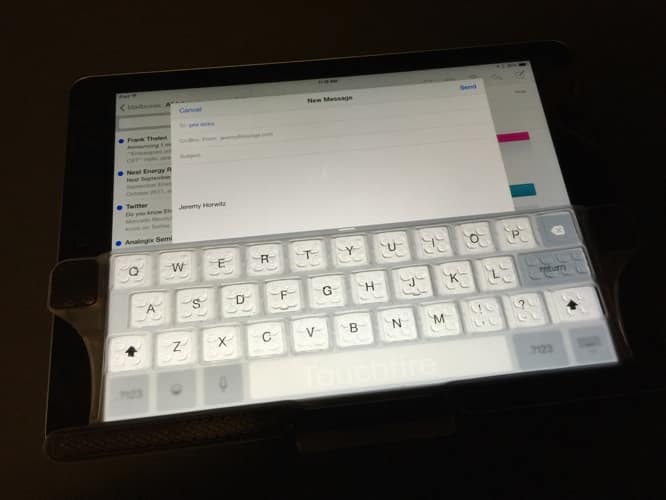
By contrast with Logitech’s great keyboard and okay case bundle, Touchfire’s Case and Keyboard for iPad Air combines a good case with something that we hesitate to even describe as a “keyboard.” The signature piece in the set is a piece of floppy clear rubber with magnets on the left, right, and bottom edges, meant to be attached to your iPad’s screen as an overlay for the landscape orientation virtual keyboard.

Thirty-one of the thirty-two “keys” have contact dots on the bottom to simulate the travel of keys on a real keyboard; the saggy rubber has been molded to resemble trapezoidal 3-D keys.
However, the backspace key has no contact dots, and the bottom row of keys — notably including the spacebar — have no elevation whatosever. The overlay must be positioned on the iPad’s right side, or else its bottom won’t magnetically connect for necessary stablization.


Although we wouldn’t rule out the possibility that the added tactility might help some users with limited vision to better sense the position of virtual iPad keys, Touchfire’s keyboard is otherwise a user experience trainwreck. It feels slimy, offers no improvement in typing accuracy — it actually makes typing worse, in our view — and needs to be taken off and put back on as frequently as the virtual keyboard slides off and on the screen. Touchfire notes that it’s incompatible with iPad screen protectors, but it has built the keyboard to be repeatedly flipped on and off the screen, either off the case’s edge or into the lid, as necessary.

Touchfire claims its rubber “keyboard” is “better than Bluetooth” because it doesn’t drain your iPad’s battery or drop Bluetooth connections, but that’s like calling a paper airplane better than a car because it doesn’t require fuel. Keyboard-related battery drain is so modest on current iPads and Bluetooth keyboards that no one even discusses the topic, and Bluetooth dropouts are incredibly rare—these aren’t real problems.
But typing on a rubbery faux keyboard rather than a real one or the iPad’s bare screen gets old real quick. We couldn’t think of a single situation when we’d rather be using this accessory than an unassisted iPad, and far superior Bluetooth keyboards have nothing to worry about.


If there’s any saving grace for Touchfire, it’s the case, which the company sells separately for $50. The case is highly similar to dozens if not hundreds of cases we’ve previously tested for iPads and iPad minis — a folio-style design with a plastic shell in the back and a three-sectioned lid on the front. As is the norm, the iPad Smart Cover-inspired lid folds back to support a variety of viewing and typing positions, including microfiber lining and hidden magnets. Unremarkable though all of these details may be, Touchfire’s version uses a nicely grippy rubber on the outside, a similarly nice magnetic clasp and screen unlocking system, and front-facing vents for the iPad’s bottom-facing speakers.











