
If there’s any single category of iPod accessories that has been botched to the point of despair, it’s on-TV navigation docks: devices that are supposed to easily enable iPod owners to connect their iPods to TVs and home audio systems, offering large, on-TV navigation of their music and video libraries with convenient remote controls. Unfortunately, Apple’s decision to make its 2007 iPods incompatible with prior video accessories only deepened existing problems common to the category: unpredictable connectivity and the need to pay too high of a premium for a relatively straightforward feature. However you felt about earlier docks — and we’ve previously said that they weren’t as good as they should have been — the idea of paying again for a new one, complete with further potential issues, is nothing short of unappealing.
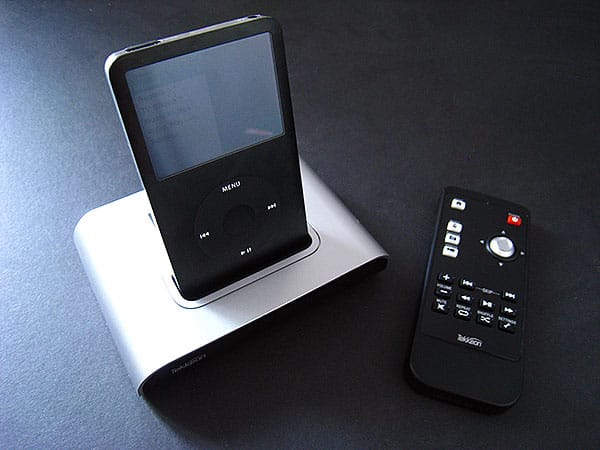
Last month, Tekkeon decided to enter the on-TV navigation dock minefield with NavDock ($130), a silver and black docking station with an almost entirely black Infrared remote control. Just like DLO’s $150 HomeDock Deluxe and Griffin’s $130 TuneCenter, the basic advantage NavDock offers over Apple’s $100 dock, remote, cable and charging sets is the ability to see iPod-like menus on a standard-definition TV, then play back selected music or video content at will. What’s new here is Tekkeon’s interface, and NavDock’s supposed ability to work with the most recent iPod classic, iPod nano, and iPod touch models, as well as earlier iPods.

We say “supposed” and cut this review somewhat short because of a couple of points: first, despite reasonable attempts to make the unit stable, NavDock’s performance is glitchy and unpredictable. Communication between our iPods and the dock took a few tries to initiate in our early testing, and though additional tests revealed that NavDock most often did connect to the docked iPod, it failed or experienced small issues a number of times, requiring re-docking in the process.

Second, we discovered that NavDock doesn’t work the same from iPod to iPod.
Plug in an iPod touch, for instance, and you’ll get a message that video navigation isn’t supported for that model, a fact that’s not noted anywhere on the product’s packaging—we only discovered it through testing and confirmed it on Tekkeon’s web site. We also found that the system refused to play back music from the iPod touch the first time it tried to load album art; Tekkeon’s site buries this known issue in an FAQ and recommends that you, as the user, turn off the album art display feature to make NavDock work properly. Otherwise, it says, you will wait “up to 40 seconds” for the art to load. In a word, this is ridiculous; if a feature doesn’t work properly with the iPods shown on the box, it shouldn’t be enabled, or the system should auto-disable it rather than forcing the user to figure out what’s wrong. It’s shocking that a product can receive Made for iPod certification when it doesn’t even work fully with the iPods it depicts on its box.

What about with the iPod nano and iPod classic? Again, NavDock acts a little weird when it’s trying to deal with album art: there’s a three-second pause, starting a split second after a song begins to play, as the system loads up that artwork. Occasionally, when it fails, all of the music navigation menus become completely bare, an apparent sign that the iPod’s no longer synchronized with the NavDock.
Assuming you’re willing to do so, turning off NavDock’s album art feature altogether seems like a better move than leaving it on; you wind up with simple, unglamorous text displays on your TV screen, but at least the interface doesn’t stop and start music so frequently.

Tekkeon’s approach to video playback on the iPod nano and classic is also somewhat limited. There aren’t any settings for widescreen, captioning, or other video features of these devices, so NavDock just spits everything out in 4:3 format, even if the iPod was set in a different mode for its own output. Depending on the videos they’re using, users of widescreen TVs and iPod nanos or classics won’t likely be as impressed by the NavDock presentation as what they’d get from Apple’s own Universal Dock; it goes without saying at this point that iPod touch owners will find the unit even less satisfactory. Tekkeon recommends that they use the touch’s own menus for video selection, which defeats the purpose of an accessory such as this.

Photo navigation on all iPod models is, as explained by an on-TV instruction screen, similarly up to the user to handle with the iPod’s own display. This is an issue common to all iPods, and a limitation of Apple’s iPod firmware; no video dock released to date has ever provided an interface for thumbnail or album detail browsing.


There are some positives to the NavDock design—the remote control’s straightforward, if not especially attractive use of dedicated “home,” “music,” “photos,” and “videos” shortcut buttons, and an obvious four-way elevated navigation controller—as well as the navigation interface, which looks nice on a standard-definition TV and can be recolored with four color schemes (green, blue, orange, and pink).


Video and audio both sound fine coming out of the dock, and Tekkeon packs in both a power cube and a nice AV cable, as well as including an S-Video port, a NTSC/PAL switch, and a settings menu feature to toggle between English, Japanese, and Spanish, all of which broaden the system’s potential appeal.











