
Pros: A renamed version of ABT’s iJet, this is the iPod’s wireless remote control broadcasting champion, with over 100-foot unobstructed broadcasting range and the ability to work through walls. Includes detachable belt clip and recessed buttons to minimize chances of accidental button presses. Has less of a problem with first-generation iPod photos than other RF remotes. Includes nice acrylic iPod stand with integrated remote holder.
Cons: Pricey; small quirks in remote and receiver design; not as versatile as TEN’s naviPro EX on iPod control functionality, or Griffin’s AirClick on ease of use in pockets and cars.
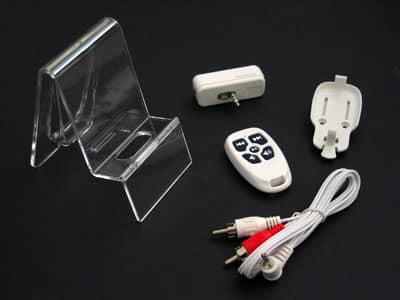
Earlier this month, Targus released RemoteTunes, a rebranded version of ABT’s iJet Remote Control (iLounge rating: A-) with modest cosmetic and pack-in tweaks. This updated version of our earlier review notes differences between the units, as previously highlighted in iLounge’s Free iPod Book review of both products.
Background: the Perfect Remote
What would the best possible current-generation iPod remote control look like? It would give you lots of ways to access your iPod’s music, work through walls and from great distances, and would be easy to carry wherever you go. Even better would be the ability to use the same remote to control both iPods and iTunes playback. In other words, the ideal remote control would combine and build upon the features of Griffin’s AirClick (iLounge rating: A-) and TEN’s naviPro EX (iLounge rating: B+). We’re relatively convinced that our dream feature – an LCD screen – won’t appear on a current-generation iPod remote, so our reviews don’t take that possibility into account.
Judged by this standard, Targus’s new RemoteTunes Wireless Remote ($49.99) is a highly recommendable though imperfect offering. It’s tied with ABT’s internally identical iJet as the strongest iPod remote we’ve ever seen, claiming 150-foot distances and actually delivering between 100-110 feet reliably in our testing with most iPods. (Its range was limited in testing only with the first-generation iPod photo, which still performed better with RemoteTunes and iJet than with any of the other remotes we’ve seen.) But unlike Griffin’s cheaper AirClick, which has remotes that are easy to use in a car and can also be used to control iTunes and other computer programs, and TEN’s cheaper naviPro EX, which offers a significantly wider array of iPod controls, the benefits of RemoteTunes are relatively simple: five button, long-distance iPod control.
A Brief Note on RF Technology
RF (radio frequency) wireless technology is an alternative to Infrared (invisible light) technology, which has been used in most but not all of the iPod’s wireless remote controls. Compared with Infrared, RF has the advantages of working through walls and equally well indoors and outdoors, and the disadvantage of working less well in an environment with strong radio interference.
Since the density of your walls and the level of radio interference where you live may vary from ours, your results may also vary, and you should not regard any review’s statement of radio performance as definitive as to your own personal living situation. As such, we provide test results with our unobstructed (optimal) numbers, and a general sense of how RemoteTunes performed when obstructions were added.
Aesthetics
Cosmetically, RemoteTunes isn’t the sleekest industrial design we’ve seen, but it looks fine, and a little better than iJet. The receiver is a white mostly glossy plastic nub that’s comparatively chunky even on top of a 60GB iPod, with the RemoteTunes name in small, understated gray text on its front bottom right side – a classier touch than iJet’s black, centered, in-your-face logo. As with iJet, there’s a stereo minijack on its left side – a tougher position than Griffin’s top-mounted jack and Engineered Audio’s right-mounted jack, both of which work with add-ons such as Macally’s PodWave and PodGear’s PocketParty. It also fits full-sized iPods better than iPod minis, hanging off of minis’ sides like most (but not all) of the iPod remotes we’ve tested.

Similarly, Targus’s standard white remote is a clean five-button design intended to generally match the look of a full-sized iPod. Four buttons are arranged in a rough square on its front for track forward and backward, volume up and down, while play/pause is a comparatively tiny circle in the center. A pinhole-sized red LED light indicates that the remote is working, and a detachable plastic mounting piece can be used as a belt clip, or left off if you desire. Each RemoteTunes set also includes a minijack-to-stereo RCA cable that’s nicer-looking but functionally the same as the one ABT included with iJet.
Performance
Using RemoteTunes for the first time is a little less convenient than Griffin’s AirClick: you need to give it around five seconds for a self-diagnostic test before the remote works, but when it’s synchronized, it’s undeniably impressive. We successfully tested RemoteTunes at a distance of 100-110 feet from the iPod and were able to control everything from playing to track switching without a hitch – around 50 feet better than Griffin’s AirClick, 40 feet better than Engineered Audio’s RemoteRemote 2, and 80 feet better than TEN’s naviPro EX and naviPod series remotes. While this didn’t meet the 150-foot claim on RemoteTunes’s packaging, it’s so much better than the competition that the number almost doesn’t matter.
And it goes without saying that your experiences may vary.


As with all RF-based remotes, RemoteTunes performed well both outdoors and through walls, not suffering from any of the line-of-sight and other issues that can afflict Infrared-based remote controls such as TEN’s naviPro and DLO’s iDirect. Walls are the greatest challenge for any remote control, and Targus notes that each wall may cut signal strength of an RF transmitter by 30 feet. This isn’t a precise number, however – a lot depends on the density of your walls (and floors for that matter), and we found that our drywall and wood walls didn’t affect performance by quite that much. Try the same thing in a room with all-metal walls and you’ll see a difference. In any case, whereas AirClick and Remote Remote 2 did fine in our testing at a short distance from an iPod through two wall-like surfaces, they did better through one wall and best through none. RemoteTunes has the broadcasting power to work well through three of our walls and quite a few feet, or two walls and a good distance.
There were some other small differences in the look and feel of RemoteTunes’s remote as compared with Griffin’s and Engineered Audio’s offerings. Of those three remotes, we liked Griffin’s the best, as its five buttons were equally large and easy to press. AirClick also includes a hold switch, an integrated belt clip, and detachable wrist/car strap, nice gray rubber accents, and screws to open the casing. Engineered Audio’s RemoteRemote 2 uses a slightly smaller remote with no belt clip, buttons that are around the same size as RemoteTunes’, and a similar hole that could be used to mount the remote on a necklace. We’d rate that one second in comfort, third in looks.

Because of a concave design, recessed buttons, and the way its casing opens, RemoteTunes’ remote is the least comfortable to use and open of the three, even though it looks good. In order to guard against accidental button presses when RemoteTunes is in your pocket, all five buttons are at least slightly recessed, but the center button was especially so, and occasionally hard to press down.











