
Last week, we looked at Navigon’s MobileNavigator for iPhone, one of a number of turn-by-turn navigation GPS applications that have been released for the device, but also one of few to use a smarter, one price model rather than a per-search, per-day, or per-month subscription plan. This week, we look at a competitor, Sygic Mobile Maps US ($60), which is also available in more expensive versions for North America, Europe, Southeast Asia, Russia, Brazil, and Australia/New Zealand. In short, the 1.43GB Sygic application offers users a more affordable and in some cases more intuitive mapping option than MobileNavigator, but uses lower-quality on-screen maps and has its own point-of-interest database issues.

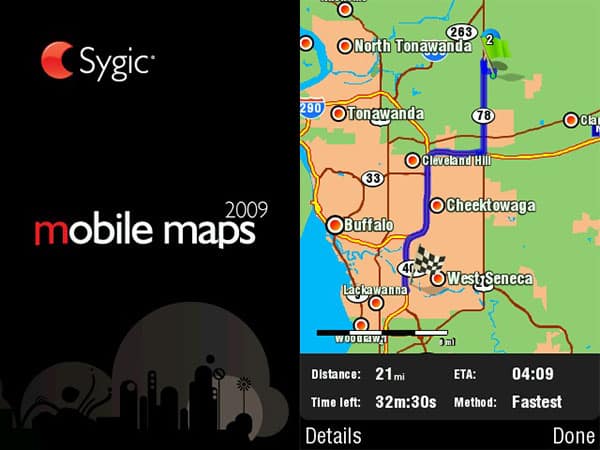
The single most impressive feature of Sygic Mobile Maps US is its non-map interface, which takes pains to function like a full-fledged GPS device and make good use of the iPhone’s screen. Like Navigon, Sygic lets the map and its entire interface shift into horizontal or vertical orientation as you prefer, but Sygic uses large, colorful icons, a combination of bold text, and a nice keyboard to make its screens look sharp. It offers a choice of 29 on-screen languages and 27 spoken languages for turn prompting. Its panel of in-map displays can be customized for order, emphasis, and units of measurement to suit the user’s needs.
And then, it surprises you by including “extras”—a calculator, unit converter, world clock, and very basic information for a number of different countries, each essentially a mini-app—within its software. Sygic treats the iPhone like a standalone GPS device, and though the extras arguably aren’t necessary, the iPhone is better for it.


As a mapping device, an iPhone equipped with Sygic Mobile Maps US has its ups and downs, some inflicted by the iPhone hardware, and others by the software. On the up side, you get a no-Internet-required Tele-Atlas map database plus the ability to automatically recalculate if you miss a turn, both absent from the iPhone’s Maps database. One interesting feature of Sygic is its roughly 98% accurate calculation of your speed in real time, enabling a navigating passenger to know when to say “slow down!” without looking at the car’s speedometer. There are overhead 2-D and limited 3-D map views, plus daytime and nighttime interface colorations, and an “automatic” setting to let the software switch between them. Though the graphics are extremely simple in both modes, they’re designed effectively enough for strong contrast, and labels are invariably clear, day or night. The bottom of the screen even displays approximate block numbers for the current street, a handy reference; speed limits where known are displayed in a European-style circle and number icon atop the map.


Another up is that the basic mapping feature works, if not always providing the most optimal routing—an issue in common with Navigon’s software.
You’ll get to your destination using Sygic, and there’s a fair chance you’ll be able to do it with the name of the business you’re visiting. Sample searches we ran in its database came up with more results than MobileNavigator, but also some double-entries and certainly some missing businesses, recent and otherwise. Without POI data, you’ll need the address; you can also set multiple points on an itinerary and save different itineraries.


Unfortunately, there’s no link to the iPhone’s Internet functionality to look up businesses, or to your Contacts database to find people you know; moreover, every POI or address lookup starts with state selection exercise, then a city—sometimes without every little city name—then a street, and then a number or intersection, the latter quite nicely from a limited list of actual intersections that are automatically presented for your selection. It eventually learns previously used cities and streets, and enables you to add your own POIs, but the idea that you always need to tell it to start a hunt in your home state flies in the face of common usage; certain defaults should be assumed.


What’s not so hot in Sygic is its performance through turns, which we’re inclined to blame on the iPhone 3G/3GS GPS hardware rather than the software. Like Navigon’s software, it gets messed up under certain extended turn situations, such as heavily curved off-ramps or windy neighborhood roads, and sometimes takes a minute or two to figure out that it’s still on the path it was guiding you on. Also similar to MobileNavigator is the fact that it doesn’t always provide ideal verbal cues, nor verbose ones, though the multi-lingual voice samples that are there are clear and easy to hear.











