
iLoungeiLounge
  • News
    • Apple
      • AirPods Pro
      • AirPlay
      • Apps
        • Apple Music
      • iCloud
      • iTunes
      • HealthKit
      • HomeKit
      • HomePod
      • iOS 13
      • Apple Pay
      • Apple TV
      • Siri
    • Rumors
    • Humor
    • Technology
      • CES
    • Daily Deals
    • Articles
    • Web Stories
  • iPhone
    • iPhone Accessories
  • iPad
  • iPod
    • iPod Accessories
  • Apple Watch
    • Apple Watch Accessories
  • Mac
    • MacBook Air
    • MacBook Pro
  • Reviews
    • App Reviews
  • How-to
    • Ask iLounge
Font ResizerAa
iLoungeiLounge
Font ResizerAa
Search
  • News
    • Apple
    • Rumors
    • Humor
    • Technology
    • Daily Deals
    • Articles
    • Web Stories
  • iPhone
    • iPhone Accessories
  • iPad
  • iPod
    • iPod Accessories
  • Apple Watch
    • Apple Watch Accessories
  • Mac
    • MacBook Air
    • MacBook Pro
  • Reviews
    • App Reviews
  • How-to
    • Ask iLounge
Follow US

Reviews

Reviews

Review: Striped Sail miFrame for iPad 2

Last updated: May 17, 2021 11:55 am UTC
By Nick Guy
Review: Striped Sail miFrame for iPad 2

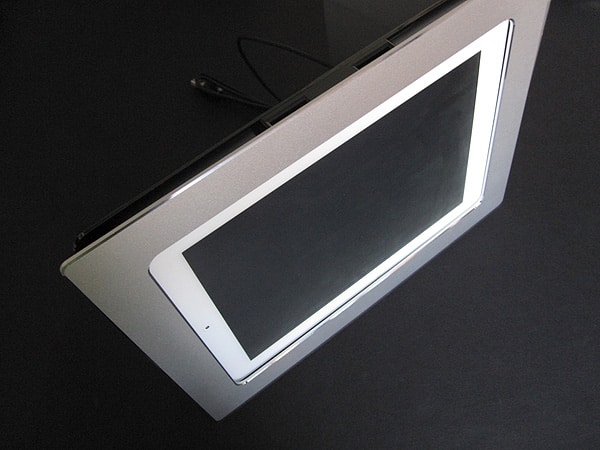
One of the more underused iPad capabilities is the Picture Frame feature found on the Lock Screen, which lets you turn a docked iPad into a digital photo slideshow device with just a single screen tap. Striped Sail has sought to capitalize on this feature with its miFrame dock for iPad 2 ($79), which is composed of three separate pieces: a black plastic back with an integrated Dock Connector and USB charging cable, a black or silver metal frame that snaps on and off, and a stand that can hold the dock in either orientation. The bare iPad 2 simply slides down over the plug, and the cable can be connected to something to charge the tablet. Also included is a pane of glass-like plastic, in case you choose to use miFrame as a frame for a real photograph when an iPad’s not inside.


Review: Striped Sail miFrame for iPad 2

While the value of such a solution may be debatable, we have to give Striped Sail credit for executing on the concept as elegantly as it did.

It’s very easy to insert and remove the iPad 2, and even without the frame on, the iPad stays in place. The frame snaps on and off without too much effort, and both variations look nice, with diamond cut beveled edges that really stand out. miFrame would have looked better if it covered the iPad’s bezel, but that would also block access to the Home button, so we can understand why it was designed the way it was. The aluminum stand slides easily into the bottom, left, or right side of the plastic back, and is very secure regardless of the iPad orientation you choose.


Review: Striped Sail miFrame for iPad 2

Review: Striped Sail miFrame for iPad 2

One big issue: the charging solution is incomplete. You can plug miFrame into a computer’s USB ports for charging and syncing, but practically, most users are going to want to place a picture frame someplace away from a computer screen, such as a kitchen or living room. In those places, you must use either the 10W charger that came with your iPad, or go out and drop $29 on another one; for the $79 asking price, Striped Sail should really have included a wall adapter of its own.


Review: Striped Sail miFrame for iPad 2

Review: Striped Sail miFrame for iPad 2

Overall, we see miFrame as an OK solution for users who want to dock their tablet for charging, as well as anyone looking for a way to show off photos using the iPad’s screen. Considered broadly, miFrame is best understood as a somewhat more elaborate version of Apple’s iPad 2 Dock, which costs only $29; both require that you use your iPad 2 without a case—inconvenient for many users—and though miFrame has advantages such as including a USB cable and supporting multiple orientations, Apple’s dock has the benefit of audio output and minimalist design.



Latest News
The 14-inch MacBook Pro with M5 Chip 16GB RAM/512GB is $250 Off
1 Min Read
Noise and Static on AirPods Pro 3 Still Unfixed
1 Min Read
New iMac with 24-inch OLED Display May be Brighter With 600 Nits
1 Min Read
The 15-inch M4 MacBook Air 256GB Is $250 Off
1 Min Read
Internal Kernel Debug Kit from Apple Reveals Tests for a MacBook with A15 Chip
1 Min Read
Apple Currently In Talks With Suppliers for Chip Assembly & Packaging of iPhones in India
1 Min Read
Apple Allows Easier Battery Replacement For M5 MacBook Pro with 14-inch Display
1 Min Read
The Apple Watch SE 3 44mm GPS is $50 Off
1 Min Read
20th Anniversary iPhone May Launch in Two Years
1 Min Read
Better Image Generation Capabilities and Apple Music Integration Coming to ChatGPT
1 Min Read
A20 Pro Chip Coming to Next Gen iPad Mini OLED
1 Min Read
Amazon has the AirTag 4 Pack Marked $29 off
1 Min Read

iLounge logo

iLounge is an independent resource for all things iPod, iPhone, iPad, and beyond. iPod, iPhone, iPad, iTunes, Apple TV, and the Apple logo are trademarks of Apple Inc.

This website is not affiliated with Apple Inc.
iLounge © 2001 - 2025. All Rights Reserved.
  • Contact Us
  • Submit News
  • About Us
  • Forums
  • Privacy Policy
  • Terms Of Use
Welcome Back!

Sign in to your account

Lost your password?








