
Pros: A simplified, direct-to-iPod format audio and video recording device that permits transfers of video content to an iPod with three button presses and minimal connection of cables. Creates H.264 video files and 192K MP3 audio files that look and sound very close to the original source materials – good enough for virtually any current fifth-generation iPod owner. Charges iPod during recording.
Cons: Expensive given its simple functionality. Lacks output ports or other way of enabling realtime previewing of currently playing content, so your output device will need to have a second audio- or video-out that you can check before starting recordings. Firmware upgrades are required to keep the device functioning properly with up-to-date iPods, as Apple opposes direct-to-iPod recording and immediate playback without its authorized hardware or software. Video files are at least slightly less than identical to the originals, and encoded only at 320×240, appropriate to the 5G iPod’s screen but not ideal for larger viewing.
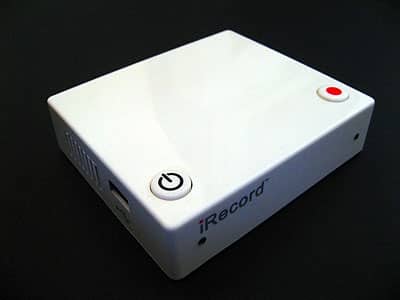
“Keep it simple” was the guiding philosophy behind Streaming Networks’ new iRecord, the first direct-to-iPod video recording device we’ve received for testing. Rather than trying to create a fully featured TiVo-style recorder straight out of the gate, iRecord provides you with two simple buttons: power and record. If you’re next to a television set and a cool music video or TV show comes on, press the record button and iRecord promises to immediately create an iPod-ready video in “stunning video quality” H.264 (320×240 with AAC audio), encoded at “over 3 hours per GB,” directly on your iPod.
Mac and PC iPods are both supported, as are Sony PSPs and USB keys; you have to provide your own USB cable to connect to iRecord, but S-Video and composite cables are included.
Want to record videos directly from a DVD player or live television to your fifth-generation iPod? Or do the same with a CD player? Streaming Networks’ iRecord ($200) – a tiny audio and video transfer device – was designed with a “keep it simple” philosophy, featuring a total of two buttons, one port to connect your iPod, and a set of ports to connect your video or audio output device. It’s designed to work with PC- or Mac-formatted iPods, too, as well as Sony PSPs and virtually any USB mass storage device, with recording time limited only by the available space on your device.
The idea is that you plug iRecord into a wall outlet with the included power adapter, connect the included S-Video or composite (RCA-style) AV cables into iRecord your DVD or CD player, power all of the devices on, connect your iPod, press play on your source player, and hit the single record button to create iPod-ready files in H.264 video format or 192Kbps MP3 audio format. A red light flashes to indicate that video and audio are being recorded, or an amber light for only audio, and your iPod – connected with its included USB to Dock Connector cable – charges while it records. When you’re done recording, hit the record button again and the process stops. With iPod firmware version 1.2 installed, an iPod-ready audio or video file, prefaced with the word iRecord and a time/date stamp, will now be sitting on the iPod immediately ready to be watched and/or heard, and later renamed in iTunes.

For on-iPod viewing, iRecord’s video files are just fine. They’re encoded at 320×240 resolution and 768Kbps, which is appropriate to the 5G iPod’s 320×240 screen, but only 1/4 the resolution of today’s iTunes Store downloads, and less than optimal for viewing on a larger computer or iPod accessory display with superior resolution. Our test videos looked and sounded very close to the originals, apart from a slight resizing of the video image (the duplicate was a little bigger), and iRecord logos placed briefly at the start and end points of recorded files. Color differences in our sample shot are attributable to the different screens in our enhanced and original 5G iPods, not iRecord.
Lossless audio files transferred via iRecord also sounded very close to the source originals – assuming audio levels were set properly, preferably via a direct line-out connection. If you buy into Streaming Networks’ concept that people will be happy with pretty good renditions of their source materials, recorded quickly and conveniently, you’re most likely to like what this device has to offer.

There are only a few problems with iRecord. The biggest one is that Apple doesn’t want developers to release devices like this – despite its recent support for CD-quality audio recorders, it has stated in no uncertain terms that it doesn’t support direct-to-iPod video recorders, and hinted that such items are subject to randomly not working any time the company releases a new firmware update.

This isn’t merely an abstract concern. We discovered during testing that current fifth-generation iPod firmware 1.2.1 isn’t compatible with iRecord, and a connected iPod basically locks the accessory up without any way to create video or audio files. Streaming Networks anticipated Apple’s moves, and says that it will get around this with firmware updates, but the updates may not work as well as suggested in the introductory paragraph above: since the 1.2.1 update, the company now says on its website that saved video files will need to be synchronized with iTunes before viewing, making the process that much more of a hassle. We couldn’t download updated firmware from the company’s web site, either.

As much as it disturbs us that Apple is creating artificial roadblocks for developers of devices such as iRecord – ones that appear to lie more in a concern over writing files directly to an iPod without the use of an Apple-authorized accessory or piece of software than anything else – there’s no question that the consequence is an inconvenient experience for users.











